

Bilingual Reader: Side by Side
Suzuki Medical Engineering LLC Education iPhoneiPadiPod touch
Bilingual Reader: Side by Side is a free Education app for iPhone and iPad by Suzuki Medical Engineering LLC. Requires iOS 18.0. Updated November 12, 2026.
- Price
- Free
- on the App Store
- Size
- 2 MB
- Age 4+
- Updated
- Nov 12
- 2026 · v1.1
Screenshots
Save to Pinterest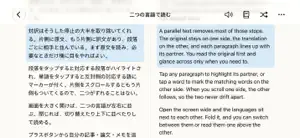


About Bilingual Reader: Side by Side
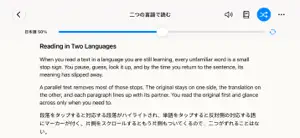
Read articles, papers and PDFs in another language with your own language right beside them. Bilingual Reader translates what you import paragraph by paragraph and lays the original and the translation side by side. On a wide screen (iPad, landscape, or the inner display of a foldable) the two languages sit in two columns and scroll together. On a narrow screen, switch between them or read one above the other. • Tap a paragraph to highlight its partner • Tap a word to mark the matching word in the translation, and save it to your word list • Words for This Text: a list of the words you need to read it, with their meanings and the sentences they appear in, at three levels • Mix mode: read some sentences in each language and set the ratio yourself • Review cards: recall the meaning of the words you saved; words you know come back less often • Read aloud: hear the original, the translation, or both, with the device voice • Look words up in the iPhone's built-in dictionary, and export your word list as CSV for Anki or a spreadsheet • Import web pages, PDFs, EPUB books and pasted text, or share from Safari, Files and Mail • Books and long PDFs are translated as you read, so only what you read uses characters. Scanned PDFs are read with on-device text recognition • Languages: English, Japanese, Korean, Chinese (Simplified and Traditional), Spanish, French, German and Portuguese PRICING • Free: translate up to 10,000 characters to try • Pro (one-time purchase): up to 300,000 characters in total, with no time limit. It is not a subscription and not unlimited. • If you run out, you can add 300,000 more characters. 300,000 characters is about 60 news articles or 6 long papers. Long texts show how many characters they will use before translating. PRIVACY Your documents and translations stay on your device. Text is sent to our server only to be translated and is not stored. No ads and no tracking. Import only material you have the right to read. Translations are made by AI (Claude by Anthropic); check important details against the original.
What’s new
Version 1.1 · Updated November 12, 2026
• Review cards for the words you saved • Read aloud: the original, the translation, or both • The iPhone's built-in dictionary, and CSV export of your word list • EPUB books and long PDFs are translated as you read, so only what you read uses characters • Scanned PDFs can now be read with on-device text recognition
App privacy
The developer, Suzuki Medical Engineering LLC, reported these privacy practices to Apple.
Data Not Linked to You
The following data, which may be collected but is not linked to your identity, may be used for the following purposes:
- Purchases: Purchase History
- User Content: Other User Content
- Identifiers: Device ID
- Diagnostics: Other Diagnostic Data
Used for: App Functionality
Alternatives to Bilingual Reader: Side by Side
Looking for apps like Bilingual Reader: Side by Side? Here are 6 similar apps on the App Store. The highest rated is Lango: Spaced Repetition (5.0/5), and 5 of the 6 are free to download.
-
 Lango: Spaced Repetition
5.0
-
 Pro - Basic Spanish Vocabulary
1.0
-
 簡単スペイン語
-
 Wisteria Reader
5.0
-
 Halacha Yomi
-
 EU Knowledge Prep
| App | Rating | Price | Last updated | Compare |
|---|---|---|---|---|
| Bilingual Reader: Side by Side | – | Free | November 12, 2026 | |
| Lango: Spaced Repetition | 5.0 / 5 (2) | Free | Nov 25, 2026 | Compare |
| Pro - Basic Spanish Vocabulary | 1.0 / 5 (1) | 2.99 USD | Nov 18, 2026 | Compare |
| 簡単スペイン語 | – | Free | Oct 5, 2026 | Compare |
| Wisteria Reader | 5.0 / 5 (1) | Free | Oct 10, 2026 | Compare |
| Halacha Yomi | – | Free | Jul 11, 2026 | Compare |
| EU Knowledge Prep | – | Free | Apr 3, 2026 | Compare |