

Steps: Goal Journal
Sebastien Grondin Lifestyle iPhoneiPadiPod touch
Steps: Goal Journal is a free Lifestyle app for iPhone and iPad by Sebastien Grondin. Requires iOS 17.0. Updated November 28, 2026.
- Price
- Free
- on the App Store
- Size
- 14 MB
- Age 4+
- Updated
- Nov 28
- 2026 · v2.3.0
Screenshots
Save to Pinterest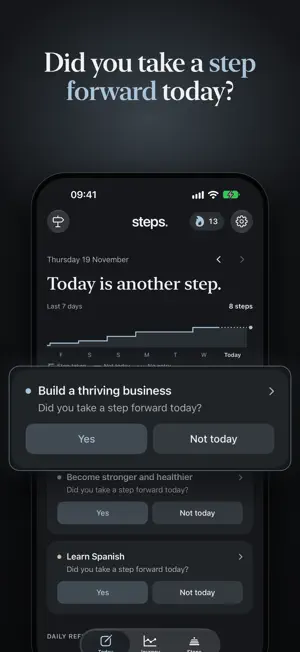


About Steps: Goal Journal
Keep going. Steps is a one-line-a-day goal journal. Every evening it asks, for each of your goals, whether you took a step forward today. If you did, you write a sentence about it, and if you didn't, you tap Not today and get on with your evening. WRITE WHAT YOU ACTUALLY DID Pick the goals that matter to you, whether that's a business, your health, a language or a book. When you answer Yes, Steps asks for a sentence: something you did, a difficulty, or a thought worth keeping. Not today saves with a single tap, and you can add a note if you want to. On evenings when you have more to say, the daily reflection gives you a page of its own. Before you close the app, you can write tomorrow's step. It will be waiting on that goal's card the next evening, and one tap turns it into your answer. Now and then, after a Yes, Steps also asks whether it really moved the goal forward, because being busy isn't always the same as making progress. READ BACK HOW YOU GOT THERE Every entry is about something you're building. The Steps tab gathers them day by day and month by month, so you can read back how each goal took shape. You can go back to any day to answer or edit it, and archive a goal without losing its story. A LINE THAT NEVER GOES DOWN Each Yes moves your step line up by one, and Not today keeps it where it was. Journey shows each goal's line over 7 or 30 days, along with how regularly you've moved it forward. YOUR RUN OF EVENINGS Each evening you answer all your goals, whether with Yes or Not today, adds one to your run, and the flame at the top of Today shows how many evenings in a row you've kept it going. If an evening slips by, you can still answer it the next day, and Steps can remind you at noon so that one busy night doesn't end your run. Journey keeps your longest run next to the current one. ON YOUR HOME SCREEN Widgets show your week's step line with the goals left to answer tonight, your total steps, or your steps for each goal. Tonight's goals also fit on your Lock Screen. STEPS PREMIUM Steps is a subscription app: after a short welcome, you start Steps Premium to keep writing, and the yearly plan begins with a free week. Premium also brings Claude, the AI made by Anthropic, into your journal. Once a week it reads the week you wrote and gives you a short review of what really moved each goal, what only kept you busy, and one next step. On any evening you can ask for a few lines about your day, or let Claude ask you two short questions about one answer and leave you with an insight to keep. You can also see each goal's line over 90 days and a full year, lock your journal with Face ID and choose another app icon. Nothing you write is sent to Claude until you ask for one of these features and agree to it. Steps Premium is billed every month or every year, and the yearly plan starts with a free week for new subscribers. Payment is charged to your Apple Account, and the subscription renews automatically unless you cancel it at least 24 hours before the end of the current period. You can manage or cancel it in your Apple Account settings. ON YOUR TERMS Reminders bring you back in the evening at the time you choose, and in the morning when you've planned a step, and you can turn them off in Settings. Your journal can be exported or deleted whenever you want. Steps is designed for a calm, focused evening, with dark and light appearance, Dynamic Type and VoiceOver labels. Steps is a journaling tool, not medical or therapeutic advice. Terms of Use: https://www.apple.com/legal/internet-services/itunes/dev/stdeula/ Privacy Policy: https://sebastien-grdn.github.io/steps-site/privacy.html
What’s new
Version 2.3.0 · Updated November 28, 2026
If you're new to Steps, a rewritten welcome helps you choose the goal you most want to move forward and take your first step, then asks you to start Steps Premium, whose yearly plan begins with a free week. If you already use Steps for free, that doesn't change. Reminders do more than ask once a day now. On the evening after you plan a step, Steps asks whether it happened, it reminds you of that step in the morning, and if the evening slips by it checks in once more a little later. They can show your goal, which you can hide in Settings. Steps now follows up to three goals at a time for everyone, so each evening stays short. Goals you already follow stay as they are.
App privacy
The developer, Sebastien Grondin, reported these privacy practices to Apple.
Data Not Linked to You
The following data, which may be collected but is not linked to your identity, may be used for the following purposes:
- Purchases: Purchase History
- Identifiers: Device ID
- Usage Data: Product Interaction
- Other Data: Other Data Types
- User Content: Other User Content
- Diagnostics: Crash Data
Used for: Third-Party Advertising, Analytics, App Functionality
Alternatives to Steps: Goal Journal
Looking for apps like Steps: Goal Journal? Here are 6 similar apps on the App Store. The highest rated is Fulfilled: Manifestation (5.0/5), and 5 of the 6 are free to download.
-
 Vision Loop: Future Self
-
 Fulfilled: Manifestation
5.0
-
 Daily Stoic Companion
5.0
-
 Livent
-
 Reach: Stay in Touch
-
 Tithi: Hindu Calendar 2026
| App | Rating | Price | Last updated | Compare |
|---|---|---|---|---|
| Steps: Goal Journal | – | Free | November 28, 2026 | |
| Vision Loop: Future Self | – | Free | Oct 5, 2026 | Compare |
| Fulfilled: Manifestation | 5.0 / 5 (5) | Free | Oct 19, 2026 | Compare |
| Daily Stoic Companion | 5.0 / 5 (2) | Free | Jan 26, 2026 | Compare |
| Livent | – | 3.99 USD | Sep 17, 2026 | Compare |
| Reach: Stay in Touch | – | Free | Nov 21, 2026 | Compare |
| Tithi: Hindu Calendar 2026 | – | Free | Jul 14, 2026 | Compare |