

Drawvy: Learn to Draw
Fahreddin Sevindir Education iPhoneiPadiPod touch
Drawvy: Learn to Draw is a free Education app for iPhone and iPad by Fahreddin Sevindir. Requires iOS 15.0. Updated November 26, 2026.
- Price
- Free
- on the App Store
- Size
- 55 MB
- Age 4+
- Updated
- Nov 26
- 2026 · v1.0.7
Screenshots
Save to Pinterest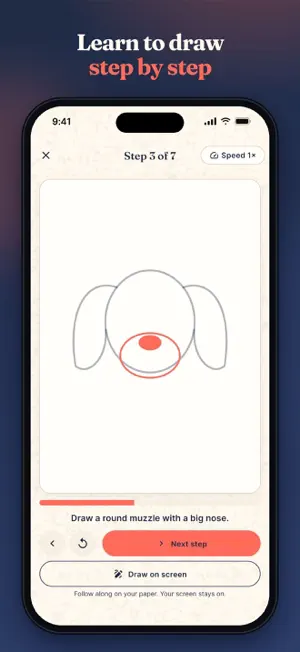


About Drawvy: Learn to Draw
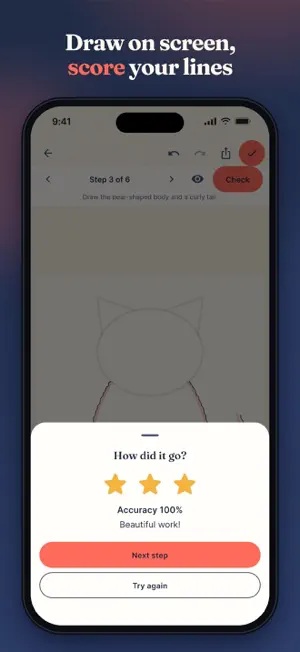
Drawvy teaches you to draw one simple step at a time. Pick a lesson, follow the guide lines as they appear, and watch a blank page turn into a real drawing. No talent or experience needed. Why you will love it • Step-by-step lessons: every step highlights the new lines and fades the earlier ones. Draw on paper with the screen as your guide, or draw right on the screen. • AI feedback on paper drawings (Premium): snap a photo of your sketch and get a 1-5 score, three strengths and three tips to improve, in your language. • Copy with your camera: place a see-through template over your camera view and trace it. No AR hardware needed. • Score your lines: in draw-on-screen mode Drawvy compares your strokes with the guide and awards stars. What you can draw Animals, faces and portraits, anime and cartoon characters, nature, everyday objects, food, vehicles and easy lessons just for kids. Learning paths take you from the basics (lines, shapes, shading) to advanced drawings. Make drawing a habit Keep a daily streak, take on the daily challenge, earn badges and level up. Your drawing journal keeps your paper and screen drawings in one place so you can compare before and after. Free and Premium Free to start: the first lessons of every learning path are free. Drawvy Premium unlocks all lessons and AI feedback and removes ads. It is an auto-renewing subscription (weekly or yearly) or a one-time lifetime purchase. Prices vary by region. Payment is charged to your Apple ID account at confirmation. Subscriptions renew automatically unless cancelled at least 24 hours before the end of the current period. Manage or cancel anytime in your App Store account settings. Family friendly Create separate profiles, including a kids profile with easy lessons only. Purchases and AI feedback on kids profiles are behind a parental gate. Private and offline Lessons work offline and there is no account or sign-in. Your drawings stay on your device. Photos you send for AI feedback are not stored. Terms of Use: https://drawvy.pairo.cloud/terms/ Privacy Policy: https://drawvy.pairo.cloud/privacy/
What’s new
Version 1.0.7 · Updated November 26, 2026
• New winter lessons: draw a penguin, a snowflake, a gingerbread man and a Santa hat step by step • All four are free and kid-friendly • Small fixes
App privacy
The developer, Fahreddin Sevindir, reported these privacy practices to Apple.
Data Used to Track You
The following data may be used to track you across apps and websites owned by other companies:
- Location: Coarse Location
- Identifiers: Device ID
- Usage Data: Product Interaction, Advertising Data
Data Linked to You
The following data, which may be collected and linked to your identity, may be used for the following purposes:
- Location: Coarse Location
- Identifiers: Device ID, User ID
- Usage Data: Product Interaction, Advertising Data, Other Usage Data
- Purchases: Purchase History
- Diagnostics: Crash Data, Performance Data, Other Diagnostic Data
- User Content: Photos or Videos
Used for: Third-Party Advertising, Analytics, App Functionality
Alternatives to Drawvy: Learn to Draw
Looking for apps like Drawvy: Learn to Draw? Here are 6 similar apps on the App Store. The highest rated is Pikura: Draw & Color (5.0/5), and all 6 are free to download.
-
 Krokito
-
 THE H.E.ART
-
 Rable – Draw on Real Paper
-
 Pikura: Draw & Color
5.0
-
 How to Draw: Sketch & Trace
1.0
-
 Drawie: Learn AR Drawing
| App | Rating | Price | Last updated | Compare |
|---|---|---|---|---|
| Drawvy: Learn to Draw | – | Free | November 26, 2026 | |
| Krokito | – | Free | Oct 23, 2026 | Compare |
| THE H.E.ART | – | Free | Oct 7, 2026 | Compare |
| Rable – Draw on Real Paper | – | Free | Oct 22, 2026 | Compare |
| Pikura: Draw & Color | 5.0 / 5 (1) | Free | Nov 21, 2026 | Compare |
| How to Draw: Sketch & Trace | 1.0 / 5 (1) | Free | Nov 20, 2026 | Compare |
| Drawie: Learn AR Drawing | – | Free | Nov 13, 2026 | Compare |