

Overtext: Screen Translator
DANIEL XIANGYANG HAN Utilities iPhoneiPadiPod touch
Overtext: Screen Translator is a free Utilities app for iPhone and iPad by DANIEL XIANGYANG HAN. Requires iOS 26.1. Updated November 23, 2026.
- Price
- Free
- on the App Store
- Size
- 39 MB
- Age 4+
- Updated
- Nov 23
- 2026 · v1.1.1
Screenshots
Save to Pinterest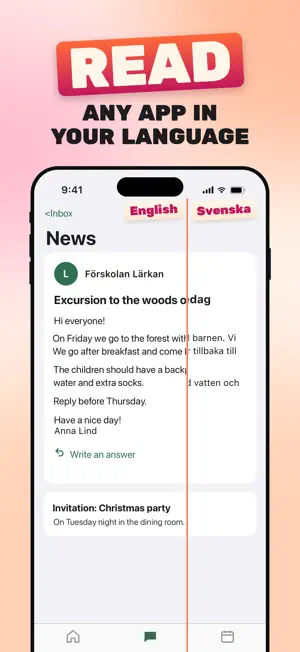


About Overtext: Screen Translator
Overtext translates the whole screen of any app on your iPhone or iPad. Double-tap the back of your iPhone, or the floating button on your iPad, and the translation appears right over the original text, in the same layout. Made for life in a new country. A note from your child's school, a letter from the bank, a long chat in the parents' group: read it in your own language, without copying text or switching apps. ONE GESTURE, THE WHOLE SCREEN - Start a translation with Back Tap or the Action button (iPhone only), or with a floating button on the screen (iPhone and iPad). - Overtext takes a screenshot and translates it on your device. - Zoom in, save or share the result. Close it, and you are back where you were. THE TRANSLATION LOOKS LIKE IT BELONGS THERE - Overtext measures each line of text on the screen: its size, weight, color and position. - It draws the translation in the same place, at the same size. Headings still look like headings, and buttons still look like buttons. - Turn on "Copy translated text after each translation" to paste the translation into a reply or a note. YOUR SCREEN STAYS ON YOUR DEVICE - Overtext reads and translates the screenshot on your iPhone or iPad. It does not send the screenshot, its text or the translation anywhere. - It works with no internet connection once a language is downloaded. Each language is about 30 MB and downloads once. - It sees one screenshot, only when you use your gesture. It does not record your screen. - No account, no sign-in and no ads. - Some technical data leaves the device: crash reports, which never contain screen content, and usage data from Google's translation library, such as the device model and the languages used, go to Google; anonymous usage counts with no identifier go to Aptabase. The privacy policy lists them. LANGUAGES - Reads screens in 17 languages written in the Latin alphabet, including Swedish, German, Dutch, French, Spanish, Polish and English. Swedish is the language we have tested the most. - Translates into 59 languages, including English, Ukrainian, Russian, Chinese, Hindi, Turkish, Spanish, Romanian and Polish. - Screens in Chinese, Japanese, Korean or Thai cannot be read yet. - The app itself is in English, Spanish, Hindi, Chinese, Ukrainian, French, Romanian, Polish, Portuguese, Russian, Turkish and Arabic. GOOD TO KNOW - Overtext translates on your device with Google ML Kit. It is good for understanding what a message is about. It can get names and short words wrong, and it is not a certified translation. For anything important, such as a decision from an authority or medical advice, check with a person. - Overtext works through the Shortcuts app. Setup takes a few minutes, and the app shows you each step. - Requires iOS 26.1 or later on iPhone, or iPadOS 26.1 or later on iPad. Overtext is free.
What’s new
Version 1.1.1 · Updated November 23, 2026
Bug fixes and improvements that make translations more reliable.
App privacy
The developer, DANIEL XIANGYANG HAN, reported these privacy practices to Apple.
Data Not Linked to You
The following data, which may be collected but is not linked to your identity, may be used for the following purposes:
- Location: Coarse Location
- User Content: Other User Content
- Identifiers: Device ID
- Usage Data: Product Interaction
- Diagnostics: Performance Data, Other Diagnostic Data, Crash Data
- Other Data: Other Data Types
Used for: Analytics, App Functionality
Alternatives to Overtext: Screen Translator
Looking for apps like Overtext: Screen Translator? Here are 6 similar apps on the App Store. The highest rated is TimeSays - Word Clock (5.0/5), and 5 of the 6 are free to download.
-
 Echo: Speed & Connectivity
-
 LocalConvert: File Converter
-
 Battery Alarm: Charge Alert
-
 Vitals: Phone Check-up
-
 TimeSays - Word Clock
5.0
-
 NoTrace: Clear site data
| App | Rating | Price | Last updated | Compare |
|---|---|---|---|---|
| Overtext: Screen Translator | – | Free | November 23, 2026 | |
| Echo: Speed & Connectivity | – | Free | Nov 15, 2026 | Compare |
| LocalConvert: File Converter | – | Free | Nov 20, 2026 | Compare |
| Battery Alarm: Charge Alert | – | Free | Nov 25, 2026 | Compare |
| Vitals: Phone Check-up | – | Free | Nov 19, 2026 | Compare |
| TimeSays - Word Clock | 5.0 / 5 (2) | Free | Nov 25, 2026 | Compare |
| NoTrace: Clear site data | – | 1.99 USD | Nov 13, 2026 | Compare |