

Photos by Date: MonthBox
Pablo Amar Butron Galvez Photo & Video iPhoneiPadiPod touch
Photos by Date: MonthBox is a free Photo & Video app for iPhone and iPad by Pablo Amar Butron Galvez. Requires iOS 17.0. Updated November 16, 2026.
- Price
- Free
- on the App Store
- Size
- 9 MB
- Age 4+
- Updated
- Nov 16
- 2026 · v1.0.2
Screenshots


About Photos by Date: MonthBox
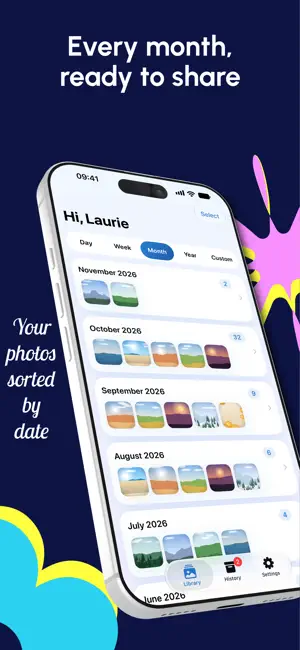
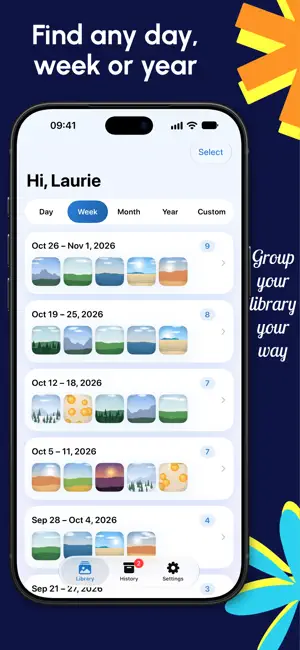
MonthBox sorts your photo library by date and turns any month into a ZIP you can share. Open the app, allow access to your photos, and your library is already grouped by month. Pick a group, tap share, and MonthBox makes a ZIP with a folder named after the date, like 2026-10. Send it with AirDrop, save it to Files, or attach it to an email. GROUP BY DATE - Month by default, using the standard calendar - Day, week (ISO weeks, starting Monday) and year with MonthBox Pro - Choose how far back to look in your library - Photos with no date go into an Undated group SHARE AS A ZIP - One folder per group, named by date: 2026-10-30, 2026-W44, 2026-10 or 2026 - Original files, at full quality - Videos are optional and can be turned on in Settings - Works with photos stored in iCloud - Large exports keep going in the background and notify you when the ZIP is ready HISTORY Your recent ZIPs stay in History, ready to share again without exporting twice. PRIVATE BY DESIGN - Everything happens on your iPhone or iPad - No account, no ads, no tracking - Nothing is uploaded FREE AND PRO Free: group by month, share one month at a time with up to 50 items per ZIP, and keep your latest ZIP in History. MonthBox Pro: group by day, week and year, share several groups in one ZIP, remove the item limit and keep up to 10 ZIPs in History. Get it as a yearly subscription with a free trial, or as a single purchase. The yearly subscription renews automatically unless cancelled at least 24 hours before the end of the current period. Manage or cancel it in your App Store account settings. The single purchase is a one-time payment. Terms of Use: https://www.apple.com/legal/internet-services/itunes/dev/stdeula/ Privacy Policy: https://monthbox.butron.dev/privacy.html
What’s new
Version 1.0.2 · Updated November 16, 2026
• Keep browsing while a ZIP is being made. Start more ZIPs and they wait their turn. History shows the progress of each one, and you can cancel any of them. • In Select mode, tap Select All to pick every photo in a group, then tap off the ones you don't want. • Slide your finger across the grid to select many photos at once.
App privacy
The developer, Pablo Amar Butron Galvez, reported these privacy practices to Apple.
Data Not Collected
The developer does not collect any data from this app.
Alternatives to Photos by Date: MonthBox
Looking for apps like Photos by Date: MonthBox? Here are 6 similar apps on the App Store. The highest rated is Shredly: Photo Cleaner (5.0/5), and 5 of the 6 are free to download.
-
 CleanCopy: Metadata Cleaner
-
 ImageSweep
-
 EZPhotos: Photo Organizer
-
 Shredly: Photo Cleaner
5.0
-
 Shutterbug: Photo Stacks
5.0
-
 Lens Lab
| App | Rating | Price | Last updated | Compare |
|---|---|---|---|---|
| Photos by Date: MonthBox | – | Free | November 16, 2026 | |
| CleanCopy: Metadata Cleaner | – | Free | Nov 12, 2026 | Compare |
| ImageSweep | – | Free | Jun 3, 2026 | Compare |
| EZPhotos: Photo Organizer | – | Free | Nov 10, 2026 | Compare |
| Shredly: Photo Cleaner | 5.0 / 5 (5) | Free | Nov 11, 2026 | Compare |
| Shutterbug: Photo Stacks | 5.0 / 5 (1) | Free | Nov 6, 2026 | Compare |
| Lens Lab | – | 6.99 USD | Sep 24, 2026 | Compare |