

DriveIn: Car TV & Video Player
Karan Fadnavis Utilities iPhoneiPadiPod touch
DriveIn: Car TV & Video Player is a free Utilities app for iPhone and iPad by Karan Fadnavis. Requires iOS 18.0. Updated November 15, 2026.
- Price
- Free
- on the App Store
- Size
- 123 MB
- Age 4+
- Updated
- Nov 15
- 2026 · v1.0
Screenshots
Save to Pinterest


About DriveIn: Car TV & Video Player
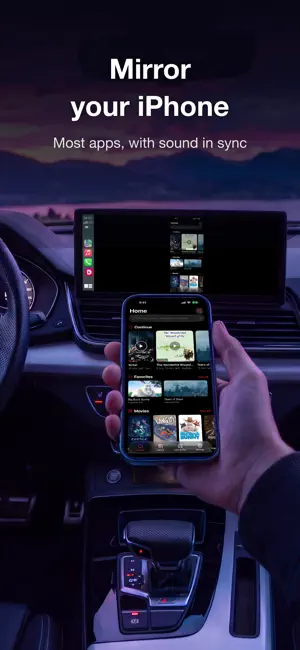
Movie time in your car. DriveIn plays live TV, movies, shows and your own videos on your car's CarPlay screen while you're parked, and mirrors your iPhone when you'd rather use another app. The drive-in theater is back, and this time the car is your own. MIRROR YOUR IPHONE TO THE CAR • Show your iPhone's screen on the car display, with the sound kept in sync with the picture. • Use the apps you already have: most of what plays on your iPhone can play on the dashboard. Apps that protect their videos show a black screen when mirrored; that's their rule, not a fault. • Start it from Cast to Car. MADE FOR THE CAR SCREEN • Browse your library on the car display, with the touchscreen or the knob. • In cars that support video in CarPlay, the picture plays on the car screen; in other cars it stays on your iPhone, with the sound through the car. • Use your iPhone as a remote while the car shows the picture. WHEN THE CAR IS PARKED Practice is running late, so you catch the end of last night's movie in the parking lot. The charger needs another half hour, so you start an episode. Camp is set up for the night, and the back seat is halfway through a series. You got to the stadium lot early, so there's time for a show before the game. Or make it the plan: takeout, a blanket and a movie under the stars. Date night, drive-in style. EVERYTHING YOU ALREADY HAVE • Plex, Jellyfin and Emby, with Continue Watching and Next Up kept in sync. • Your NAS and network shares: SMB, FTP, SFTP and WebDAV, plus DLNA servers. • M3U playlists and provider accounts for the live channels you subscribe to. • Videos from Files and Photos, saved in the app to watch offline. • Cast from other apps to DriveIn on your network. PLAYS ALMOST ANY FILE • MKV, MP4, AVI, MOV, TS, WebM, DVD images and folders, and more, with hardware decoding. • Embedded and external subtitles (SRT, VTT, ASS, SSA), with style, size and timing controls. • Audio and subtitle choices remembered, chapters, skip intro and credits, playback speed, and resume where you left off. WILL IT WORK IN MY CAR? Video on the car screen needs CarPlay, and what a car allows differs between makes, models and head units. Having CarPlay doesn't always mean your car can show video. Your first 60 minutes on the car screen are free, so try it in your own car before you pay. Watching on your iPhone works anywhere. FREE TO TRY DriveIn is free to download, with 60 minutes of video on the car screen and no account needed. After that, buy one more hour at a time, or get DriveIn Pro for unlimited car-screen playback and mirroring. Watching on your iPhone is always free. On iPad, DriveIn is a free player with no purchases. DriveIn Pro is an auto-renewing subscription, weekly, monthly or yearly. Payment is charged to your Apple Account when you confirm. It renews unless you cancel at least 24 hours before the end of the current period, and renewal is charged within the 24 hours before that. Manage or cancel it any time in your Apple Account settings. YOUR DATA STAYS ON YOUR DEVICE Your sources, sign-ins and watch history stay on your device. Turn on iCloud sync and your settings and progress go to your own iCloud. No account with us, no tracking. SAFETY Video on the car screen is for passengers, and only while the car is parked. When the car moves, the picture stops and the sound carries on. DriveIn doesn't get around your car's own safety limits. Follow local laws and keep your eyes on the road. DriveIn is a player. It doesn't provide, host or recommend any content. Use it with media you own or have the right to watch. DriveIn is made independently and isn't affiliated with or endorsed by Apple. Apple, iPhone, iPad and CarPlay are trademarks of Apple Inc. Terms of Use (EULA): https://www.apple.com/legal/internet-services/itunes/dev/stdeula/ Privacy Policy: https://karanfadnavis.com/apps/drivein/privacy/
App privacy
The developer, Karan Fadnavis, reported these privacy practices to Apple.
Data Not Collected
The developer does not collect any data from this app.
Alternatives to DriveIn: Car TV & Video Player
Looking for apps like DriveIn: Car TV & Video Player? Here are 6 similar apps on the App Store. The highest rated is DriveTV: Car IPTV & M3U Player (5.0/5), and all 6 are free to download.
-
 DriveTV: Car IPTV & M3U Player
5.0
-
 DriveCast Video Player
5.0
-
 RotaTV: Car TV & Screen Cast
-
 FamilyDay - Days for Family
-
 CarDash TV: Video, Maps, Trips
5.0
-
 Telecar - Car Video Player
| App | Rating | Price | Last updated | Compare |
|---|---|---|---|---|
| DriveIn: Car TV & Video Player | – | Free | November 15, 2026 | |
| DriveTV: Car IPTV & M3U Player | 5.0 / 5 (2) | Free | Nov 18, 2026 | Compare |
| DriveCast Video Player | 5.0 / 5 (1) | Free | Nov 24, 2026 | Compare |
| RotaTV: Car TV & Screen Cast | – | Free | Nov 15, 2026 | Compare |
| FamilyDay - Days for Family | – | Free | Nov 21, 2026 | Compare |
| CarDash TV: Video, Maps, Trips | 5.0 / 5 (2) | Free | Nov 26, 2026 | Compare |
| Telecar - Car Video Player | – | Free | Nov 17, 2026 | Compare |