

FoldLens: Fold Counter
雪柳 沈 Utilities iPhoneiPadiPod touch
FoldLens: Fold Counter is a free Utilities app for iPhone and iPad by 雪柳 沈. Requires iOS 27.1. Updated November 24, 2026.
- Price
- Free
- on the App Store
- Size
- 21 MB
- Age 4+
- Updated
- Nov 24
- 2026 · v1.3.0
Screenshots
Save to Pinterest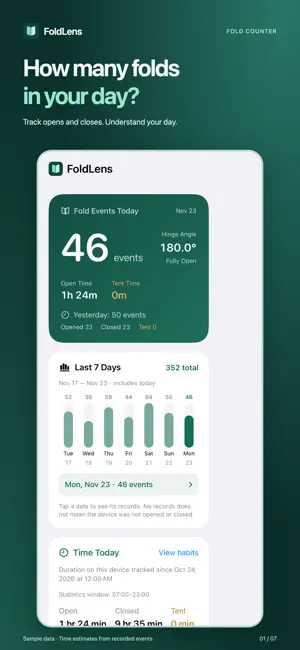

About FoldLens: Fold Counter
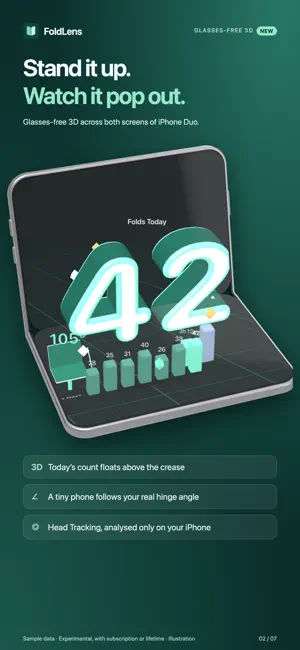
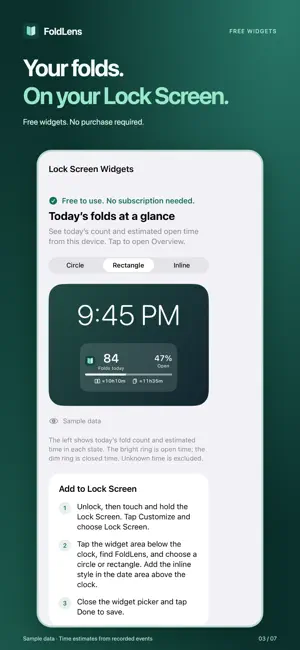
How often do you open your iPhone Duo, and how long does it stay unfolded? FoldLens records opens and closes and estimates unfolded time to help you understand your daily habits. Recording, history, trends and Lock Screen widgets are free. Automatic recording requires iPhone Duo, iOS 27.2 or later, and the Shortcuts app. Set up both the open and close automations, then physically open and close your phone to check the records. YOUR DAY, ON THE LOCK SCREEN Choose a free circular, rectangular or inline widget to see today's count and estimated unfolded time. Tap to open your overview. STATISTICS THAT FIT YOUR ROUTINE Choose early-riser, night-owl, all-day or custom hours. Exclude sleep and other times you do not want included. Overnight windows are supported, and time ratios and personal habit goals follow your chosen schedule. UNDERSTAND YOUR WEEK See today's, yesterday's and lifetime counts. Explore 7-day and 30-day trends and hourly patterns. Filter history by date, direction and source device to find individual opens and closes. TENT MODE WITH FOLDOCK Tent mode requires Foldock on the same iPhone Duo. Use tent mode while Foldock is in the foreground, then return to FoldLens to import shared local events and view counts and estimated duration. Hide tent statistics in settings at any time; original records are retained. GLASSES-FREE 3D IN LAPTOP POSE (EXPERIMENTAL) Stand iPhone Duo half open like a laptop, with one half flat on a desk, and hold it still for a second. The two screens become one 3D space: today's fold count floats above the crease, duration bars and the last 7 days stand on the desk, and a tiny phone model follows your real hinge angle. Drag or pinch to adjust the viewpoint. Turn on Head Tracking and the front camera estimates where your eyes are, on your iPhone, so the 3D image follows your head. Nothing is saved or uploaded. HOME SCREEN WIDGETS, ICLOUD HISTORY SYNC & 3D Choose a one-time lifetime purchase or a monthly subscription—both unlock the exact same features: • Small, medium and large Home Screen widgets for counts, estimated unfolded time and goal progress. • iCloud History Sync & Recovery: Sync fold history through your private iCloud container. Hardware-bound device identification keeps the same physical phone seamless across reinstalls without mixing devices after a backup restore, while History Recovery lets you restore prior devices or legacy records individually or all at once. • Glasses-free 3D in laptop pose (experimental). Lock Screen widgets remain free. PRIVATE BY DESIGN. NO ACCOUNT. No FoldLens account is required. Records stay on your device by default, and you can export the original event log. Enabling iCloud sync requires explicit confirmation and syncs only fold timestamps, actions and hardware model origin to your private iCloud database. Clearing your cloud records is always free. ABOUT THE NUMBERS An open counts once, and a close counts once. Manually running a recording shortcut also counts. Time is estimated from received events; missing records do not prove there were no folds. Widget refresh timing is controlled by iOS. Personal goals help you reflect on habits; they do not diagnose screen or hinge health. PURCHASES AND SUBSCRIPTIONS Local recording, history viewing and clearing cloud records remain available without a purchase. Lifetime access is a one-time payment with no renewal. Buying lifetime access does not cancel an existing monthly subscription; manage it in your system subscription settings. Monthly subscriptions are charged to your Apple Account and renew automatically until canceled. Access continues through the paid period after cancellation. Expiration does not delete local records. Restore purchases in the app. Local prices are shown on the purchase confirmation screen. Terms of Use: https://www.apple.com/legal/internet-services/itunes/dev/stdeula/ Privacy Policy: https://foldlens.liveby.app/privacy/
What’s new
Version 1.3.0 · Updated November 24, 2026
Version 1.3.0 brings glasses-free 3D: • New glasses-free 3D in laptop pose (experimental): stand iPhone Duo half open on a desk and both screens become one 3D space showing today's folds, durations and 7-day trend, with a tiny phone model that follows your hinge angle. • Optional Head Tracking: the front camera estimates where your eyes are, only on your iPhone, so the 3D image follows your head. Nothing is photographed, recorded or uploaded. • 3D is included in both the monthly subscription and the lifetime purchase, and can be turned off under Experimental in Settings. • Tent Mode with Foldock: when Foldock is installed, standing your phone as a tent in FoldLens opens the Foldock desk dashboard automatically. Turn it off in Tent Mode settings.
App privacy
The developer, 雪柳 沈, reported these privacy practices to Apple.
Data Not Collected
The developer does not collect any data from this app.
Alternatives to FoldLens: Fold Counter
Looking for apps like FoldLens: Fold Counter? Here are 6 similar apps on the App Store. The highest rated is Hinge Counter: Opening Tracker (3.0/5), and 4 of the 6 are free to download.
-
 Fold Cycles: Duo Fold Counter
-
 Hinge Counter: Opening Tracker
3.0
-
 DuoKit: Fold Tracker
-
 NotiKeeper
-
 Crease: Fold Counter & Stats
-
 Fold by Fold
3.0
| App | Rating | Price | Last updated | Compare |
|---|---|---|---|---|
| FoldLens: Fold Counter | – | Free | November 24, 2026 | |
| Fold Cycles: Duo Fold Counter | – | 0.99 USD | Nov 25, 2026 | Compare |
| Hinge Counter: Opening Tracker | 3.0 / 5 (2) | Free | Nov 7, 2026 | Compare |
| DuoKit: Fold Tracker | – | Free | Nov 13, 2026 | Compare |
| NotiKeeper | – | Free | Nov 4, 2026 | Compare |
| Crease: Fold Counter & Stats | – | Free | Nov 23, 2026 | Compare |
| Fold by Fold | 3.0 / 5 (4) | 0.99 USD | Nov 24, 2026 | Compare |