

WiFi Heatmap: Best Signal Spot
Kiwilytics Utilities iPhoneiPadiPod touch
WiFi Heatmap: Best Signal Spot is a free Utilities app for iPhone and iPad by Kiwilytics. Requires iOS 26.0. Updated November 10, 2026.
- Price
- Free
- on the App Store
- Size
- 1 MB
- Age 4+
- Updated
- Nov 10
- 2026 · v1.0
Screenshots
Save to Pinterest


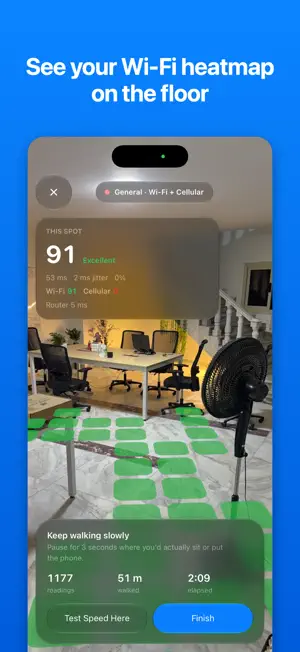
About WiFi Heatmap: Best Signal Spot
Some spots in a room get great internet. Others drop your call. WiFi Heatmap walks the room with you and shows you exactly where the good spots are. HOW IT WORKS Pick what you need the connection for, then tap Walk & Scan and walk slowly around the room. WiFi Heatmap tests your connection as you move and uses the camera to track where you are. When you finish, you get a heatmap of the room and a pin on the best spot. Tap Show Best Spot and an arrow walks you right to it. BEST SPOT FOR WHAT YOU DO - General: a good all-round connection. - Gaming: low lag and steady response. - Video Call: smooth video without freezing. - Streaming: fast enough downloads for video. - Cellular Call: the best spot for your cellular connection. Switch between them on the results to see how the best spot changes. SPEED TEST AT ANY SPOT During a walk, tap Test Speed Here for a full speed test right where you stand: download, upload, latency, jitter and packet loss. WI-FI OR CELLULAR Every scan tests your Wi-Fi and, when your iPhone allows it, your cellular connection at the same time. For each spot, WiFi Heatmap tells you which one to use. KNOW WHY A SPOT IS WEAK WiFi Heatmap also checks your router. That tells you whether a weak spot comes from weak Wi-Fi in that part of the room or from a slow internet connection. KEEP YOUR PLACES Every scan is kept for 30 days. Save your living room, office or bedroom as a place in one tap to keep it for good. PRIVATE BY DESIGN No account, no ads, no tracking. Your scans stay on your iPhone. Good to know: iPhone doesn't let apps read signal bars or call quality, so WiFi Heatmap measures everything with live tests. Walk & Scan works best on an iPhone with LiDAR.
App privacy
The developer, Kiwilytics, reported these privacy practices to Apple.
Data Not Collected
The developer does not collect any data from this app.
Alternatives to WiFi Heatmap: Best Signal Spot
Looking for apps like WiFi Heatmap: Best Signal Spot? Here are 6 similar apps on the App Store. The highest rated is Smart Home Playground Analyzer (5.0/5), and all 6 are free to download.
-
 Network IP Scanner Toolbox
-
 Smart Home Playground Analyzer
5.0
-
 NetScope: IP & LAN Toolkit
-
 NetBlade: IP & Network Scanner
-
 NetTracer – Traceroute
5.0
-
 Speedtest Pro – Internet Speed
| App | Rating | Price | Last updated | Compare |
|---|---|---|---|---|
| WiFi Heatmap: Best Signal Spot | – | Free | November 10, 2026 | |
| Network IP Scanner Toolbox | – | Free | Nov 23, 2026 | Compare |
| Smart Home Playground Analyzer | 5.0 / 5 (4) | Free | Oct 27, 2026 | Compare |
| NetScope: IP & LAN Toolkit | – | Free | Sep 20, 2026 | Compare |
| NetBlade: IP & Network Scanner | – | Free | Nov 23, 2026 | Compare |
| NetTracer – Traceroute | 5.0 / 5 (1) | Free | Oct 1, 2026 | Compare |
| Speedtest Pro – Internet Speed | – | Free | Jun 25, 2026 | Compare |