

Offline AI: Private AI Chat
Wuxi Huaxiaoman Technology Co.,Ltd Utilities iPhoneiPadiPod touch
Offline AI: Private AI Chat is a paid Utilities app for iPhone and iPad by Wuxi Huaxiaoman Technology Co.,Ltd. Requires iOS 17.0. Updated November 15, 2026.
- Price
- 9.99 USD
- on the App Store
- Size
- 85 MB
- Age 4+
- Updated
- Nov 15
- 2026 · v1.0.3
Screenshots
Save to Pinterest

About Offline AI: Private AI Chat
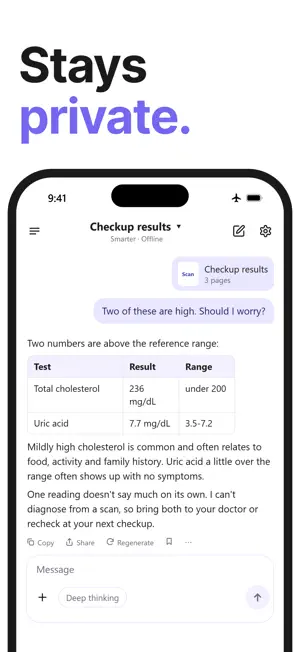
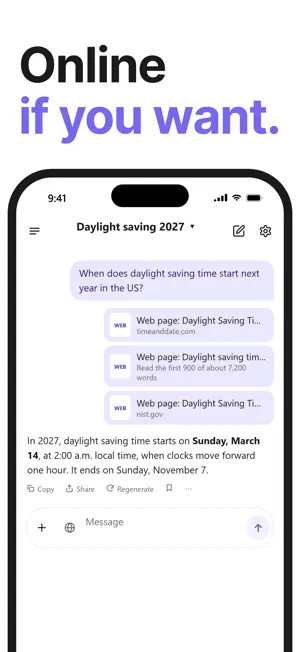
Offline AI is a private AI assistant. Run it right on your iPhone with no internet, or connect your own API key when you want a bigger model. No account either way. PRIVATE BY DESIGN On-device AI keeps every word on your phone. When you go online, your questions go straight to the AI service you picked, with your own key, never through our servers. Chats are saved only on your device and can be locked with Face ID. CALL IT Tap the call button and ask out loud. It answers out loud, even in airplane mode. Handy abroad: ask how to say something and hear it back. SCAN, SNAP, OPEN A FILE Scan a checkup report or a contract, snap a menu you can't read, or open a PDF, Word, Excel, PowerPoint or EPUB file, then ask what you want to know. For spreadsheets it works out the totals first. SEARCH THE WEB Turn on web search to ask about news, prices or anything recent. You see which pages it read. YOUR MODELS, YOUR RULES Run hand-picked open models on your phone, import any model from Hugging Face or a file, or connect any API with your own key, including a custom address. You decide which AI answers. Online use is billed by that service, not by us. WORKS WITHOUT INTERNET In the mountains, on a plane, abroad with no signal, keep going. Write an email, translate a message, summarize an article, or turn on Deep Thinking for a hard question. BUY ONCE No subscription, no in-app purchases, no ads. ALSO • Home Screen widget: start a chat, snap a photo, scan or call in one tap • Every chat is saved and sorted by date. Pick up where you left off, even in long ones • Speak instead of typing, and have answers read aloud • Make the text bigger or smaller • For tinkerers: temperature, Top P, Top K, Min P and answer length in Settings • Long-press to copy or select text; share several messages as one image FIRST LAUNCH The AI downloads once (0.5 to 5.7 GB depending on your device), so Wi-Fi is recommended. If the download stops, it picks up where it left off. On a slow connection, start with a small one and be chatting in a minute or two. WHICH DEVICES iPhones and iPads with 8 GB of memory (iPhone 15 Pro and later), and Macs, get the smartest AI. 6 GB iPhones use a mid-size AI that can also understand photos when there's enough free memory. Older iPhones use a smaller AI with simpler answers, and can still read the text in your photos.
What’s new
Version 1.0.3 · Updated November 15, 2026
• Tools: translate, write and summarize in one place • On iOS 26, use the built-in Apple model, no download needed • Make images with Image Playground and save them to Photos • Turn recordings into text, right on your phone • Ask Siri: "Ask Offline AI" • Play: text adventures and language practice • Lots of fixes
App privacy
The developer, Wuxi Huaxiaoman Technology Co.,Ltd, reported these privacy practices to Apple.
Data Not Linked to You
The following data, which may be collected but is not linked to your identity, may be used for the following purposes:
- Diagnostics: Other Diagnostic Data
Used for: Developer’s Advertising or Marketing
Alternatives to Offline AI: Private AI Chat
Looking for apps like Offline AI: Private AI Chat? Here are 6 similar apps on the App Store. The highest rated is Ethan AI Assistant (5.0/5), and 4 of the 6 are free to download.
-
 eFiles: File Manager Pro
-
 Ethan AI Assistant
5.0
-
 Car Maintenance Book & Log
-
 SiamGPT
-
 ECG Redefine
-
 Urbanice Guard
| App | Rating | Price | Last updated | Compare |
|---|---|---|---|---|
| Offline AI: Private AI Chat | – | 9.99 USD | November 15, 2026 | |
| eFiles: File Manager Pro | – | 5.99 USD | Oct 3, 2026 | Compare |
| Ethan AI Assistant | 5.0 / 5 (1) | 5.99 USD | Feb 17, 2026 | Compare |
| Car Maintenance Book & Log | – | Free | Nov 8, 2026 | Compare |
| SiamGPT | – | Free | Oct 27, 2026 | Compare |
| ECG Redefine | – | Free | Dec 18, 2025 | Compare |
| Urbanice Guard | – | Free | Oct 8, 2026 | Compare |