

Sound Meter: Noise Complaint
Igor Lebedev Utilities iPhoneiPadiPod touchApple Watch
Sound Meter: Noise Complaint is a free Utilities app for iPhone and iPad by Igor Lebedev. Requires iOS 17.0. Updated November 19, 2026.
- Price
- Free
- on the App Store
- Size
- 4 MB
- Age 4+
- Updated
- Nov 19
- 2026 · v1.2
Screenshots
Save to Pinterest


About Sound Meter: Noise Complaint
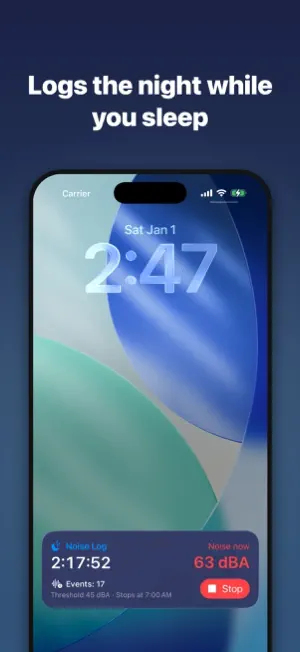
Noisy neighbors, a barking dog, music at 2 a.m., drilling on a Sunday? Sound Meter turns your iPhone into a noise logger that keeps the evidence for you. NOISE LOG FOR THE NIGHT • Start a log, set your limit and a stop time, plug in the charger and lock the screen. • Every time the noise stays above your limit, the app saves when it started, how long it lasted, its peak and average level (dBA). • Each event gets a short audio clip that starts 5 seconds before the noise — or keep levels only, without audio. • In the morning: a chart of the whole night with every event marked. • The running log is on the Lock Screen and in the Dynamic Island: time, current level and events, with a Stop button. • Start or stop a log with Siri, the Shortcuts app or a Control Center button. • Share a night card with the chart, events and loudest level in stories or messages. WHAT WAS THAT SOUND? • The type of sound — dog barking, music, drilling, shouting, door slams, footsteps and hundreds more — is recognized on your device by Apple's built-in sound classifier, with a confidence score. A REPORT FOR YOUR COMPLAINT (PRO) • One tap builds a PDF: address and map, period, summary, chart of the night, event table with sound types, method and calibration. • Audio clips and raw data are exported with SHA-256 fingerprints, so anyone can check that a file has not been altered. • Send it to your landlord, building manager, the police or a lawyer. VIDEO AND PHOTOS WITH DECIBELS • Turn on the camera behind the meter and record video or take photos with the dial, level, min/avg/max, time and address drawn right on the picture. • Location is saved in the file too. • Photos are free; video recording is part of Sound Meter Pro. A REAL SOUND LEVEL METER • dBA, dBC and dBZ frequency weighting, Fast and Slow response. • Min, average (Leq) and max, live chart and octave spectrum. • Calibration against a reference meter. • Recordings with level history, audio, location and sound type. • Dosimeter: your daily noise dose by NIOSH or OSHA and how long a level is still safe. • Apple Watch app: the noise level on your wrist. PRIVATE BY DESIGN • No account, no ads, no analytics, no tracking. • Recordings, logs and reports stay on your device until you share them. • Free download: sound meter, noise log with sound types, photos, dosimeter and Apple Watch. • Sound Meter Pro — a one-time purchase, no subscription — adds PDF reports, audio and data export with SHA-256 fingerprints and video with decibels. Please note: a phone microphone is not a certified class 1 or 2 sound level meter. Sound Meter is made to document noise — when, how loud and how long — not to replace an official measurement. Terms of Use: https://www.apple.com/legal/internet-services/itunes/dev/stdeula/ Privacy Policy: https://ilebedev.app/soundmeter/privacy/
What’s new
Version 1.2 · Updated November 19, 2026
Tap the noise log on the Lock Screen or in the Dynamic Island to open it right away. Recordings and event clips now play at a normal volume. Small fixes and improvements.
App privacy
The developer, Igor Lebedev, reported these privacy practices to Apple.
Data Not Collected
The developer does not collect any data from this app.
Alternatives to Sound Meter: Noise Complaint
Looking for apps like Sound Meter: Noise Complaint? Here are 6 similar apps on the App Store. The highest rated is NoiseTrail: Noisy Neighbor Log (2.0/5), and all 6 are free to download.
-
 NoiseCase: Noise Log
-
 Noise Monitor: Home Journal
-
 NoiseLog: Decibel Meter
-
 NoiseTrail: Noisy Neighbor Log
2.0
-
 Noise Diary: dB Log
-
 Date Gap Calculator
| App | Rating | Price | Last updated | Compare |
|---|---|---|---|---|
| Sound Meter: Noise Complaint | – | Free | November 19, 2026 | |
| NoiseCase: Noise Log | – | Free | Nov 25, 2026 | Compare |
| Noise Monitor: Home Journal | – | Free | Nov 22, 2026 | Compare |
| NoiseLog: Decibel Meter | – | Free | Aug 17, 2026 | Compare |
| NoiseTrail: Noisy Neighbor Log | 2.0 / 5 (1) | Free | Nov 20, 2026 | Compare |
| Noise Diary: dB Log | – | Free | Aug 19, 2026 | Compare |
| Date Gap Calculator | – | Free | Jan 27, 2026 | Compare |