

Limit Keeper: Speed Cameras
Dmitry Logachev Navigation iPhoneiPadiPod touch
Limit Keeper: Speed Cameras is a free Navigation app for iPhone and iPad by Dmitry Logachev. Rated 5.0/5 from 1 ratings. Requires iOS 18.0.
- Rating
- 5.0
- 1 ratings
- Price
- Free
- on the App Store
- Size
- 12 MB
- Age 4+
- Updated
- Nov 21
- 2026 · v1.1.0
Screenshots
Save to Pinterest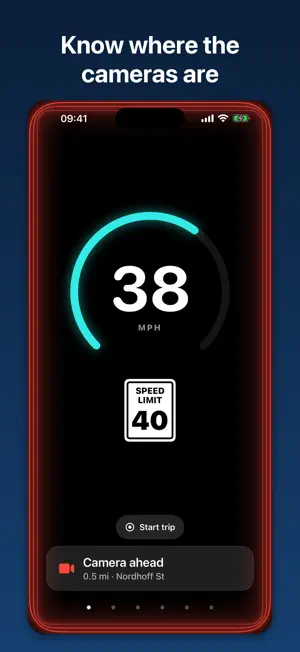


About Limit Keeper: Speed Cameras
Know where the speed cameras are and keep to the limit. Log your miles with one tap and export them for taxes. Limit Keeper does two jobs. It warns you before you reach a speed camera zone in Los Angeles, San Francisco, Oakland or Long Beach, so you can check your speed and stay within the limit (San Jose's and Glendale's zones are on the map while their cameras are installed, and Malibu's PCH cameras are shown at approximate places, without alerts). And it keeps your mileage log: one tap per trip, with PDF and CSV export for your records. Camera locations come from each city's published list. In LA County it also warns before the red-light cameras in Culver City and the Metro rail-crossing cameras on Crenshaw Blvd, and shows bus-lane cameras on the map. HOW IT WORKS - A spoken heads-up about half a mile before a zone, a red flash on the screen, and a Live Activity on your lock screen and Dynamic Island. - Six views, one swipe apart: Focus (your speed, the limit and the next camera, nothing else), Map, All cameras, Road, Dashboard and Glow only, with an optional neon frame in your colour. - A gentle chime if you are over the limit inside a zone (you can turn it off). - Tap a zone to see what that camera does and does not enforce, and where the information comes from. - New: drive history maps every drive, kept only on your iPhone (the last 30 days free). Parked, report a camera by email. TRIP LOG One tap starts and ends a trip; the miles come from your iPhone's GPS. IRS-ready mileage log (date, miles, destination, purpose): the start place and destination fill in by themselves and you can edit them or name your places. Pick a category (Delivery, Rideshare, Business, Personal or your own), add the purpose, a client or platform, tolls and parking, and your odometer at the start and end of the year. Export a CSV file or a PDF summary with the totals, business miles and business-use percentage. Your home address is hidden in exports by default. Enter your own mileage rate to see an estimate (not tax advice). BUILT FOR PRIVACY No account. No ads. No tracking. Your location, drive history and trip log stay on your iPhone. Camera data is bundled in the app; the Los Angeles zone status is refreshed about once a day from public LADOT data. VOICES AND LANGUAGES Voice alerts in 6 languages (7 voice options): English (US or UK accent), Spanish (Mexico), Korean, Mandarin, Cantonese and Russian. Each has a female or male voice. The app screens are in English, Spanish (Mexico), Russian, Korean and Chinese (Simplified and Traditional). LIMIT KEEPER PRO Camera alerts are free. Limit Keeper Pro adds cameras on your route, Shift mode for deliveries, full drive history and export, the yearly tax report, unlimited vehicles and all neon colors. Choose monthly, yearly (7 days free for new subscribers) or a one-time Lifetime purchase; the App Store shows the prices. Subscriptions renew automatically unless cancelled at least 24 hours before the end of the period; manage them in Settings > Apple ID > Subscriptions. If you installed before 1.1, Pro is yours free (Founding drivers). Terms of Use: https://www.apple.com/legal/internet-services/itunes/dev/stdeula/ GOOD TO KNOW Works with "While Using" location; "Always" lets alerts continue while you use another app or the screen is locked. Zones are approximate; some cameras are still in their warning period, San Jose's and Glendale's cameras are still being installed (shown on the map, no alerts yet), and Malibu publishes no exact camera locations (shown as approximate, never alerted). Red-light cameras named only in older city lists or the press (Beverly Hills, Montebello, Commerce, Hawthorne) alert as "Reported", with a chime first; park stop-sign cameras are shown at approximate places, without alerts. Always obey posted limits and traffic law. Limit Keeper is not affiliated with, endorsed by or sponsored by the City of Los Angeles or LADOT, or any other city or transportation agency.
What’s new
Version 1.1.0 · Updated November 21, 2026
Limit Keeper 1.1 Camera alerts stay free for everyone. New: Limit Keeper Pro (optional) • Cameras on your route: when parked, pick a place, see the camera zones on each route, then go with your navigator. • Yearly tax report: one PDF per tax year with the odometer, business miles and share, a month-by-month table and every trip. • Shift mode for deliveries and rideshare: one business trip across every stop, with a notification to add it to the log when it ends. • Full drive history and export: drives older than 30 days, and any period as GPX, CSV or PDF. • Unlimited vehicles and all neon colors. Founding drivers: if you installed Limit Keeper before 1.1, Pro is yours free forever. No account, nothing to do. Also new, free: • Drive history, the last 30 days: every drive on a map, kept only on your iPhone. Forgot to start a trip? Add the drive to the log. Detailed speed is kept 30 days by default. Deleting your drives is always free. • Report a camera: when parked, tell us a camera is here, gone or has a wrong limit. Your email app sends it. • Early speed warning: about 12 seconds before a zone, if you're over the limit, a stronger alert says the limit so you can slow down in time. • Always-on status: while alerts are on, the Lock Screen and Dynamic Island show that Limit Keeper is watching and how far the next camera is. Also free: Siri and Shortcuts. Say "Start alerts in Limit Keeper" or "End trip in Limit Keeper".
App privacy
The developer, Dmitry Logachev, reported these privacy practices to Apple.
Data Not Collected
The developer does not collect any data from this app.
Alternatives to Limit Keeper: Speed Cameras
Looking for apps like Limit Keeper: Speed Cameras? Here are 6 similar apps on the App Store. The highest rated is VeloX GPS Speedometer (1.0/5), and all 6 are free to download.
-
 Speedio
-
 Speed Alert Drive
-
 VeloX GPS Speedometer
1.0
-
 SpeedCap
1.0
-
 Simple Speed: Ad Free
-
 Beam: Radar & Speed Cameras
| App | Rating | Price | Last updated | Compare |
|---|---|---|---|---|
| Limit Keeper: Speed Cameras | 5.0 / 5 (1 rating) | Free | November 21, 2026 | |
| Speedio | – | Free | Sep 11, 2026 | Compare |
| Speed Alert Drive | – | Free | Nov 11, 2026 | Compare |
| VeloX GPS Speedometer | 1.0 / 5 (1) | Free | Aug 6, 2026 | Compare |
| SpeedCap | 1.0 / 5 (1) | Free | Mar 31, 2025 | Compare |
| Simple Speed: Ad Free | – | Free | Oct 30, 2026 | Compare |
| Beam: Radar & Speed Cameras | – | Free | Jul 20, 2026 | Compare |