

Facet: STL STEP 3D File Viewer
Uranum Labs Productivity iPhoneiPadiPod touch
Facet: STL STEP 3D File Viewer is a free Productivity app for iPhone and iPad by Uranum Labs. Rated 5.0/5 from 1 ratings. Requires iOS 17.0.
- Rating
- 5.0
- 1 ratings
- Price
- Free
- on the App Store
- Size
- 43 MB
- Age 4+
- Updated
- Nov 23
- 2026 · v1.0.1
Screenshots
Save to Pinterest


About Facet: STL STEP 3D File Viewer
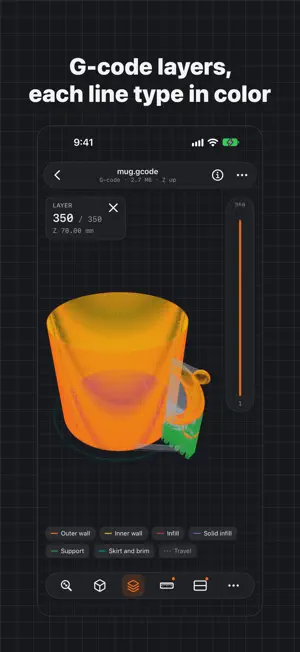
Facet opens 3D and CAD files on iPhone and iPad. Offline. No account. No ads. Large files open without closing the app. Formats STL, STEP and STP, IGES, DXF, OBJ (with MTL colors), PLY, GLB and glTF, 3MF and G-code. Every format opens in the free version, with no limit on the number of files. Models inside a ZIP archive or a folder open too. Free Orbit, pan and zoom, perspective or orthographic view. Model info: triangle count, bounding box with dimensions, units and layers. Screenshot and share. For G-code, a layer slider, extrusion shown apart from travel moves, each line type (walls, infill, support) in its own color, and the print time and filament the slicer estimated. DXF drawings show their text and dimensions. Light or dark appearance, following the system. Pro Pro is a one-time purchase, not a subscription, and works with Family Sharing. It adds point-to-point, angle, radius and area measurement, a section plane, viewing models in AR, an exploded view of assemblies, export and conversion to STL, OBJ or GLB at any scale, wireframe, X-ray and normals with mesh analysis, comparison of two models, and viewport themes. Large files When a model is too large for the memory of your device, Facet opens a reduced version and tells you so, instead of crashing. Files and Quick Look Open files from Files, Mail or any app with Open In. Quick Look previews and thumbnails in Files show your models without opening Facet. iPad Split View, Stage Manager, several windows, keyboard shortcuts, trackpad and pointer. Privacy Data Not Collected. Your files never leave your device, and Facet itself opens no network connection. No account, no tracking, no ads. Purchases are handled by the App Store.
What’s new
Version 1.0.1 · Updated November 23, 2026
• Try Pro free: the first model you open has every Pro tool on — measure, section, exploded view, AR and export. • Send feedback from Settings. • Recents no longer lists the same file twice after an update.
App privacy
The developer, Uranum Labs, reported these privacy practices to Apple.
Data Not Collected
The developer does not collect any data from this app.
Alternatives to Facet: STL STEP 3D File Viewer
Looking for apps like Facet: STL STEP 3D File Viewer? Here are 6 similar apps on the App Store.


| App | Rating | Price | Last updated | Compare |
|---|---|---|---|---|
| Facet: STL STEP 3D File Viewer | 5.0 / 5 (1 rating) | Free | November 23, 2026 | |
| PocketCAD | – | Free | Nov 18, 2026 | Compare |
| AnyView – File Viewer | – | Free | Nov 20, 2026 | Compare |
| App Blocker Vocabulary Builder | – | Free | Oct 1, 2025 | Compare |
| Focus Matrix | – | Free | Apr 28, 2026 | Compare |
| 3DCost | – | Free | Nov 19, 2026 | Compare |
| Core 3D Viewer | – | Free | Oct 27, 2026 | Compare |