

Respeak: Fix Recording Slips
xiang zhang Productivity iPhoneiPadiPod touch
Respeak: Fix Recording Slips is a free Productivity app for iPhone and iPad by xiang zhang. Requires iOS 17.4. Updated November 18, 2026.
- Price
- Free
- on the App Store
- Size
- 4 MB
- Age 4+
- Updated
- Nov 18
- 2026 · v1.0.5
Screenshots
Save to Pinterest

About Respeak: Fix Recording Slips
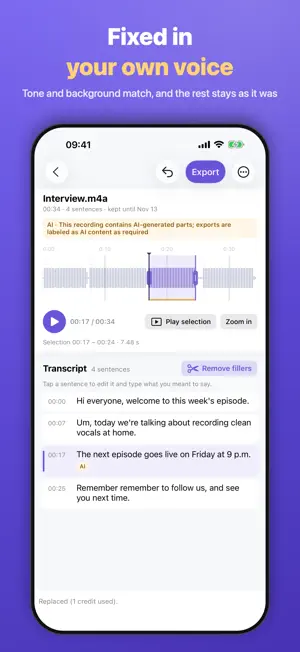
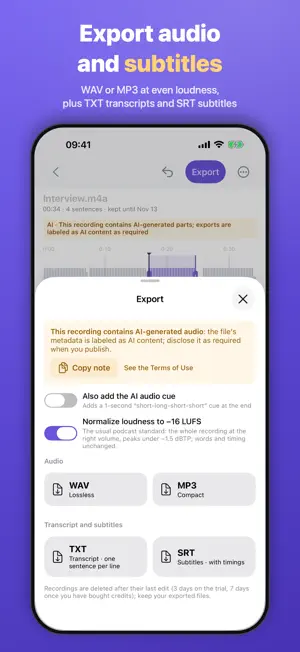
Said the wrong thing? Fix it in your own voice. Upload a recording or a video and it is transcribed for you. Tap the sentence you got wrong and type the new one: AI reads it in your own voice, with the tone and background matching the rest. Listen first, and replace it only when you're happy. You can also share a recording or video to Respeak from Voice Memos, Photos, Files and other apps. FIX A SENTENCE • Only the sentence you pick changes; the rest stays as it was • Each sentence gets 3 free generations of 2 takes each; compare the new and the original side by side • Pronunciation is checked automatically • Or record the line yourself, or import a clip, to replace it without AI • Undo any time REMOVE FILLERS Cut ums, uhs, repeated words and long pauses straight from the transcript. Review them one by one, listen, then apply. ENHANCE VOICE Remove hiss, fan noise and hum in one tap for a clearer voice. Undo if you don't like it. VIDEO TO TEXT AND SUBTITLES Import an MP4 or MOV video as it is and get the transcript as TXT or SRT subtitles. EXPORT WAV or MP3, with loudness normalized to −16 LUFS if you like. When a recording contains AI-generated audio, the file is labeled as AI content as required, with an optional audio cue. YOU STAY IN CONTROL • Only your own voice can be used, after a separate voice consent • Your voice never trains models • Recordings are deleted after their last edit (3 days on the trial, 7 days once you have bought credits); export what you want to keep PRICING Sign up and verify your email to get 10 credits. Each sentence you fix (a confirmed replacement) uses 1 credit: pay per sentence, no subscription. Transcribing, removing fillers, enhancing voice and exporting are free.
What’s new
Version 1.0.5 · Updated November 18, 2026
Shared recordings and videos now import in order, and video imports upload only the audio. Unfinished edits are saved on your device. Replacement previews start sooner, and playback is smoother on long recordings.
App privacy
The developer, xiang zhang, reported these privacy practices to Apple.
Data Linked to You
The following data, which may be collected and linked to your identity, may be used for the following purposes:
- Purchases: Purchase History
- Contact Info: Email Address, Name
- User Content: Audio Data, Other User Content
- Identifiers: User ID
- Sensitive Info: Sensitive Info
Used for: App Functionality
Alternatives to Respeak: Fix Recording Slips
Looking for apps like Respeak: Fix Recording Slips? Here are 6 similar apps on the App Store. The highest rated is Texpeak: AI Audio Editor (5.0/5), and all 6 are free to download.
-
 Texpeak: AI Audio Editor
5.0
-
 FenVoice: Voice Clone & TTS
-
 GoalTrail
4.5
-
 AI Voice Clone & TTS - Voicify
-
 Clipbud - Clipboard Manager
4.7
-
 Black Hat MEA
1.5
| App | Rating | Price | Last updated | Compare |
|---|---|---|---|---|
| Respeak: Fix Recording Slips | – | Free | November 18, 2026 | |
| Texpeak: AI Audio Editor | 5.0 / 5 (1) | Free | Sep 15, 2026 | Compare |
| FenVoice: Voice Clone & TTS | – | Free | Nov 14, 2026 | Compare |
| GoalTrail | 4.5 / 5 (4) | Free | Oct 21, 2024 | Compare |
| AI Voice Clone & TTS - Voicify | – | Free | Nov 15, 2026 | Compare |
| Clipbud - Clipboard Manager | 4.7 / 5 (56) | Free | Dec 21, 2025 | Compare |
| Black Hat MEA | 1.5 / 5 (2) | Free | Nov 18, 2026 | Compare |