

MIDI Host Herder
Janos Debreczi Music iPhoneiPadiPod touch
MIDI Host Herder is a free Music app for iPhone and iPad by Janos Debreczi. Rated 5.0/5 from 1 ratings. Requires iOS 17.0. Updated November 6, 2026.
- Rating
- 5.0
- 1 ratings
- Price
- Free
- on the App Store
- Size
- 3 MB
- Age 4+
- Updated
- Nov 6
- 2026 · v1.0
Screenshots


About MIDI Host Herder
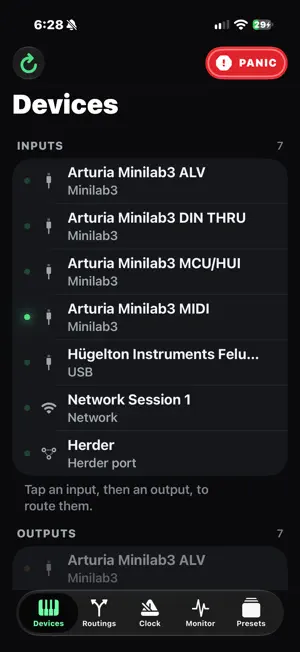
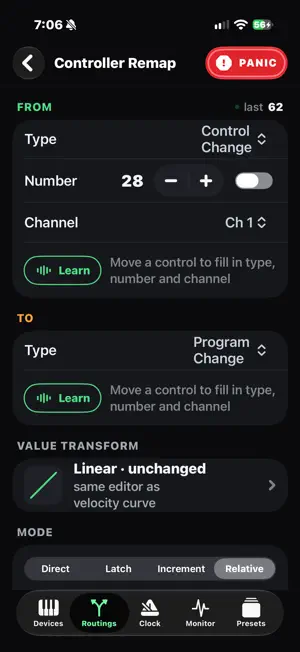
MIDI Host Herder turns your iPhone into a USB MIDI host and router. Plug a USB hub into your phone, connect your keyboards, pads, controllers and synths, and send MIDI between them. It does the job of a hardware MIDI host box. ROUTING • Send any input to any outputs, with as many routings as you like. • Quick route: tap an input, then tap an output. • Route everything to everything with one tap, like a MIDI thru box. • Works with USB, Bluetooth MIDI, Network MIDI and other music apps on your phone. FILTERS AND TRANSFORMS Add these to each routing, in any order: message filter, channel filter, channel remap, key range for splits, velocity range for layers, transpose, note map for drum pads, velocity curve, controller remap, controller filter and clock divider. CONTROLLER REMAP Turn any knob, fader, pad, pitch bend or aftertouch into another control or a program change. Choose Direct, Latch, Increment or Relative mode. Use MIDI Learn: move a control instead of typing numbers. CONDITIONS A routing can pass MIDI only while a footswitch is held or a knob is above a value. The condition can come from any device. CLOCK AND MONITOR • An internal MIDI clock with tap tempo and BPM buttons, which also shows the tempo of incoming clock. • A live, readable log of every message in and out, with filters and a hex view. PRESETS Save as many setups as you like. Everything saves automatically. Switch presets by tapping, by program change from your controller, or with a pad or footswitch. Send program changes and SysEx to your synths when a preset loads. BUILT FOR THE STAGE • A Panic button on every screen stops stuck notes the moment you touch it. • If a routing is turned off or a keyboard is unplugged mid-chord, held notes are released. • Devices appear as you plug them in, and routings reconnect by name. • Routing keeps running in the background with the screen locked. WHAT YOU NEED An iPhone with iOS 17 or later, a USB hub (a powered one is best), a USB data cable, and class-compliant USB MIDI devices. Older iPhones with Lightning need Apple's Lightning to USB 3 Camera Adapter and a powered hub. Free. No account, no ads, no in-app purchases and no tracking. Your settings and presets stay on your phone.
App privacy
The developer, Janos Debreczi, reported these privacy practices to Apple.
Data Not Collected
The developer does not collect any data from this app.
Alternatives to MIDI Host Herder
Looking for apps like MIDI Host Herder? Here are 6 similar apps on the App Store. The highest rated is VelocityScaler (5.0/5), and all 6 are free to download.
-
 VelocityScaler
5.0
-
 OneMove Air
5.0
-
 Toaster: Live Music Visualizer
-
 Sylvaris Sapling
-
 DJFX Looper (AUv3)
5.0
-
 midi-sink
| App | Rating | Price | Last updated | Compare |
|---|---|---|---|---|
| MIDI Host Herder | 5.0 / 5 (1 rating) | Free | November 6, 2026 | |
| VelocityScaler | 5.0 / 5 (1) | Free | Nov 14, 2026 | Compare |
| OneMove Air | 5.0 / 5 (1) | Free | Nov 13, 2026 | Compare |
| Toaster: Live Music Visualizer | – | Free | Nov 1, 2026 | Compare |
| Sylvaris Sapling | – | Free | Oct 27, 2026 | Compare |
| DJFX Looper (AUv3) | 5.0 / 5 (1) | Free | Nov 2, 2026 | Compare |
| midi-sink | – | Free | Oct 22, 2026 | Compare |
Compare MIDI Host Herder with the top alternatives: ratings, updates, ASO score and keyword gaps →