

Glimpsed: Screenshot Search
Doan Khanh Dong Productivity iPhoneiPadiPod touch
Glimpsed: Screenshot Search is a free Productivity app for iPhone and iPad by Doan Khanh Dong. Rated 5.0/5 from 5 ratings. Requires iOS 16.4.
- Rating
- 5.0
- 5 ratings
- Price
- Free
- on the App Store
- Size
- 57 MB
- Age 4+
- Updated
- Nov 15
- 2026 · v1.1.1
Screenshots

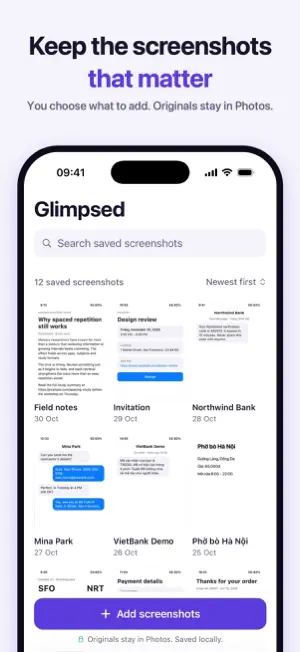


About Glimpsed: Screenshot Search
You took the screenshot so you wouldn't forget. Now it's buried under 4,000 others. Glimpsed makes your screenshots searchable. Choose the ones you want to keep, and Glimpsed reads their text with on-device OCR. Type any word you remember and go straight to the right image: a code, a link, an address, a receipt, a note. SEARCH BY WHAT'S INSIDE - Find screenshots by the text inside them - Copy recognized text, or a single code or line - See links, emails, phone numbers, addresses and dates in one place FOUND: EVERY CODE IN ONE PLACE - Booking, order, tracking and flight codes and links, gathered automatically - Search and filter by type to jump straight to the one you need KEEP WHAT MATTERS ORGANIZED - Add notes, tags and collections - See new screenshots you haven't added yet, and choose which to add - Clean up duplicates and old verification codes, with iOS asking you to confirm before anything is deleted PRIVATE BY DESIGN - No account - Text recognition happens on your iPhone - Your screenshots and their text are never uploaded - Export your text, notes, tags and collections at any time LANGUAGES - English, Japanese, Spanish, Portuguese and Vietnamese - Choose the app language in Settings GLIMPSED PRO Free includes 200 saved screenshots and 3 collections. Pro adds more screenshots and collections, smart collections, and Redact & Share: hide sensitive details in a screenshot before you send it. Pro is available as a monthly or yearly subscription, or as a one-time lifetime purchase. The yearly subscription starts with a 7-day free trial for eligible new subscribers. Subscriptions renew automatically unless cancelled at least 24 hours before the end of the current period. Your Apple Account is charged for renewal within 24 hours before the period ends. Manage or cancel in your Apple Account settings. Terms of Use: https://www.apple.com/legal/internet-services/itunes/dev/stdeula/ Privacy Policy: https://dustindoan315.github.io/recallshot-site/privacy/
Ratings & reviews
5.0
5 ratings
What’s new
Version 1.1.1 · Updated November 15, 2026
What’s New (1.1.1) NEW - Glimpsed now speaks Japanese, Spanish, Portuguese and Vietnamese. Choose the app language in Settings. - Found lists booking, order and flight codes and links in one place. Search it or filter by type. - Links that wrap onto two lines are now joined, so you can open them in one tap. - Copy a single code or line straight from a screenshot. - Redact & Share: choose exactly what gets hidden before you share. IMPROVED - Faster importing and a smaller app. - Fixes for ZIP codes detected inside addresses and for screenshots wrongly marked as deleted.
App privacy
The developer, Doan Khanh Dong, reported these privacy practices to Apple.
Data Not Linked to You
The following data, which may be collected but is not linked to your identity, may be used for the following purposes:
- Purchases: Purchase History
Used for: Analytics, App Functionality
Alternatives to Glimpsed: Screenshot Search
Looking for apps like Glimpsed: Screenshot Search? Here are 6 similar apps on the App Store. The highest rated is Ditto: Meeting Notes (5.0/5), and all 6 are free to download.
-
 Ditto: Meeting Notes
5.0
-
 Improvory
-
 CellNotes App
5.0
-
 PhoneNap: Screen Time Blocker
-
 LocalGateKeys Password Vault
5.0
-
 Modo: Notes, Calendar, Widget
5.0
| App | Rating | Price | Last updated | Compare |
|---|---|---|---|---|
| Glimpsed: Screenshot Search | 5.0 / 5 (5 ratings) | Free | November 15, 2026 | |
| Ditto: Meeting Notes | 5.0 / 5 (1) | Free | Nov 11, 2026 | Compare |
| Improvory | – | Free | Nov 6, 2026 | Compare |
| CellNotes App | 5.0 / 5 (1) | Free | Nov 3, 2026 | Compare |
| PhoneNap: Screen Time Blocker | – | Free | Nov 16, 2026 | Compare |
| LocalGateKeys Password Vault | 5.0 / 5 (5) | Free | Nov 14, 2026 | Compare |
| Modo: Notes, Calendar, Widget | 5.0 / 5 (6) | Free | Nov 16, 2026 | Compare |