

SnipMark: Screenshot Markup
Nga Nguyen Thi Thuy Productivity iPhoneiPadiPod touchMac
SnipMark: Screenshot Markup is a free Productivity app for iPhone and iPad by Nga Nguyen Thi Thuy. Requires iOS 17.0. Updated November 21, 2026.
- Price
- Free
- on the App Store
- Size
- 19 MB
- Age 4+
- Updated
- Nov 21
- 2026 · v1.1.3
Screenshots
Save to Pinterest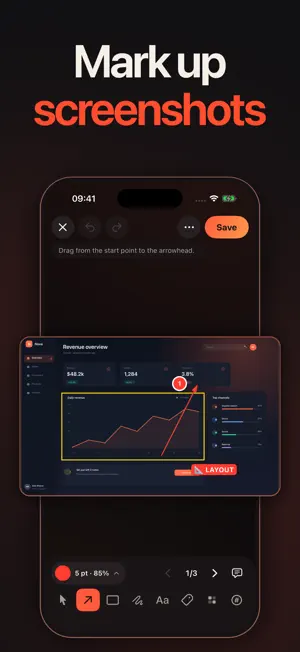


About SnipMark: Screenshot Markup
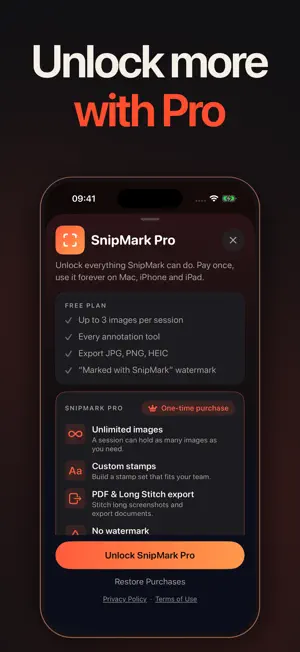
SnipMark is the screenshot workspace for people who send screenshots every day. Capture, mark, compress and rename in one native app — nothing is uploaded, ever. CAPTURE • Press the SnipMark region shortcut on Mac to grab any part of any display. • On iPhone and iPad, add screenshots in a couple of taps, or send them straight from other apps’ Share sheet with the SnipMark Share Extension. • Every capture lands in an ordered session, with the source app attached on Mac. MARK • Arrows, rectangles, freehand lines, text, stamps, step counters and blur. • Marks are vector-based, so they stay crisp at any export size. • Blur or pixelate an area to obscure it — check the result before you share. SEND • Compress a whole batch to a sharing size with a quality slider and a max long-edge cap. • Rename files with a pattern instead of typing 01-final-final again. • Export JPG, PNG, HEIC or a multi-page PDF, stitch a long screenshot into one tall image, or copy straight to the clipboard on Mac. PRIVATE BY ARCHITECTURE • No account, no sign-in, no server, no upload queue. • No third-party analytics, ad SDKs or cross-app tracking. • Your screenshots stay in local app storage until you export or delete them. FREE vs PRO • Free covers short sessions: up to 3 images per session, with a small "Marked with SnipMark" watermark on export. • SnipMark Pro Lifetime is a one-time in-app purchase: no watermark, unlimited images per session, custom stamps and PDF & Long Stitch export. • Pro is shared between Mac and iPhone with the same Apple Account. • All purchases are handled by Apple through the App Store. SnipMark never sees your payment details, and prices in your local currency are shown in the app before you buy. REQUIREMENTS macOS 14 or later, iOS/iPadOS 17 or later. Support: https://snipmark.starlingtech.vn/support — a real person reads every message.
What’s new
Version 1.1.3 · Updated November 21, 2026
Hide emails, phone numbers, and other sensitive info in screenshots with one tap. SnipMark Pro can hide them automatically when you import images.
App privacy
The developer, Nga Nguyen Thi Thuy, reported these privacy practices to Apple.
Data Not Collected
The developer does not collect any data from this app.
Alternatives to SnipMark: Screenshot Markup
Looking for apps like SnipMark: Screenshot Markup? Here are 6 similar apps on the App Store. The highest rated is Mote: Lock Screen Notes (5.0/5), and all 6 are free to download.
-
 iScript: intelligent Script
-
 iFieldSurvey
-
 Quad To-Do: Eisenhower Matrix
-
 Mote: Lock Screen Notes
5.0
-
 Yike: To-Do List, Task Planner
-
 Handy: Snippets & Files
| App | Rating | Price | Last updated | Compare |
|---|---|---|---|---|
| SnipMark: Screenshot Markup | – | Free | November 21, 2026 | |
| iScript: intelligent Script | – | Free | Apr 16, 2026 | Compare |
| iFieldSurvey | – | Free | Nov 19, 2026 | Compare |
| Quad To-Do: Eisenhower Matrix | – | Free | Nov 20, 2026 | Compare |
| Mote: Lock Screen Notes | 5.0 / 5 (6) | Free | Nov 18, 2026 | Compare |
| Yike: To-Do List, Task Planner | – | Free | Nov 22, 2026 | Compare |
| Handy: Snippets & Files | – | Free | Oct 27, 2026 | Compare |