

Shrink — Video Compressor
洋杰 吴 Utilities iPhoneiPadiPod touch
Shrink — Video Compressor is a free Utilities app for iPhone and iPad by 洋杰 吴. Requires iOS 16.0. Updated November 15, 2026.
- Price
- Free
- on the App Store
- Size
- 2 MB
- Age 4+
- Updated
- Nov 15
- 2026 · v1.1
Screenshots
Save to Pinterest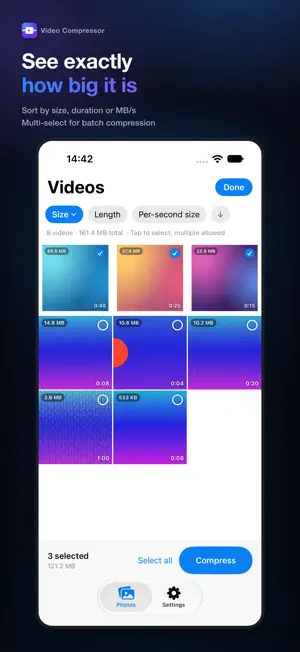
About Shrink — Video Compressor
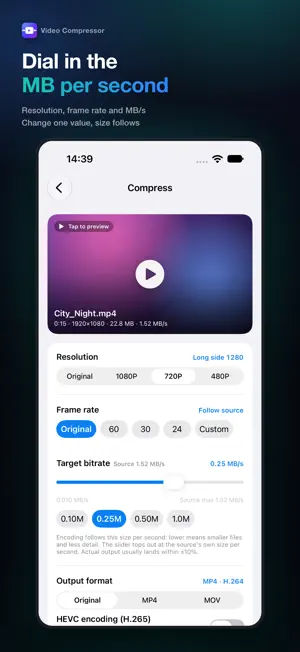
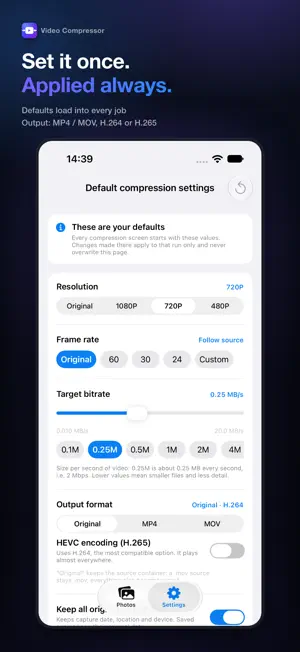
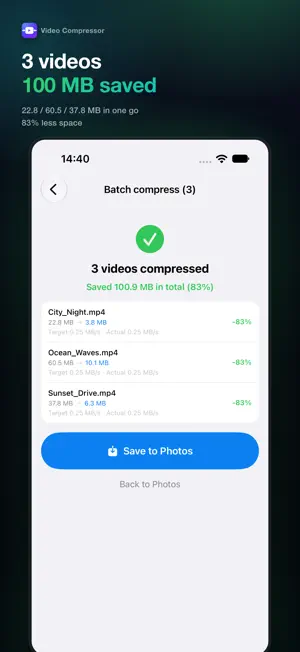
Shrink big videos on your phone, and choose exactly how small they get. A few minutes of 4K footage can top 1 GB. The library fills up, chat apps refuse the file, upload forms stop at a size limit. The built-in Photos app has no “compress to this size” button. This app is that button. ■ See size, duration and bitrate at a glance The library lays your videos out in a grid, and each tile shows the value you are sorting by. Sort by file size, duration, average bitrate or size per second: tap once to switch the criterion, tap again to reverse it. The space hogs stand out immediately. ■ A bitrate slider, not High / Medium / Low Drag to 2M and the encoder targets 2 Mbps average; drag to 0.2M and it targets 0.2 Mbps. The number goes straight into the encoder instead of being derived from a quality preset. Need to land under a specific file size? Multiply duration by the target bitrate and you know where to drag. ■ Resolution and frame rate, adjusted separately Resolution: original, 1080p, 720p, 480p, with the aspect ratio kept and even dimensions so no fringing appears. Frame rate: follow the source (up to 60), 60, 30, 24, or anything between 1 and 120. Dropping the frame rate is the fastest way to lose weight; on ordinary home footage, 24 fps is hard to tell apart from the source. ■ Batch it Select several videos, apply one set of settings, and they run in sequence with “2 of 4” and overall progress. When it finishes you get, for every file, the original size, the new size, the percentage saved, and target versus actual bitrate. Not happy with the result? Change the numbers and run again. The originals are still there. ■ Keep the original, or don't You can keep the source video, or delete it after compressing to free up space. Deletion asks for confirmation twice, only runs once the new file is saved, and the system asks once more: you will not end up with the original gone and no replacement. ■ Your videos never leave the phone No server, no upload, no network permission at all. No account, no sign-in, no ads, no analytics. Encoding runs on the system's own VideoToolbox, on device, and works in airplane mode. That is why this app can promise no uploads: there is no networking code inside it. ■ Three steps 1. Open the app and allow access to Photos 2. Tap a video, or select several, and set resolution, frame rate and bitrate 3. Start compressing, then save the results back to Photos Made for these moments: the library is nearly full; an attachment will not fit a chat, form or portal limit; you shot a lot of footage and only need one light copy; an older phone should hold a few more films. Requires iOS 16.0 or later. Universal for iPhone and iPad, portrait or landscape. Need a hard limit, such as “under 25 MB”? Work out duration times target bitrate, move the slider, and you will usually land it on the first try.
What’s new
Version 1.1 · Updated November 15, 2026
Version 1.1 · Choose the output format: keep the original container, or export as MP4 / MOV · Optional HEVC (H.265) encoding: smaller files at the same quality, with automatic fallback to H.264 where it is unavailable · Interface now available in 10 languages · Compression defaults moved to Settings › Compression Defaults · Bitrate presets now show a clean value instead of a long decimal
App privacy
The developer, 洋杰 吴, reported these privacy practices to Apple.
Data Not Collected
The developer does not collect any data from this app.
Alternatives to Shrink — Video Compressor
Looking for apps like Shrink — Video Compressor? Here are 6 similar apps on the App Store.
-
 轻像
-
 视频压缩-缩小体积分辨率并保留画质快速导出保存
-
 Flash Sign: LED Banner
-
 视频压缩-无损高清压缩
-
 Video Compressor: Offline
-
 MockMock - Mockup
| App | Rating | Price | Last updated | Compare |
|---|---|---|---|---|
| Shrink — Video Compressor | – | Free | November 15, 2026 | |
| 轻像 | – | Free | Sep 17, 2026 | Compare |
| 视频压缩-缩小体积分辨率并保留画质快速导出保存 | – | Free | Mar 27, 2026 | Compare |
| Flash Sign: LED Banner | – | Free | Sep 14, 2026 | Compare |
| 视频压缩-无损高清压缩 | – | Free | Aug 27, 2026 | Compare |
| Video Compressor: Offline | – | Free | Sep 16, 2026 | Compare |
| MockMock - Mockup | – | Free | Oct 22, 2026 | Compare |