

PDF Duo: Edit, Sign & Fill
Alano Tech Pte. Ltd. Productivity iPhoneiPadiPod touch
PDF Duo: Edit, Sign & Fill is a free Productivity app for iPhone and iPad by Alano Tech Pte. Ltd. Requires iOS 18.0. Updated November 26, 2026.
- Price
- Free
- on the App Store
- Size
- 5 MB
- Age 4+
- Updated
- Nov 26
- 2026 · v1.0.2
Screenshots
Save to Pinterest


About PDF Duo: Edit, Sign & Fill
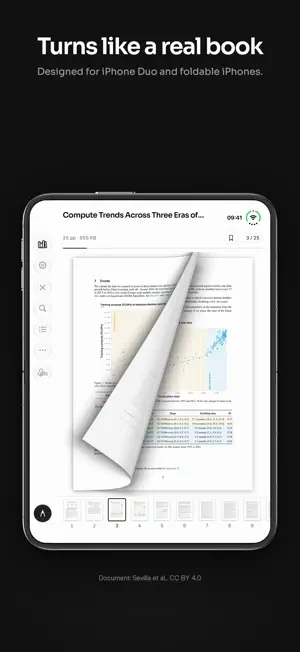
PDF Duo is a free, beautifully crafted PDF reader and editor for iPhone, designed for iPhone Duo and foldable iPhones: open your Duo to read like a book with a real page curl, sign and fill forms, and mark up anything, privately on your phone. No account, no ads, no watermark. It works on every other iPhone and on iPad too. Reading, mark-up, form filling, signing and flattened export are all free, with no subscription. READ LIKE A BOOK Open your iPhone Duo to read a PDF like a book: two pages at once, with the spine on the real hinge. Turn pages with a real page curl; the page curls over the spine under your finger, in every pose. With Reduce Motion on, pages fade instead. Pinch to zoom into any page. The cover stands alone on the right, then pages 2–3, 4–5, as in a printed book. SIGN AND FILL Sign a PDF on iPhone with your finger, then drag, pinch and turn your signature into place. Save several signatures and initials; they stay on your phone. Fill in PDF forms field by field: text fields, checkboxes, radio buttons, dropdowns and lists, with Next field to move on. Add today's date or a line of text anywhere, or clear a form in one step. Flatten the PDF when you're done: send a copy with your signature, marks and form values burned into the page, so it can't be changed. Leases, contracts, school forms, delivery notes and invoices: signed and sent from your phone. MARK UP Highlight a PDF by running your finger along the text; underline and strike through the same way. Draw with the pen, or add text boxes, sticky notes, rectangles, ellipses, lines and arrows, in five colors and three opacities. Select, move or delete any mark, see every mark in one list, and undo or redo any change. Marks are saved as standard PDF annotations. A COMPLETE PDF READER Find any word and see every match with its line. Jump through the PDF's own contents, add bookmarks, browse thumbnails and a page grid, or scrub through the pages. Scroll continuously or read one page at a time; PDF Duo reopens where you left off. Compare two PDFs side by side across the fold, scrolling together. Connect iCloud Drive or any folder once and every PDF is there, or choose Open in PDF Duo from Files, Mail, Safari and Messages. Open password-protected PDFs. Rotate, delete, reorder and extract pages, or insert a blank page or a photo. DESIGNED FOR IPHONE DUO PDF Duo is designed for iPhone Duo and foldable iPhones, and fits each way you hold the phone: • Closed: read with one hand; the buttons stand in the Duo's own control column beside the clock. • Open as a book: two pages across the fold, a page curl over the spine, and no bar across the top. • Open upright: one large page, with a thumbnail rail under your thumb. • Half open like a laptop: the page stands above the fold, with thumbnails below, or the signature pad when you sign. Fold or rotate mid-document and you stay on the same page, with the same document and the same edit. iOS already shows a PDF as two pages on the open iPhone Duo with Quick Look. PDF Duo builds on that for reading and paperwork: a page curl over the spine, saved signatures, form filling field by field, your place remembered in every document, and a laptop pose for signing. PRIVATE BY DESIGN No account, no sign-in and no cloud service of ours. Your documents stay in your files, and PDF Duo opens them where they are. Signatures are kept only on this phone, in the Keychain, and are never synced or uploaded. It works offline, with no ads and no tracking. Unsaved changes come back after a crash, and every save is checked before it replaces your file. WHAT IT DOESN'T DO YET • Edit existing text or images in a PDF. You can sign, fill, highlight, draw, add text and notes, and reorder pages. • Certificate-based digital signatures. Your signature is a handwritten one, placed on the page. • Apple Pencil on iPhone Duo. • XFA forms and form scripts. • Selecting text straight in the book spread; pinch in and the page becomes selectable.
What’s new
Version 1.0.2 · Updated November 26, 2026
The buttons in the side column now move down when the Dynamic Island grows during a call, a timer or a Live Activity, so every button stays easy to tap, folded or open.
App privacy
The developer, Alano Tech Pte. Ltd., reported these privacy practices to Apple.
Data Not Collected
The developer does not collect any data from this app.
Alternatives to PDF Duo: Edit, Sign & Fill
Looking for apps like PDF Duo: Edit, Sign & Fill? Here are 6 similar apps on the App Store. The highest rated is Grid Paper Notes (5.0/5), and all 6 are free to download.
-
 專注|語音陪讀・溫書工作計時器
-
 Foldleaf Reader
-
 Shelfbound: Image, PDF, Text
-
 PageBuddy - PDF Reader & Notes
-
 Grid Paper Notes
5.0
-
 Apeiron.io Communicator
| App | Rating | Price | Last updated | Compare |
|---|---|---|---|---|
| PDF Duo: Edit, Sign & Fill | – | Free | November 26, 2026 | |
| 專注|語音陪讀・溫書工作計時器 | – | Free | Sep 12, 2026 | Compare |
| Foldleaf Reader | – | Free | Oct 21, 2026 | Compare |
| Shelfbound: Image, PDF, Text | – | Free | Nov 16, 2026 | Compare |
| PageBuddy - PDF Reader & Notes | – | Free | Sep 7, 2026 | Compare |
| Grid Paper Notes | 5.0 / 5 (2) | Free | Nov 16, 2026 | Compare |
| Apeiron.io Communicator | – | Free | Jul 2, 2024 | Compare |