

Projects: Timeline Planner
Rayan Waked Productivity iPhoneiPadiPod touchMac
Projects: Timeline Planner is a free Productivity app for iPhone and iPad by Rayan Waked. Rated 5.0/5 from 1 ratings. Requires iOS 26.0.
- Rating
- 5.0
- 1 ratings
- Price
- Free
- on the App Store
- Size
- 64 MB
- Age 4+
- Updated
- Nov 19
- 2026 · v1.3
Screenshots
Save to Pinterest


About Projects: Timeline Planner
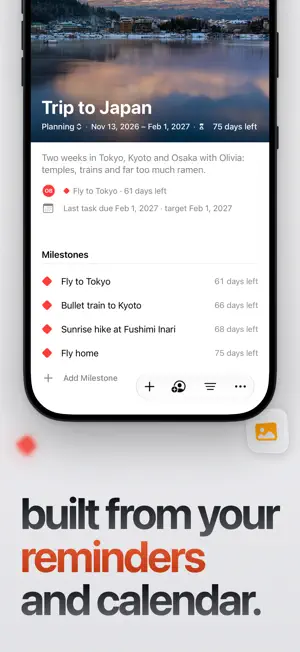
Projects turns the Reminders lists and Calendar events you already have into projects on one Gantt-style timeline, so you can see what’s coming and what’s running late, weeks or months ahead. There’s no new system to learn: plan a move, a wedding, a renovation, or a thesis with the apps you already use. Your reminders and events stay in Reminders and Calendar, synced both ways. No account, no ads, and free to start. Works on iPhone, iPad, Mac, and Apple Vision Pro. REMINDERS AND CALENDAR • Your Reminders lists become projects. Change a date in either app and the other updates. • Calendar events appear next to your tasks. • Works with iCloud, Google, and Exchange accounts. • Add any milestone to Calendar as a one-time copy. TEMPLATES • Start from a free template for every kind of project, from a wedding or a move to a dissertation, with phases, tasks, and milestones in place. • Choose a start date or the day it’s due, and Projects sets the dates. Templates come in 30 languages. TIMELINE • See every project side by side, or open one on its own. • Zoom from days to weeks, months, or quarters. • Break work into phases, milestones, and subtasks. • Touch and hold a task to move it a day or a week, or to change when it starts or ends. • See each project’s last due date next to your target date. ADDING TASKS • End a task with a day, like “Order tiles Friday,” and it’s due Friday. • Save links from Instagram, Pinterest, TikTok, and the web. Their images appear on the timeline on the day you choose. AGENDA AND ALERTS • Agenda lists what starts, ends, or reaches a milestone each day. • Smart Alerts cover tasks that are only in Projects, and follow up on reminders and events when there’s more to know. WIDGETS, SIRI, AND SHORTCUTS • Today and Project widgets show today’s tasks and a project’s progress. Check off tasks from the widget. • Add a task from Control Center, or touch and hold the app icon. • Ask Siri “What’s due in Projects?” or “Add a task in Projects.” • Export a timeline as a PDF or an image. PROJECTS PRO Projects Pro is for plans with a date to hit, alone or with others. • Link tasks so one starts after another. When a task slips, the tasks after it move too. • See a forecast of your real finish date and which tasks set it. Catch Up re-plans the tasks after a late one. • Get more than 170 extra templates, and fit any template to the time you have. • Count down to the big day on the Home Screen, Lock Screen, and StandBy with Countdown widgets, and in the Dynamic Island on iPhone. • On iPhone and iPad models that support Apple Intelligence, draft a plan from one sentence or break a task into steps. • Add your own photos and color swatches to moodboards. • Share a project over iCloud, assign tasks to people, and plan together on FaceTime with SharePlay. People you invite join free. • Share Yearly or Monthly with up to five family members. The timeline, Reminders and Calendar sync, a template for every kind of project, the Today and Project widgets, and export stay free. Nothing that was free became part of Pro. PRIVACY Your plans stay on your devices and in your iCloud. Projects collects anonymous usage data, and you can turn it off in Settings. ABOUT PROJECTS PRO Projects Pro is available as a monthly or yearly auto-renewing subscription, or as Lifetime, a one-time purchase. Yearly and Monthly include a one-month free trial. Lifetime isn’t shared through Family Sharing. Payment is charged to your Apple Account when you confirm the purchase, or when the free trial ends. A subscription renews automatically unless it’s canceled at least 24 hours before the end of the current period, and your account is charged for the renewal within 24 hours before the period ends. Manage or cancel it in your Apple Account settings. Terms of Use: https://www.apple.com/legal/internet-services/itunes/dev/stdeula/ Privacy Policy: https://waked.dev/privacy/
What’s new
Version 1.3 · Updated November 19, 2026
• Start a project from a template. There’s a free one for every kind of project, from a wedding or a move to a dissertation or marathon training, with phases, tasks, and milestones already in place. Choose a start date or the day it’s due, and Projects sets the dates. Templates come in 30 languages. • Projects Pro adds more than 170 templates, and Fit to My Date stretches or shortens a plan to the time you have. • With Pro, you can link tasks so one starts after another. When a task slips, the tasks after it move by the same amount. In quick add, enter “Tile floor 2 days after Plumbing.” • Every project now shows when its last task is due next to your target date. With Pro, linked plans show a forecast of your real finish date and which tasks set it. • When a task with later tasks runs late, Catch Up in Pro re-plans the rest from today or keeps your target date. You see the before and after first. • The new Countdown widget, part of Pro, counts down to a milestone or target date on the Home Screen, the Lock Screen, and in StandBy. • Add to Calendar saves a copy of a milestone in Calendar, free for everyone. • On iPhone and iPad models that support Apple Intelligence, Pro can draft a plan from a sentence you write and suggest steps for a task. You review every change before it’s added. • With Pro, add your own photos and color swatches to moodboards. Links and header photos stay free. • Create in Reminders is now on by default for new projects. • Quick add reads date ranges, like “Nov 23 to 27” or “Monday to Friday.” • Changing a task’s start date now keeps its length. • Countdowns for all-day milestones now start at 6 AM on the day. • Projects Pro offers no longer open full screen on their own. Start Free Month says what you get, and you’re reminded 3 days before the free month ends. • Nothing that was free became part of Pro. • In shared projects, linked tasks move together when the change is made in Projects 1.3 or later.
App privacy
The developer, Rayan Waked, reported these privacy practices to Apple.
Data Not Linked to You
The following data, which may be collected but is not linked to your identity, may be used for the following purposes:
- Purchases: Purchase History
- Location: Coarse Location
- Identifiers: Device ID
- Usage Data: Product Interaction, Other Usage Data
- Diagnostics: Crash Data, Performance Data, Other Diagnostic Data
Used for: Analytics
Alternatives to Projects: Timeline Planner
Looking for apps like Projects: Timeline Planner? Here are 6 similar apps on the App Store. The highest rated is Provisum: Family Binder & Care (5.0/5), and all 6 are free to download.
-
 Provisum: Family Binder & Care
5.0
-
 ヨテい - AIカレンダー・予定表
-
 OwlCal
5.0
-
 Remind Me: Weekly Widgets
5.0
-
 familiSync
5.0
-
 Due Something: Pokes to Remind
5.0
| App | Rating | Price | Last updated | Compare |
|---|---|---|---|---|
| Projects: Timeline Planner | 5.0 / 5 (1 rating) | Free | November 19, 2026 | |
| Provisum: Family Binder & Care | 5.0 / 5 (1) | Free | Nov 15, 2026 | Compare |
| ヨテい - AIカレンダー・予定表 | – | Free | Nov 16, 2026 | Compare |
| OwlCal | 5.0 / 5 (9) | Free | Sep 1, 2026 | Compare |
| Remind Me: Weekly Widgets | 5.0 / 5 (1) | Free | Nov 6, 2026 | Compare |
| familiSync | 5.0 / 5 (2) | Free | Nov 6, 2026 | Compare |
| Due Something: Pokes to Remind | 5.0 / 5 (2) | Free | Nov 15, 2026 | Compare |