

Nimu: Photo Series Editor
Antonio De Moraes Barros Filho Photo & Video iPhoneiPadiPod touch
Nimu: Photo Series Editor is a free Photo & Video app for iPhone and iPad by Antonio De Moraes Barros Filho. Requires iOS 17.0. Updated November 28, 2026.
- Price
- Free
- on the App Store
- Size
- 58 MB
- Age 4+
- Updated
- Nov 28
- 2026 · v1.2.4
Screenshots
Save to Pinterest

About Nimu: Photo Series Editor
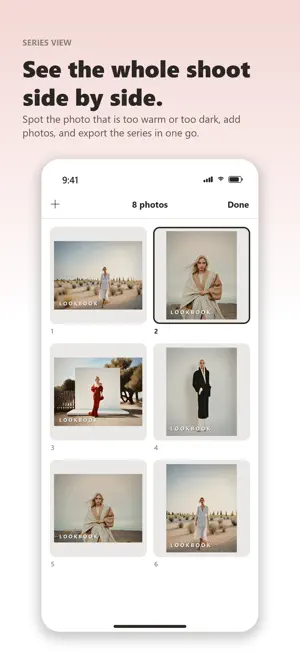
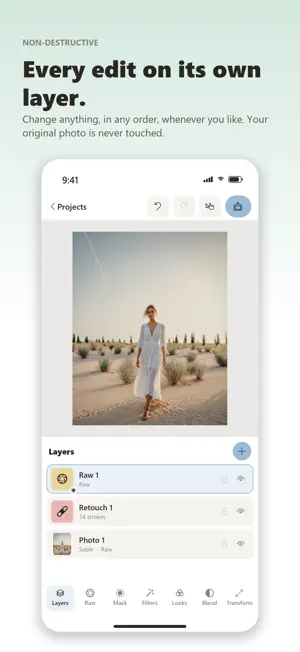
Nimu edits a whole photo series at once. Open a shoot, grade it once, and every photo follows: the same raw adjustments, the same film look, the same title or logo, adapted to each photo's size. Then fine-tune any single photo on top with its own retouching. Every edit stays on its own layer, so nothing is ever baked in. BATCH EDIT A WHOLE SHOOT • Open up to 100 photos as one series, in the order you pick them • Layers shared by the series work on every photo: change them once and the whole shoot changes • Each photo can keep layers of its own, such as retouching for that one picture • Select Subject finds the subject again in every photo, so one mask works across the shoot • Crop the whole shoot to the same ratio in one step: 4:5, square, or your own • See every photo side by side in the series view, add or remove photos, and export the whole series in one go • Line up the series: Nimu finds the person in every photo and crops each one so they stand in the same place, at the same size. Made for progress photos and lookbooks • Compare: export photos side by side or as a grid, with the date each one was taken Prefer one picture? Open a single photo or a blank canvas: every tool works the same. REMOVE BACKGROUND One tap keeps only the subject, on a transparent background, ready to save as PNG. Shift Edge, Hard Edge, and Feather perfect the outline, and the brush fixes any area by hand. In a series, every photo is cut out at once, each around its own subject. FOLLOW SURFACE Lay text, a logo, or a picture on the 3D shape of the photo under it: in perspective on a car or a wall, around a body, into the folds of cloth. On a paint layer, each stroke stays on the surface where it starts, so you can paint a wall a new colour without touching the furniture. REAL LAYERS • Photo, text, paint, colour fill, retouch and raw adjustment layers • Opacity and nine blend modes, including Multiply, Screen, Overlay and Soft Light • Clip an adjustment to the layer below so it changes that one photo only • Move, scale, rotate, flip, lock, hide and merge layers • Masks hide instead of erasing and filters stay live, so nothing is ever lost RAW TOOLS Exposure, Contrast, Highlights, Shadows, Whites, Blacks, Temperature, Tint, Vibrance, Saturation, Texture, Clarity, Dehaze, Denoise, Vignette, Grain, Bloom, Halation, Curves, Color Mixer, Color Grading, Optics and Lens Blur. MASKS Linear gradient, radial gradient and brush, plus Select Subject and Select Background. Add and subtract shapes to build exactly the area you want. RETOUCHING Spot Healing Brush, Healing Brush and Clone Stamp, on a layer of their own. 34 SMART FILTERS Blur, Sharpen, Noise, Pixelate, Render, Distort and Liquify, all editable after you apply them. PAINT AND TEXT Brush, Pencil, Marker, Airbrush and Eraser, with Apple Pencil pressure and an eyedropper. Text with any font on your device, letter spacing, line height, alignment, outline, and drop shadow. 40 FILM LOOKS The same looks as Nimu Cam, our manual camera, from clean editorial to warm film and black and white, on any layer at any strength. PRIVATE BY DESIGN No account, no subscription, no ads. Everything runs on your device, works offline, and nothing about you is collected. WHAT NIMU PRO CHANGES Every tool is included, including series and background removal. Without Pro, photos save up to 1600 px with a small Nimu mark. Nimu Pro is a single purchase, not a subscription: full resolution, no watermark.
What’s new
Version 1.2.4 · Updated November 28, 2026
• Follow surface: lay text, a logo, or a picture on the 3D shape of the photo under it, in perspective on a car or a wall, around a body, or in the folds of cloth. In the Blend tab. • Paint on a surface: put a paint layer on Follow Surface, and each stroke stays on the surface where it starts: a wall, the floor, a car door. Your brush can run over the edge, and the colour still stays on it. • Line up the series: in the Crop tab, Nimu finds the person in every photo and crops each one so they stand in the same place, at the same size. Made for progress photos. • Compare: in Export, put two or more photos side by side or in a grid, with the date each one was taken. • Denoise: a new Noise section in Raw takes the grain and colour speckles out of any photo, and Detail keeps the texture you want. • Bloom and Halation, in Raw > Effects: a soft glow around the bright parts, and the red fringe film gives around highlights. • Redeem a code on the Nimu Pro screen and in Settings.
App privacy
The developer, Antonio De Moraes Barros Filho, reported these privacy practices to Apple.
Data Not Collected
The developer does not collect any data from this app.
Alternatives to Nimu: Photo Series Editor
Looking for apps like Nimu: Photo Series Editor? Here are 6 similar apps on the App Store. The highest rated is Senko - Simple Pro Camera (5.0/5), and all 6 are free to download.
-
 VeraRaw
-
 Chromagraph Camera Pro
-
 Photo Studio : Edit Photos
-
 Senko - Simple Pro Camera
5.0
-
 Camera Files
3.0
-
 Pro Camera : Iris
5.0
| App | Rating | Price | Last updated | Compare |
|---|---|---|---|---|
| Nimu: Photo Series Editor | – | Free | November 28, 2026 | |
| VeraRaw | – | Free | Aug 30, 2026 | Compare |
| Chromagraph Camera Pro | – | Free | Nov 24, 2026 | Compare |
| Photo Studio : Edit Photos | – | Free | Sep 4, 2025 | Compare |
| Senko - Simple Pro Camera | 5.0 / 5 (2) | Free | Sep 12, 2024 | Compare |
| Camera Files | 3.0 / 5 (2) | Free | May 24, 2026 | Compare |
| Pro Camera : Iris | 5.0 / 5 (3) | Free | Nov 24, 2026 | Compare |