

Remoti: TV Control
Cao Canh Ta Utilities iPhoneiPadiPod touch
Remoti: TV Control is a free Utilities app for iPhone and iPad by Cao Canh Ta. Requires iOS 17.0. Updated November 16, 2026.
- Price
- Free
- on the App Store
- Size
- 42 MB
- Age 4+
- Updated
- Nov 16
- 2026 · v1.2.1
Screenshots
Save to Pinterest


About Remoti: TV Control
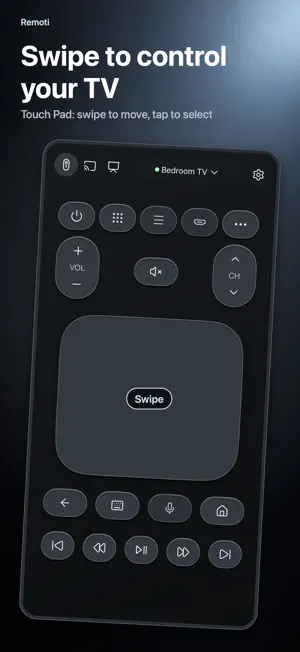
Turn your iPhone into a TV remote. Cast, mirror and present. CONTROLS • Directional buttons, OK, Back and Home • Volume and mute • Playback keys in supported apps • Four layouts, including Touch Pad and Hybrid Pad CAST PHOTOS AND VIDEOS Choose media from Photos or Files to share on a compatible TV. Supported formats and playback depend on the receiver. SCREEN MIRRORING Mirror your iPhone screen to a compatible TV. Video only, no sound; requires iOS 17.4 or later and Remoti Plus. PRESENT SLIDES Open a PDF, images or simple static PowerPoint (.pptx) slides, preview them, then use your iPhone to move through the presentation. Fonts may be substituted. Export complex PowerPoint content, Keynote and other slide formats to PDF first. HOME SCREEN WIDGET Put remote keys on your Home Screen. On iOS 27 a key sends straight to your last-used TV without opening Remoti; on earlier iOS a tap opens Remoti. APPS AND KEYBOARD Open supported TV apps. On supported Sony TVs, an extra authorization lets Remoti show the TV's apps. The iPhone keyboard sends English and Vietnamese text only, in supported TV fields. Other languages and emoji are not supported; text entry varies by TV app. CONNECT Put your iPhone and TV on the same local network. Turn on the TV, select it and enter the pairing code shown on its screen. Local remote control works without internet; TV streaming apps may need it. COMPATIBILITY Control a compatible Android TV or Google TV from your iPhone over Wi-Fi. Tested on Sony BRAVIA 2K GB ATV3 (Android 9). Casting and presenting need a compatible receiver; support differs from remote control. Controls depend on the TV model, firmware and app. Power-on requires a supported, authorized TV that stays reachable on the network in standby. Interface in English, Vietnamese, Simplified and Traditional Chinese, Japanese, Korean, German, French, Spanish and Brazilian Portuguese. REMOTI PLUS Remoti Plus includes ad removal, Screen Mirroring, slide presenting, keyboard text entry and additional themes. Screen Mirroring is video-only, without sound, and requires iOS 17.4 or later. Basic remote controls, Touch Pad and all four layouts are free. Plus is available monthly, yearly or as a one-time Lifetime purchase. Monthly and Yearly renew automatically; a seven-day free trial is available only to eligible new subscribers. Manage or cancel subscriptions in Apple account settings. Buying Lifetime does not cancel an existing subscription. Terms of Use: https://www.apple.com/legal/internet-services/itunes/dev/stdeula/ Privacy Policy: https://remoti.canhta.com/privacy/ PRIVACY AND SUPPORT Pairing credentials stay in the iPhone Keychain. Typed text goes only to the paired TV. Read the privacy policy for diagnostics, ads and consent choices. Support: https://remoti.canhta.com/support/
What’s new
Version 1.2.1 · Updated November 16, 2026
- Remoti links on the web now open the app directly
App privacy
The developer, Cao Canh Ta, reported these privacy practices to Apple.
Data Used to Track You
The following data may be used to track you across apps and websites owned by other companies:
- Identifiers: Device ID
Data Linked to You
The following data, which may be collected and linked to your identity, may be used for the following purposes:
- Location: Coarse Location
- Identifiers: Device ID
- Usage Data: Product Interaction, Advertising Data
- Purchases: Purchase History
Used for: Third-Party Advertising, Developer’s Advertising or Marketing, Analytics, App Functionality
Data Not Linked to You
The following data, which may be collected but is not linked to your identity, may be used for the following purposes:
- Diagnostics: Performance Data, Other Diagnostic Data, Crash Data
Used for: Third-Party Advertising, Developer’s Advertising or Marketing, Analytics, App Functionality
Alternatives to Remoti: TV Control
Looking for apps like Remoti: TV Control? Here are 6 similar apps on the App Store. The highest rated is Remoty: Smart TV Remote (5.0/5), and all 6 are free to download.
-
 Remoty: Smart TV Remote
5.0
-
 Zapio: Universal TV Remote
-
 SmartRemote: Wi-Fi TV Remote
5.0
-
 Xem file SKP
-
 MobiEyes SmartHome
-
 Beamote: Projector & TV Remote
| App | Rating | Price | Last updated | Compare |
|---|---|---|---|---|
| Remoti: TV Control | – | Free | November 16, 2026 | |
| Remoty: Smart TV Remote | 5.0 / 5 (4) | Free | Nov 12, 2026 | Compare |
| Zapio: Universal TV Remote | – | Free | Nov 19, 2026 | Compare |
| SmartRemote: Wi-Fi TV Remote | 5.0 / 5 (1) | Free | Nov 25, 2026 | Compare |
| Xem file SKP | – | Free | Nov 28, 2026 | Compare |
| MobiEyes SmartHome | – | Free | Mar 26, 2025 | Compare |
| Beamote: Projector & TV Remote | – | Free | Nov 25, 2026 | Compare |
Compare Remoti: TV Control with the top alternatives: ratings, updates, ASO score and keyword gaps →