

LiveWidget: Widget Maker
ReleCompany Utilities iPhoneiPadiPod touch
LiveWidget: Widget Maker is a free Utilities app for iPhone and iPad by ReleCompany. Requires iOS 26.0. Updated November 22, 2026.
- Price
- Free
- on the App Store
- Size
- 53 MB
- Age 4+
- Updated
- Nov 22
- 2026 · v20261122001
Screenshots
Save to Pinterest


About LiveWidget: Widget Maker
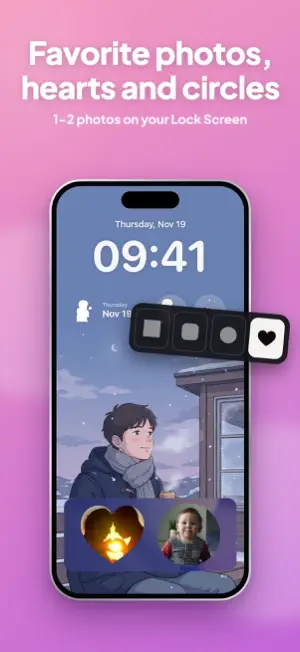
Give your whole Home Screen a look you love. Each LiveWidget theme pairs wallpaper with widgets and app icons, right down to the fonts inside your widgets. ONE THEME, TWO SCREENS Open the Themes tab and pick a set. It comes with wallpaper and widgets for both your Home Screen and Lock Screen. Follow the guide to add the matching app icons using Shortcuts. Most themes are free, some are included with Pro, and new designs keep coming. No account, no sign-in, no ads. Want to start with something personal? With My Photo Theme in Pro, AI creates a theme from a photo you choose. A HOME FOR FAVORITE FACES Give your pet a small corner of your Home Screen or fill a large widget with a family photo. Choose small, medium, or large, then crop to fill the widget or frame the photo in a circle or arch. You can also loop up to 9 seconds from a video. Remove the background on your device to keep just a person or pet, or remove a black or green background. Pick a transparent widget background to let your wallpaper show through. Blur, system, light, and dark backgrounds are available too. PIXEL FRIENDS ON YOUR LOCK SCREEN Put a pixel friend under the clock or give it a little more room in a Lock Screen banner. On supported iPhones, a pixel cat can keep you company in the Dynamic Island. A HEART FOR ONE, A CIRCLE FOR THE OTHER Show a saved clip on your Lock Screen as a Live Activity. Fill the banner with one photo, or fit one or two photos side by side. Choose a square, rounded square, circle, or heart for each. KEEP THE DATE WITH THE PHOTO Count the days since your baby was born or see how many are left until your anniversary. Choose from 5 day-counter styles. Preview your widget against your own wallpaper before saving, and keep your creations together in the library. LIVEWIDGET PRO Pro includes every theme pack, My Photo Theme, high-quality saving, and Extra Large widgets on iPhone with iOS 27. It also unlocks every Lock Screen pixel widget and custom pixel colors, the Dynamic Island cat on supported iPhones, and Lock Screen clips. Pro subscriptions renew automatically each week, month, or year. Your Apple Account is charged when you confirm your purchase. Your subscription renews unless you cancel at least 24 hours before the current period ends. After purchase, manage or cancel it in Settings › Apple Account › Subscriptions. Terms of Use: https://relecompany.com/en/terms/livewidget Privacy Policy: https://relecompany.com/en/privacy/livewidget
What’s new
Version 20261122001 · Updated November 22, 2026
Thank you for your feedback. We polished LiveWidget to help you make even better widgets.
App privacy
The developer, ReleCompany, reported these privacy practices to Apple.
Data Not Linked to You
The following data, which may be collected but is not linked to your identity, may be used for the following purposes:
- Purchases: Purchase History
- Location: Coarse Location
- Identifiers: Device ID
- Usage Data: Product Interaction
- User Content: Photos or Videos
- Diagnostics: Crash Data, Other Diagnostic Data
Used for: Analytics, App Functionality
Alternatives to LiveWidget: Widget Maker
Looking for apps like LiveWidget: Widget Maker? Here are 6 similar apps on the App Store. The highest rated is RELAY 릴레이 (5.0/5), and all 6 are free to download.
-
 Blanky: Pet Walking on Screen
-
 편한키보드 - 맞춤법, 클립보드, 상용구, 번역
-
 RELAY 릴레이
5.0
-
 사야하나
-
 Fonkii - Font & AI Translation
-
 Findlet - Camera Item Finder
5.0
| App | Rating | Price | Last updated | Compare |
|---|---|---|---|---|
| LiveWidget: Widget Maker | – | Free | November 22, 2026 | |
| Blanky: Pet Walking on Screen | – | Free | Nov 25, 2026 | Compare |
| 편한키보드 - 맞춤법, 클립보드, 상용구, 번역 | – | Free | Nov 24, 2026 | Compare |
| RELAY 릴레이 | 5.0 / 5 (2) | Free | Nov 21, 2026 | Compare |
| 사야하나 | – | Free | Nov 2, 2026 | Compare |
| Fonkii - Font & AI Translation | – | Free | Aug 4, 2026 | Compare |
| Findlet - Camera Item Finder | 5.0 / 5 (2) | Free | Nov 23, 2026 | Compare |