

FretEar: Chord Finder
HIROSHI SHINKAWA Music iPhoneiPadiPod touch
FretEar: Chord Finder is a free Music app for iPhone and iPad by HIROSHI SHINKAWA. Requires iOS 16.0. Updated November 16, 2026.
- Price
- Free
- on the App Store
- Size
- 4 MB
- Age 4+
- Updated
- Nov 16
- 2026 · v1.1.3
Screenshots


About FretEar: Chord Finder
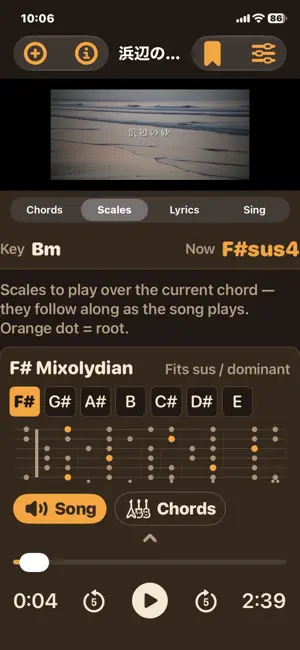
FretEar listens to your songs and writes out the chords — bar by bar. Load a music or video file and FretEar analyzes it right on your iPhone. It finds the beat, the key and the chord in every bar, then lays them out as a clear chord chart that follows along as the song plays. CHORD CHART • Chords shown bar by bar, with the current bar highlighted and auto-scrolling • Tap any bar to jump to it • Diagrams for the current and next chord • Alternative chord candidates for each bar — drag one onto the bar to swap it in • Hear it: turn on the built-in chord sound to play the chords along with the song — swap in a candidate and hear the difference before you choose • Automatic key detection with correct #/b spelling, plus BPM and time signature TRANSPOSE & ADJUST • Transpose the chords and the audio together — the pitch changes, the tempo stays the same • Half or double tempo, beats per bar, shift the bar start, or set the key by hand SCALES • Scales that fit the key of the song • Scales for the chord playing right now, shown on a full-neck fretboard • Extra "spice" scales for more color PLAY ALONG • Built-in chord sound: clean or distorted, ringing, strummed, or rock 8th/16th chugs • Mute the song or mix it with the chord sound, each with its own volume • Fine-tune the sync, or tap the downbeat to line it up • Tap tempo: tap along at the start of each bar to lock the chord rhythm to the song LYRICS • Paste lyrics (plain text or LRC) and they highlight in time with the song • Tap a line to jump to it • Sing-along tab: lyrics, chords and chord diagrams together on one screen PDF LEAD SHEET • Export a printable PDF with the chord chart, chord diagrams, candidate chords, scales and lyrics SAVE & MORE • Save songs to your library with their settings and lyrics, and reopen them anytime • Export saved songs from the Files app • Switch the app language right in the app (13 languages) Import from Files, from videos in Photos, or from the share sheet. Audio is analyzed on your device — your songs are not uploaded. NOTES • Chord detection is automatic and may not be perfect, especially on dense mixes. Use the candidates and adjustments to fix it by ear. • Please use only music you have the right to use. PDFs that include lyrics are for personal use.
What’s new
Version 1.1.3 · Updated November 16, 2026
• Fixed the position of the treble clef in PDF chord charts.
App privacy
The developer, HIROSHI SHINKAWA, reported these privacy practices to Apple.
Data Not Linked to You
The following data, which may be collected but is not linked to your identity, may be used for the following purposes:
- Identifiers: Device ID
- Usage Data: Product Interaction
- Diagnostics: Crash Data, Performance Data
Used for: Analytics, App Functionality
Alternatives to FretEar: Chord Finder
Looking for apps like FretEar: Chord Finder? Here are 6 similar apps on the App Store.



| App | Rating | Price | Last updated | Compare |
|---|---|---|---|---|
| FretEar: Chord Finder | – | Free | November 16, 2026 | |
| Ceylo Music | – | Free | Nov 15, 2026 | Compare |
| Iglesia Plan | – | Free | May 14, 2026 | Compare |
| Guitar by Ear | – | 19.99 USD | Dec 8, 2023 | Compare |
| DroPilot Arpeggios | – | Free | Oct 24, 2026 | Compare |
| Akbo: Sing to Sheet Music | – | Free | Nov 17, 2026 | Compare |
| Jebbio | – | Free | Aug 31, 2026 | Compare |