

RateLenz: Currency Converter
Hiroaki Arimura Travel iPhoneiPadiPod touch
RateLenz: Currency Converter is a free Travel app for iPhone and iPad by Hiroaki Arimura. Requires iOS 16.0. Updated November 25, 2026.
- Price
- Free
- on the App Store
- Size
- 43 MB
- Age 4+
- Updated
- Nov 25
- 2026 · v1.0.3
Screenshots
Save to Pinterest
About RateLenz: Currency Converter
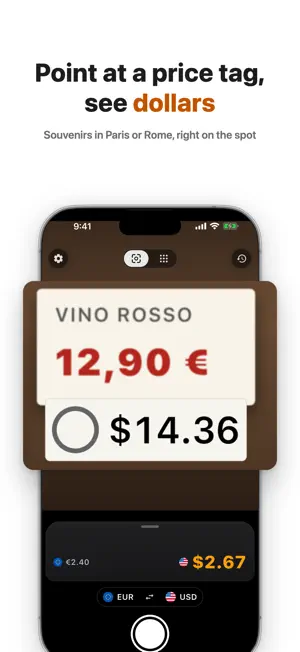
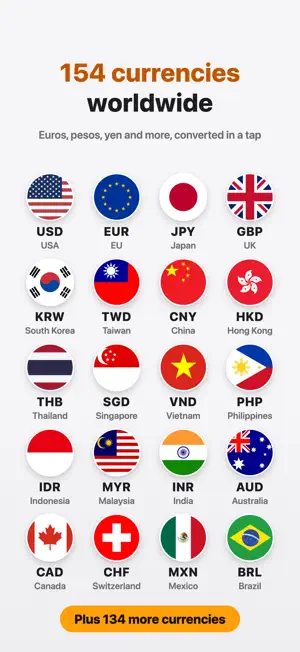
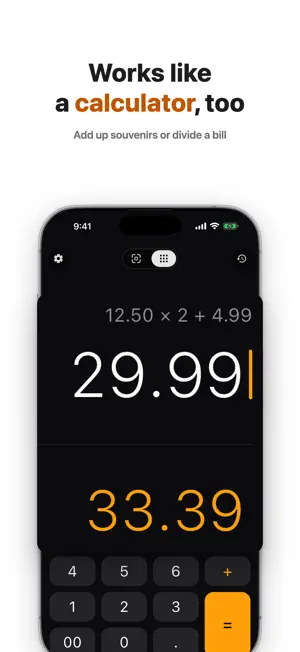
Seeing prices in euros and not knowing what that is in dollars? Doing the math in your head every time gets old fast. RateLenz shows you the price in dollars right next to the price tag. Just point your iPhone camera at it. Comparing T-shirts in Paris or Rome. Checking what that bag really costs at the duty-free shop. Adding up souvenirs to see where your total stands. HOW IT WORKS 1. Pick the currency on the price tag and your own currency 2. Point your camera at a price tag or menu 3. The converted amount appears next to each price GREAT FOR - Trips abroad when local prices don't mean much to you yet - Keeping track of your total while you shop for souvenirs - Getting a rough idea of amounts before you exchange money - Digital nomads, remote workers and expats getting used to prices in a new currency - Anyone tired of switching between a calculator and a currency app FEATURES Point and convert Aim your camera at shelf tags, restaurant menus or receipts. Each price it reads gets its own converted label, even with several tags in view. Tap to add up Tap a label to keep that item in a list. RateLenz shows the total in your currency, so you can stay on budget while you shop. Pause and check Tap the shutter to freeze the screen and check the prices at your own pace. Frozen screens are saved to History with their converted prices, so you can look back after your trip. Prices you only point the camera at aren't saved. Type prices like a calculator Switch to the keypad to enter an amount by hand. You can add, subtract, multiply and divide, so "how much for three?" takes a second. Swap the two currencies with one tap. 154 currencies Euros, British pounds, Mexican pesos, Japanese yen, Canadian dollars and more: 154 currencies in all. Search by currency, country or code, and add the ones you use most to Favorites. Dark Mode Screens follow your iPhone's light or dark setting, or you can choose Light or Dark in the app's settings. PRIVACY - Text recognition happens on your iPhone. Camera images are never sent anywhere. - No account needed. FREE VERSION - Up to 15 camera scans a day, and 30 on the day you start using the app. Scans reset to 15 every day at midnight. - A scan lasts from when you point the camera at a price tag until the tag leaves the screen. After 60 seconds, a new scan begins. - Watch a short ad to get 10 more scans (up to 2 ads a day; you can hold up to 30 scans at a time). - Converting with the keypad is unlimited. - No banner ads. A full-screen ad may appear when you go back to the camera from a frozen screen, but not during your first 24 hours. - Converting needs an internet connection. - History shows your 10 most recent entries. UPGRADE With a subscription, you get: - Unlimited camera scans - No ads - Offline conversion with the last rates you saved, handy on the plane or with a weak signal - History of up to 200 entries Choose a weekly, monthly or yearly subscription, or a one-time lifetime purchase. If the yearly plan has a free trial, its length is shown before you subscribe, and the yearly price is charged automatically unless you cancel at least 24 hours before the trial ends. ABOUT SUBSCRIPTIONS - Payment is charged to your Apple Account when you confirm the purchase. - Subscriptions renew automatically unless canceled at least 24 hours before the end of the current period. - Manage or cancel anytime in Settings > your name > Subscriptions. - The lifetime purchase is a single payment and does not renew. ABOUT EXCHANGE RATES RateLenz uses publicly available reference rates. They may differ from the rates used by card issuers, banks and exchange bureaus, so please treat converted amounts as a guide. Terms of Use: https://hiro0211.github.io/ratelens-legal/terms/en/ Privacy Policy: https://hiro0211.github.io/ratelens-legal/privacy/en/
What’s new
Version 1.0.3 · Updated November 25, 2026
• Fixed an issue where the front camera opened instead of the rear camera on some iPhones. • Minor improvements.
App privacy
The developer, Hiroaki Arimura, reported these privacy practices to Apple.
Data Used to Track You
The following data may be used to track you across apps and websites owned by other companies:
- Location: Coarse Location
- Identifiers: Device ID
- Usage Data: Product Interaction, Advertising Data
Data Not Linked to You
The following data, which may be collected but is not linked to your identity, may be used for the following purposes:
- Location: Coarse Location
- Identifiers: Device ID
- Usage Data: Product Interaction, Advertising Data
- Diagnostics: Performance Data, Crash Data, Other Diagnostic Data
- Purchases: Purchase History
Used for: Third-Party Advertising, Analytics, App Functionality
Alternatives to RateLenz: Currency Converter
Looking for apps like RateLenz: Currency Converter? Here are 6 similar apps on the App Store. The highest rated is Travelonium - Trip Organizer (4.9/5), and all 6 are free to download.
-
 Travo Driver
-
 海外価格かんたん換算
-
 HowMuchEx - Scan & Convert
-
 Travelonium - Trip Organizer
4.9
-
 Shopping Simple Calculator
-
 Pintrips: Itinerary Planner
4.6
| App | Rating | Price | Last updated | Compare |
|---|---|---|---|---|
| RateLenz: Currency Converter | – | Free | November 25, 2026 | |
| Travo Driver | – | Free | Nov 21, 2026 | Compare |
| 海外価格かんたん換算 | – | Free | Oct 4, 2026 | Compare |
| HowMuchEx - Scan & Convert | – | Free | May 5, 2026 | Compare |
| Travelonium - Trip Organizer | 4.9 / 5 (22) | Free | Nov 22, 2026 | Compare |
| Shopping Simple Calculator | – | Free | Apr 21, 2026 | Compare |
| Pintrips: Itinerary Planner | 4.6 / 5 (10) | Free | Nov 20, 2026 | Compare |