

MeelMore: ADHD To-Do List
Matthew Gallagher Productivity iPhoneiPadiPod touch
MeelMore: ADHD To-Do List is a free Productivity app for iPhone and iPad by Matthew Gallagher. Rated 5.0/5 from 1 ratings. Requires iOS 26.0.
- Rating
- 5.0
- 1 ratings
- Price
- Free
- on the App Store
- Size
- 4 MB
- Age 4+
- Updated
- Nov 17
- 2026 · v1.4.2
Screenshots
Save to Pinterest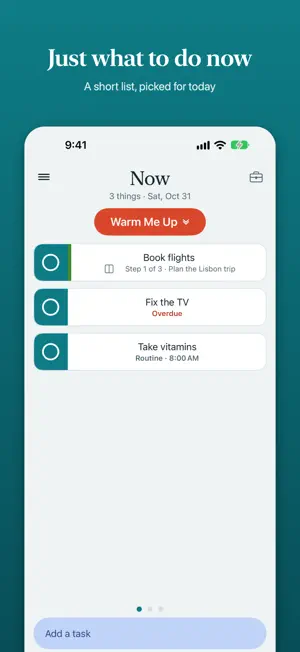


About MeelMore: ADHD To-Do List
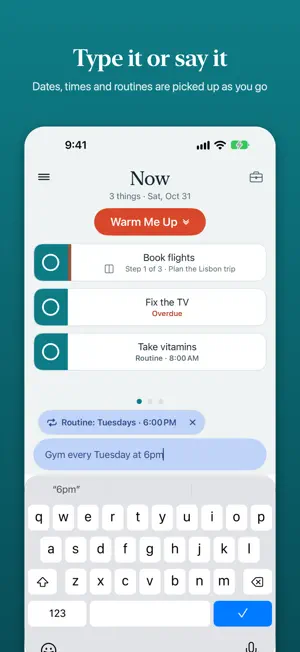
MeelMore is a calm to-do list for brains that see time as NOW or NOT NOW. It shows three things to do now and keeps everything else out of the way until it matters, so you get started instead of stuck. NOW: JUST THREE THINGS MeelMore picks three tasks for right now, so there's no long list to scroll and no deciding where to start. Dates, routines and what you said matters today all count. Real deadlines get a clear Due or Overdue label, not a wall of red. Choose what Now favors: quick wins, the most important things, or what's waited longest. NOT NOW: EVERYTHING ELSE The rest waits on its own page, grouped by category or by where you'll do it. Search it, drag a task to change its priority, or swipe it onto Now when you're ready. CATEGORIES THAT FIT YOUR LIFE Keep the categories you use, remove the ones you don't, and add your own, like Kids, Church or a side project. After your first few tasks, MeelMore suggests categories that fit them and sorts your tasks into the ones you pick. Add your own words, like a project or a colleague's name, so voice capture spells them right and files their tasks. TYPE IT OR SAY IT Type it, or tap the microphone once and just talk: MeelMore saves the task by itself when you stop, so it works in the car or from the Action Button. Tap the words to fix them first. "Call the dentist tomorrow at 3pm" becomes "Call the dentist", by tomorrow at 3, and "by this afternoon" means by 4. "Gym every Tuesday at 6pm" becomes a routine. Say a long thought, and the rest goes in the notes. PLANS, NOT JUST DEADLINES Most dates are a plan. "Sort the garage by Saturday" helps pick what's on Now, and if Saturday passes, MeelMore asks what you'd like to do, with no overdue pile. For dates that really matter, say "due" or turn on Hard deadline. ALREADY DID IT? IT STILL COUNTS Say "I called the bank" and it lands on Now, ready to tick off, or the matching task you already had moves up instead. BIG TASK? SMALL STEPS Tap "Break this task down" and Apple Intelligence splits it into steps you can actually start: a couple for a small job, up to six for something that takes days. If the task has a date, each step gets its own date leading up to it. A task left untouched for a couple of days gets offered a breakdown too. WARM ME UP Not ready for the big stuff? Warm Me Up shows your three easiest tasks, for a few quick wins to build momentum first. DAILY PRIORITIES Each morning MeelMore asks, "What are your priorities today?" Answer in your own words, and it moves the matching tasks up or adds new ones. ROUTINES COME BACK Daily, weekly or monthly routines, even several times a day, live on their own page and come back when they're due. Miss one and it rolls on, with no overdue guilt. FRIENDLY REMINDERS Get a heads-up before something's due, worded for the task and personal to you. Choose when reminders arrive, or turn them off. ON YOUR HOME SCREEN The widget shows what's next; tick tasks off right there. Add a task from the widget, Control Center, the Lock Screen, the Action Button or Siri. LEAVE WORK AT WORK Tap the briefcase to hide work tasks or show only them, or set your work hours and MeelMore switches by itself. PRIVATE BY DESIGN No account, no ads, no tracking. Your tasks stay on your iPhone or iPad. Voice and Apple Intelligence run on the device, and nothing is sent to us. Delete all your data from Settings at any time. WORKS WITHOUT APPLE INTELLIGENCE TOO On an iPhone or iPad without Apple Intelligence, MeelMore works fully in simple mode: your words become the task, and you set the details yourself. FREE, WITH A TIP JAR Every feature is free, with no ads, no account and no subscription. If MeelMore helps, you can buy the developer a coffee in Settings. Why "MeelMore"? It comes from the Irish "míol mór", whale, and the saying "keep kicking the whale down the beach": big things move a little at a time.
What’s new
Version 1.4.2 · Updated November 17, 2026
• Show on the “Added …” banner now takes you straight to the task, even in a folded group. • Refresh AI suggestions keeps your exact words when you’ve asked for them. • While a new task is being sorted, the banner says “sorting…” instead of naming General first.
App privacy
The developer, Matthew Gallagher, reported these privacy practices to Apple.
Data Not Collected
The developer does not collect any data from this app.
Alternatives to MeelMore: ADHD To-Do List
Looking for apps like MeelMore: ADHD To-Do List? Here are 6 similar apps on the App Store. The highest rated is Resurface: ADHD To-Do List (5.0/5), and all 6 are free to download.
-
 Handled: Household Organizer
-
 StuffFinder: Home Inventory
-
 Resurface: ADHD To-Do List
5.0
-
 Your Brain: ADHD Memory
5.0
-
 Kindling Spark – ADHD Focus
5.0
-
 Reset Room: Declutter Timer
2.0
| App | Rating | Price | Last updated | Compare |
|---|---|---|---|---|
| MeelMore: ADHD To-Do List | 5.0 / 5 (1 rating) | Free | November 17, 2026 | |
| Handled: Household Organizer | – | Free | Nov 15, 2026 | Compare |
| StuffFinder: Home Inventory | – | Free | Jun 28, 2026 | Compare |
| Resurface: ADHD To-Do List | 5.0 / 5 (2) | Free | Nov 18, 2026 | Compare |
| Your Brain: ADHD Memory | 5.0 / 5 (3) | Free | Oct 17, 2026 | Compare |
| Kindling Spark – ADHD Focus | 5.0 / 5 (1) | Free | Apr 2, 2026 | Compare |
| Reset Room: Declutter Timer | 2.0 / 5 (1) | Free | Jun 16, 2026 | Compare |