

StepAway: Walk Break Reminder
AirFly Studios Health & Fitness iPhoneiPadiPod touchMacApple Watch
StepAway: Walk Break Reminder is a free Health & Fitness app for iPhone and iPad by AirFly Studios. Requires iOS 17.0. Updated November 26, 2026.
- Price
- Free
- on the App Store
- Size
- 20 MB
- Age 4+
- Updated
- Nov 26
- 2026 · v1.2
Screenshots
Save to Pinterest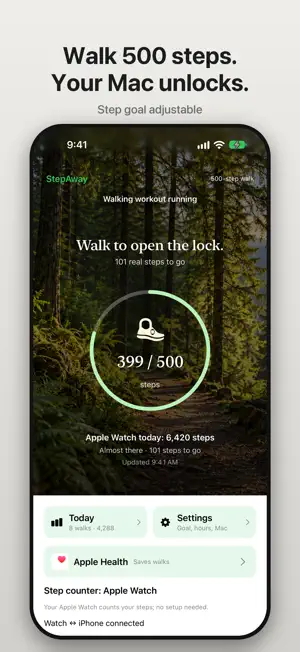


About StepAway: Walk Break Reminder
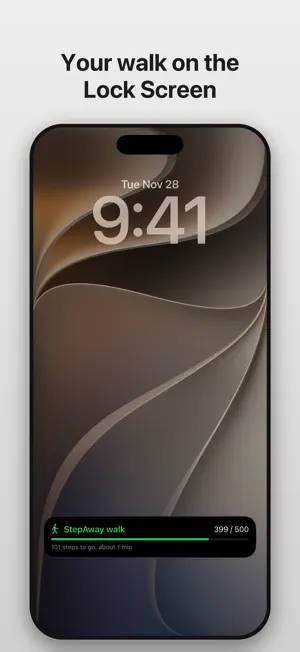
Turn desk time into walking breaks. Reach your step goal and your Mac unlocks on its own, with stop and emergency-skip options when you need them. Reminders are easy to ignore. StepAway isn't. It counts your screen-on work time on your Mac, and when the work period ends it covers your screen and asks you to take a short walk. Your Apple Watch or iPhone counts the steps. Reach your goal and your Mac unlocks, ready for the next work session. WHAT YOU NEED Breaks and the screen cover run in the StepAway app for Mac. Your Apple Watch or iPhone counts the steps. Without a Mac, the iPhone app still works as a simple walk tracker. HOW IT WORKS 1. Work: StepAway counts your work time, 30 minutes by default. The timer pauses while you are away. 2. Get a heads-up: a 2-minute warning, then a dimmed break screen. 3. Walk: walk your step goal, 500 steps by default, from a short stroll to as many as you like. 4. Come back: the lock opens and a fresh work session starts. JUST ASK SIRI - "Start a walk in StepAway" - "Stop StepAway" (Siri checks with you first) - "How many steps are left in StepAway" - "StepAway today" - "Start 750 steps in StepAway" - "Set my goal to 1000 steps in StepAway" APPLE HEALTH StepAway works with the Apple Health app. Your iPhone starts a walking workout on your Apple Watch, and with your permission the Watch saves each completed walk as a workout in Apple Health and Fitness. StepAway does not read your health data. Change access any time in the Health app. APPLE WATCH - Each break starts a real Walking workout, no extra taps. - A reminder when a break starts, even with StepAway closed. - Finished walks count toward your Activity rings. - Live step ring and a watch face complication with your next walk time. IPHONE - Counts your steps when you don't wear a Watch. - Start a walk from Control Center or the Action button. - Your walk on the Lock Screen with a progress line, plus a Lock Screen widget. - Settings synced with your Mac, and Today with the last month. MAC - Lives in the menu bar, with a figure that shows where you are: working, countdown, walking, back. - Choose your work time, break length and step goal. - Today timeline of work sessions and walks, with the last month. - Stop or skip a walk when you really can't step away. PRICING Try StepAway free for 14 days, no payment needed. Then choose Monthly, Yearly or Lifetime. One purchase works on iPhone, Apple Watch and Mac. Subscriptions renew automatically until you cancel in your Apple Account settings at least 24 hours before the period ends. If you used StepAway before version 1.1, it stays free for you. PRIVATE BY DESIGN No account, no ads, no tracking. Your steps, work time and settings stay on your devices. Terms of Use: https://www.apple.com/legal/internet-services/itunes/dev/stdeula/ Privacy Policy: https://airflystudios.com/privacy.html Built by a founder who sits at a desk all day and needed a reminder that can't be ignored. StepAway is a reminder to move. It is not a medical device and does not give medical advice.
What’s new
Version 1.2 · Updated November 26, 2026
- Your Mac, iPhone and Apple Watch now stay together: start, stop, finish or skip a walk, or change your goal, on any of them. - Stop a walk on your Watch and your Mac unlocks, even when your iPhone isn't nearby. - New Settings on iPhone: work period, working hours, lunch, days off and more, synced with your Mac. - Today on iPhone now looks like the Mac's, and both can go back through the last month. - See your walk on the Lock Screen with a green progress line. Turn it off in Settings if you prefer. - Ask Siri: "Start 750 steps in StepAway" or "Set my goal to 1000 steps in StepAway". - Watch turned off? Open StepAway on your iPhone and it counts the walk instead. - Goal buttons are now 500, 750 and 1K. - Starting a walk on iPhone rewinds the ring from your last walk. Walks counted by the iPhone beep halfway. - Fixes and clearer goal buttons on the Watch.
App privacy
The developer, AirFly Studios, reported these privacy practices to Apple.
Data Not Collected
The developer does not collect any data from this app.
Alternatives to StepAway: Walk Break Reminder
Looking for apps like StepAway: Walk Break Reminder? Here are 6 similar apps on the App Store. The highest rated is Ascend: Stair Master Workouts (5.0/5), and all 6 are free to download.
-
 FabStep
-
 Ascend: Stair Master Workouts
5.0
-
 Step It Up by CHAI
5.0
-
 Corpus: AI Running Coach
-
 StrideMap: Step & Mile Tracker
5.0
-
 Hypertrophy Gym Log: TRY
4.9
| App | Rating | Price | Last updated | Compare |
|---|---|---|---|---|
| StepAway: Walk Break Reminder | – | Free | November 26, 2026 | |
| FabStep | – | Free | Oct 6, 2026 | Compare |
| Ascend: Stair Master Workouts | 5.0 / 5 (5) | Free | Nov 23, 2026 | Compare |
| Step It Up by CHAI | 5.0 / 5 (1) | Free | Jan 6, 2026 | Compare |
| Corpus: AI Running Coach | – | Free | Nov 9, 2026 | Compare |
| StrideMap: Step & Mile Tracker | 5.0 / 5 (1) | Free | Nov 1, 2026 | Compare |
| Hypertrophy Gym Log: TRY | 4.9 / 5 (18) | Free | Nov 25, 2026 | Compare |