

Latch: Focus Lock & Blocker
Omar ELRAMLAWY Productivity iPhoneiPadiPod touch
Latch: Focus Lock & Blocker is a free Productivity app for iPhone and iPad by Omar ELRAMLAWY. Requires iOS 17.0. Updated October 29, 2026.
- Price
- Free
- on the App Store
- Size
- 15 MB
- Age 4+
- Updated
- Oct 29
- 2026 · v1.0
Screenshots


About Latch: Focus Lock & Blocker
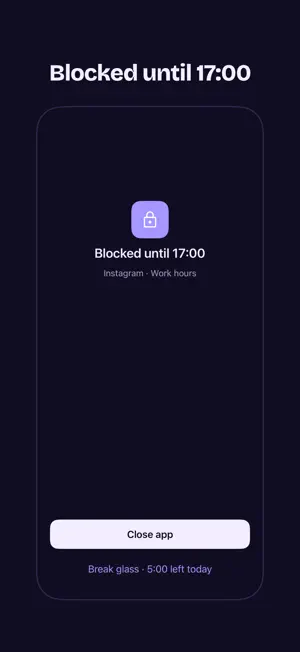
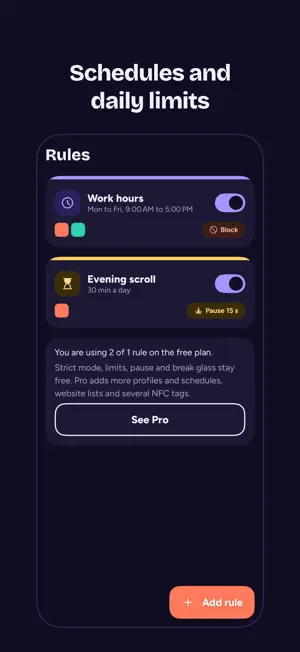
Latch blocks the apps you choose, when you choose, and keeps blocking when you try to talk yourself out of it. Latch uses Apple's Screen Time API to apply the limits you set yourself. No account, no sign-in, no internet access. Nothing you do leaves your iPhone. RULES Pick apps or whole categories in Apple's picker, then block them on a schedule, after a daily limit, or always. PAUSE Add a Shortcuts automation, and opening a chosen app first shows Latch's breathing ring. Breathe, then decide whether to continue. STRICT MODE Choose a cooldown now, while you are calm. Once a block is on, ending strict mode means waiting the cooldown out. Restarting the phone or changing the clock does not shorten it. Strict mode is free. PROTECT LATCH Latch walks you through setting a Screen Time passcode. On iOS 26.4 and later, turning off Latch's Screen Time access then asks for that passcode. BREAK GLASS Five minutes a day on any blocked app, for real emergencies. Every use is logged, and days without it build your streak. Outside strict mode, once those minutes are used, the shield offers "Open anyway, 5 min". NFC SWITCH Make any NFC sticker your switch. Tap it to start a session that blocks every enabled rule; tap it again to end it, unless strict mode holds the session. TODAY AND PROTECTION HEALTH Today shows what is blocked, what comes next and your streak. Latch checks itself when you open it and every hour while you use it, and tells you if anything stopped working, with the fix. THEMES Choose a color palette and light, dark or system mode. WHAT LATCH CANNOT DO Latch tells you its limits up front. Turning Latch off in Screen Time without Protect Latch, resetting the Screen Time passcode, changing Share Across Devices in Screen Time, or erasing the iPhone can end every block. Latch does not prevent deleting the app. No app on iPhone can stop all of these. LATCH PRO Pro adds Latch's own extras: more profiles and schedules, website lists that block sites in Safari, several NFC stickers, a focus timer with Lock Screen and Home Screen widgets and Live Activities, a weekly report, and Pro color themes. The lock is always free: a rule with its schedule, limits, pause, strict mode, Protect Latch, break glass and one NFC sticker. SUBSCRIPTIONS Latch Pro is available monthly, yearly with a free trial for eligible Apple Accounts, or as a one-time lifetime purchase. Payment is charged to your Apple Account. Subscriptions renew automatically unless cancelled at least 24 hours before the end of the current period. Manage or cancel them in Settings › Apple Account › Subscriptions. Privacy policy: in the app under More › Privacy policy. Terms of Use: Apple's standard EULA.
App privacy
The developer, Omar ELRAMLAWY, reported these privacy practices to Apple.
Data Not Collected
The developer does not collect any data from this app.
Alternatives to Latch: Focus Lock & Blocker
Looking for apps like Latch: Focus Lock & Blocker? Here are 6 similar apps on the App Store. The highest rated is ScrollTime Challenge: App Lock (5.0/5), and all 6 are free to download.
-
 AntiDoom: Screen Time Control
-
 Screen Time Blocker – Strict
-
 Holdfast: App & Site Blocker
-
 ScrollTime Challenge: App Lock
5.0
-
 Doombreak - App Blocker
-
 LOXN
| App | Rating | Price | Last updated | Compare |
|---|---|---|---|---|
| Latch: Focus Lock & Blocker | – | Free | October 29, 2026 | |
| AntiDoom: Screen Time Control | – | Free | Nov 2, 2026 | Compare |
| Screen Time Blocker – Strict | – | Free | Nov 9, 2026 | Compare |
| Holdfast: App & Site Blocker | – | Free | Oct 13, 2026 | Compare |
| ScrollTime Challenge: App Lock | 5.0 / 5 (1) | Free | Nov 18, 2026 | Compare |
| Doombreak - App Blocker | – | Free | Nov 9, 2026 | Compare |
| LOXN | – | Free | Aug 28, 2026 | Compare |