

Spacemap: Video Compressor
RUI QI Utilities iPhoneiPadiPod touch
Spacemap: Video Compressor is a free Utilities app for iPhone and iPad by RUI QI. Requires iOS 27.0. Updated November 10, 2026.
- Price
- Free
- on the App Store
- Size
- 3 MB
- Age 4+
- Updated
- Nov 10
- 2026 · v1.2
Screenshots


About Spacemap: Video Compressor
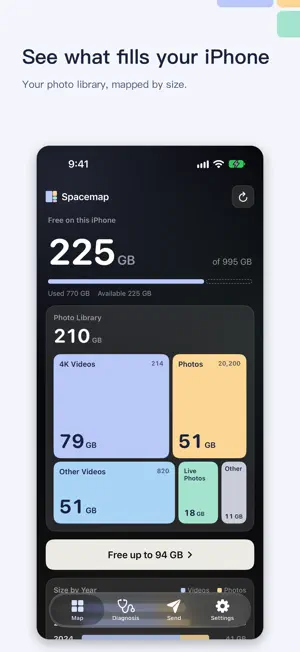
“iPhone Storage Full” again? Which videos and photos are actually taking the space? Will compressing lose the date, the location or the album? Why didn't free space go up after you deleted things? Spacemap draws your photo library as a map by size, tells you what you can save, and replaces only what you choose with smaller copies. You see the difference first, and the originals stay recoverable for 30 days. SEE WHAT'S USING THE SPACE • A map of 4K videos, other videos, photos, Live Photos, screen recordings and screenshots • Space used by each year • Reasons ranked by how much you can save • Sizes are read without downloading originals from iCloud SHRINK VIDEOS, KEEP WHAT MATTERS • Largest videos first, nothing selected until you choose • Frame rate, HDR and Dolby Vision are kept • Four quality levels, from keeping every pixel to 720p • Watch a preview, then compare the same frame or play both side by side SHRINK PHOTOS AND SCREENSHOTS • Each photo is tried at several settings and the smallest file that passes a quality check is kept • Photos that are already small are left alone • Compare at full size before you replace MAKE LIVE PHOTOS YOURS • Drag to any frame and keep it as a still photo • Keep the original photo, several frames, or both NOTHING IS REPLACED ON TRUST • Each new file is checked before the original is removed. If a check fails, the original stays • Date, location, favorite, caption, keywords, rating and position in albums carry over • Originals move to Recently Deleted, where you can recover them for 30 days • Spacemap tells you when space returns, and how to empty Recently Deleted ALSO • Before You Shoot: how many minutes of video fit right now • Limited Access is supported • iCloud and iPhone storage are explained separately • Filters by year, month, size and video length • A Home Screen widget for free space • Send smaller: fit a video under 10, 25 or 50 MB, or a photo under 1, 2 or 5 MB, without changing your library • A Lock Screen widget and a Control Center control show how many minutes of video still fit Free to download: the first 1 GB is free, then a one-time Spacemap Pro purchase replaces without a limit. No account, no ads, no subscription, no data collected. Everything runs on your iPhone. Spacemap works only with your photo library. It can't reduce apps or System Data.
What’s new
Version 1.2 · Updated November 10, 2026
• Spacemap is now free to download. The first 1 GB you free up is free; a one-time Spacemap Pro purchase replaces the rest, with no subscription. If you bought Spacemap before, Pro is already unlocked. • Diagnosis now shows how much space you've saved so far, and how many more minutes of video that is. • A Lock Screen widget and a Control Center control show how many minutes of video still fit. • Videos and photos Spacemap already compressed are no longer suggested again. • Spacemap now speaks Spanish, Brazilian Portuguese and Italian. • New Send tab: fit a video under 10, 25 or 50 MB, or a photo under 1, 2 or 5 MB, for messages, email and upload forms. Your library stays as it is.
App privacy
The developer, RUI QI, reported these privacy practices to Apple.
Data Not Collected
The developer does not collect any data from this app.
Alternatives to Spacemap: Video Compressor
Looking for apps like Spacemap: Video Compressor? Here are 6 similar apps on the App Store.
-
 ISO 286 TOLERANCE HOLE & SHAFT
-
 FoldTally: Hinge Counter
-
 Intervals - Auto Camera Timer
-
 XD AI Translator
-
 Photo Sender
-
 PenCue - For iPhone Duo
| App | Rating | Price | Last updated | Compare |
|---|---|---|---|---|
| Spacemap: Video Compressor | – | Free | November 10, 2026 | |
| ISO 286 TOLERANCE HOLE & SHAFT | – | Free | Nov 13, 2026 | Compare |
| FoldTally: Hinge Counter | – | Free | Nov 7, 2026 | Compare |
| Intervals - Auto Camera Timer | – | Free | Nov 8, 2026 | Compare |
| XD AI Translator | – | Free | Nov 13, 2026 | Compare |
| Photo Sender | – | Free | Nov 12, 2026 | Compare |
| PenCue - For iPhone Duo | – | Free | Nov 6, 2026 | Compare |