

MusicFlow: Audio Visualizer
府 王 Music iPhoneiPadiPod touch
MusicFlow: Audio Visualizer is a free Music app for iPhone and iPad by 府 王. Rated 5.0/5 from 1 ratings. Requires iOS 18.0. Updated October 31, 2026.
- Rating
- 5.0
- 1 ratings
- Price
- Free
- on the App Store
- Size
- 12 MB
- Age 4+
- Updated
- Oct 31
- 2026 · v1.0
Screenshots



About MusicFlow: Audio Visualizer
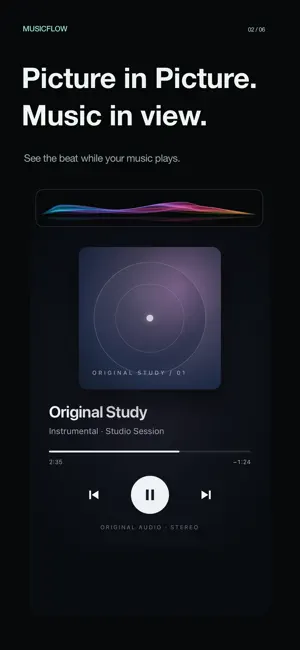
See your music come alive. MusicFlow turns compatible audio into flowing waves, ribbons, spectra, and glowing notes on your iPhone or iPad. Watch the details of your music in full screen, or keep a small Picture in Picture window visible while you use other apps. FOUR WAYS TO FEEL THE MUSIC • Glass Waves — luminous waves that follow the melody. • Silk Ribbons — flowing layers of silk that move with your music. • Classic Spectrum — responsive frequency bands and clear peaks. • Floating Notes — glowing notes that dance with the sound. Choose an effect, turn water reflections on or off, and switch looks while visualization is running. The getting-started guide helps you explore the effects, choose an audio source, and see your first live visualization. FULL SCREEN OR PICTURE IN PICTURE Enjoy an immersive view in portrait or landscape. Choose from three Picture in Picture proportions, move or resize the system window, and keep the visuals nearby. Automatic Picture in Picture can be turned off in Settings. CHOOSE YOUR AUDIO SOURCE System Audio uses screen-sharing permission to analyze audio from compatible apps. Some apps and protected content do not allow capture. Protected Apple Music audio cannot be captured directly. Microphone mode responds to music playing through speakers, speech, and nearby sounds. It cannot hear music playing through headphones. The microphone starts only when you explicitly start this mode. PRIVATE BY DESIGN Audio is analyzed on your device. Audio and screen content are never saved or uploaded, and screen images are discarded immediately. Optional Music permission checks Apple Music playback status for compatibility guidance without reading your library or song details. No account, ads, or third-party tracking or analytics. Tap Stop in MusicFlow or close Picture in Picture with × to end capture. Pausing the picture freezes the visuals while audio analysis continues. Requires iOS or iPadOS 18 or later. Audio availability depends on the source app and content.
App privacy
The developer, 府 王, reported these privacy practices to Apple.
Data Not Collected
The developer does not collect any data from this app.
Alternatives to MusicFlow: Audio Visualizer
Looking for apps like MusicFlow: Audio Visualizer? Here are 6 similar apps on the App Store. The highest rated is Music Pulse: Audio Visualizer (5.0/5), and 5 of the 6 are free to download.
-
 Music Pulse: Audio Visualizer
5.0
-
 Sound Visualizer - Vibe
2.5
-
 Music Visualizer: Sound Art
4.0
-
 Music Visualizer: LIQUIDWAVE
2.0
-
 Echo Flow: Music Player & EQ
-
 projectM-iOS
| App | Rating | Price | Last updated | Compare |
|---|---|---|---|---|
| MusicFlow: Audio Visualizer | 5.0 / 5 (1 rating) | Free | October 31, 2026 | |
| Music Pulse: Audio Visualizer | 5.0 / 5 (2) | Free | Oct 28, 2026 | Compare |
| Sound Visualizer - Vibe | 2.5 / 5 (2) | Free | Oct 30, 2026 | Compare |
| Music Visualizer: Sound Art | 4.0 / 5 (4) | Free | Nov 18, 2026 | Compare |
| Music Visualizer: LIQUIDWAVE | 2.0 / 5 (1) | Free | Nov 16, 2026 | Compare |
| Echo Flow: Music Player & EQ | – | 2.99 USD | Apr 7, 2026 | Compare |
| projectM-iOS | – | Free | Nov 11, 2026 | Compare |