

Measure & Count Anything
IAN PETER THOMPSON Utilities iPhoneiPadiPod touch
Measure & Count Anything is a free Utilities app for iPhone and iPad by IAN PETER THOMPSON. Rated 5.0/5 from 2 ratings. Requires iOS 17.0.
- Rating
- 5.0
- 2 ratings
- Price
- Free
- on the App Store
- Size
- 221 MB
- Age 4+
- Updated
- Nov 16
- 2026 · v1.3
Screenshots
Save to Pinterest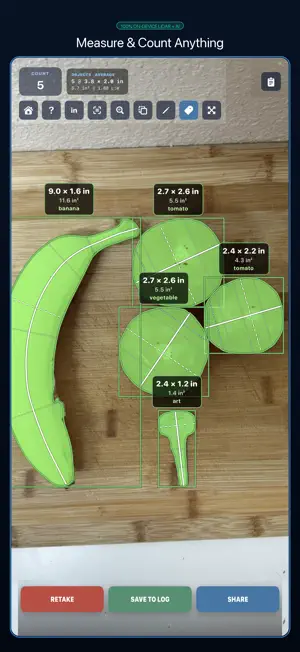


About Measure & Count Anything
MEASURING NEEDS A LiDAR SCANNER: iPhone 12 Pro or newer Pro model, or iPad Pro (2020 or newer). Other iPhones and iPads can outline and count objects, but not size them. Measure & Count Anything combines your iPhone Pro or iPad Pro's LiDAR depth scanner with 100% on-device computer vision to outline objects, compute real-world dimensions, count matching items in a single frame, and export structured Excel spreadsheets with annotated photos. Unlike manual point-to-point AR rulers that require tapping every corner by hand, Measure & Count Anything automatically detects object boundaries and computes Length, Width, Surface Area, Curved Spine Length, and Corner-to-Corner Diagonals in a single tap. FOUR WAYS TO MEASURE & COUNT • Point & Shoot: Aim the center crosshair at any object and tap the shutter for an instant outline and measurement pill. • Drag a Box: Draw a rectangle around any item (or several items) on screen to segment and measure them immediately. • Find Similar (Batch Counting): Measure one item — such as hardware parts, tiles, fasteners, stones, or specimens — and tap "Find Similar" to automatically outline, count, and average every matching object in the photo. • Find by Name & Hands-Free Auto-Scan: Type the name of an object to locate it automatically using on-device open-vocabulary vision, or turn on Auto-Scan to log items continuously without touching the screen. BUILT FOR REAL WORKFLOWS • Home Improvement & Space Planning: Measure tiles, pavers, fixtures, and materials and share high-resolution annotated photos with dimensions baked right onto the image. • Online Selling, Makers & Crafts: Create clean listing photos with clear Length × Width overlays for eBay, Etsy, Poshmark, or workshop logs. • Inventory, Parts & Batch Counting: Pair barcode/QR scanning with multi-object counting to log incoming lots and part sizes in seconds. • Field Science, Biology & QA Notebooks: Organize measurements into structured Project Notebooks with customizable Accessory Data Columns (ratings, steppers, dropdown choices, numbers, and notes). INSTANT EXCEL, CSV & PHOTO ZIP EXPORTS • Export any project as a multi-sheet Excel (.xlsx) workbook + CSV + folder of annotated photos via AirDrop, Files, Mail, or Messages. • Every row in your exported Excel sheet includes a clickable link that opens the corresponding annotated measurement photo. • Import existing sample lists from CSV and let the app automatically build your custom notebook columns. 100% ON-DEVICE PRIVACY • Every AI model (MobileSAM object segmentation and OWL-ViT open-vocabulary detection) runs locally on Apple Silicon. • Zero accounts, zero cloud uploads, and zero tracking or analytics. HARDWARE REQUIREMENT & MEASUREMENT DISCLAIMER • Requires an iPhone Pro / Pro Max (iPhone 12 Pro or newer) or iPad Pro (2020 or newer) equipped with a built-in LiDAR scanner. For best results, hold your device 1 to 3 feet (30–100 cm) from the object and aim square to the surface. • Measurements are approximate estimates generated from LiDAR depth and visual outlines, and may vary with camera angle, distance, lighting, and surface properties. Do not rely on the app as a substitute for a calibrated physical ruler or tape measure where precise commercial, construction, engineering, or safety-critical dimensions are required.
What’s new
Version 1.3 · Updated November 16, 2026
• Opens straight to the camera, ready to measure. • The Log opens full screen from the camera. Tap any capture to see its photo and every measurement. • Projects have moved behind the folder button, out of the way until you want them. • Measuring a project? Pick any sample from the camera, search by sample ID, or scan a sample's tag. Finish one and the camera moves to the next.
App privacy
The developer, IAN PETER THOMPSON, reported these privacy practices to Apple.
Data Not Collected
The developer does not collect any data from this app.
Alternatives to Measure & Count Anything
Looking for apps like Measure & Count Anything? Here are 6 similar apps on the App Store. The highest rated is Zima: Ballistics Calculator (4.0/5), and 4 of the 6 are free to download.
-
 Motion Log Plus
1.0
-
 Easy Solar Sizer
-
 LiDAR Measure by Alex
-
 Camera Measure - PartoMeter
3.8
-
 Zima: Ballistics Calculator
4.0
-
 Measure Size
| App | Rating | Price | Last updated | Compare |
|---|---|---|---|---|
| Measure & Count Anything | 5.0 / 5 (2 ratings) | Free | November 16, 2026 | |
| Motion Log Plus | 1.0 / 5 (1) | 2.99 USD | Feb 7, 2026 | Compare |
| Easy Solar Sizer | – | Free | Jul 25, 2026 | Compare |
| LiDAR Measure by Alex | – | Free | Oct 28, 2026 | Compare |
| Camera Measure - PartoMeter | 3.8 / 5 (64) | 2.99 USD | Mar 25, 2026 | Compare |
| Zima: Ballistics Calculator | 4.0 / 5 (4) | Free | Nov 25, 2026 | Compare |
| Measure Size | – | Free | Oct 18, 2026 | Compare |