

Take It Easy: Study Timer
HARO WORKS Productivity iPhoneiPadiPod touch
Take It Easy: Study Timer is a free Productivity app for iPhone and iPad by HARO WORKS. Requires iOS 15.0. Updated November 19, 2026.
- Price
- Free
- on the App Store
- Size
- 26 MB
- Age 4+
- Updated
- Nov 19
- 2026 · v1.1.0
Screenshots
Save to Pinterest

About Take It Easy: Study Timer
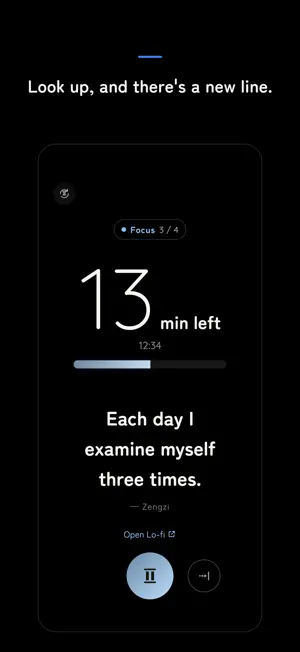
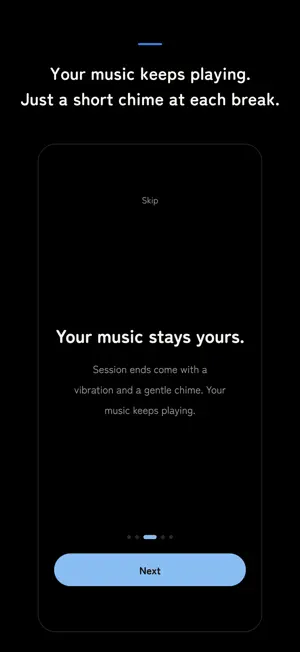
For studying and working in pomodoros. Take It Easy is just a timer and a few words of encouragement. - Now and then, a few words Below the timer you'll see cheers, quotes, insights, and kind words. They change quietly every few minutes (choose 1, 3, 5, or 10), and the tone shifts from the start to the final push. During breaks, the words turn gentler. About 380 lines in all, so the same words rarely come back soon. - Your music keeps playing No background music, no sound effects. The end of each work session or break is marked by vibration and a notification with a short chime. The app never stops your music or podcast on its own. - Only your hours add up Your total completed pomodoros and total focus time appear quietly each time you finish one. No streaks to keep up with. - Like a desk clock Just the numbers and the words. While the timer runs, the screen stays on. - Stay clear of notifications Settings show how to use Focus / Do Not Disturb. - Pick a scene Work from home (about 4 hours, 50-minute focus), Study (classic 25 minutes), Spare moments (about an hour) — tap one and the times are set. Rename a scene or change its times, and add your own (up to 5). - Open your music in one tap Save up to 5 links from your music app (Share → Copy link) and give each a name. Before and during focus or a break, one tap opens it in your music app. You can also pause or resume what's playing with the note button on the main screen (on iPhone, the built-in music app, once you turn it on in Settings). - Your look Digital, hourglass, or analog face. Four calm color themes (Morning, Forest, Night, Paper), light or dark, portrait or landscape. Tap the timer to show or hide the time left. - Also ・Work 5–60 min, breaks 1–15 min, long breaks 5–30 min, 2–6 sessions before a long break ・Picks up where you left off, even after closing the app ・A daily reminder (skipped if you've already finished one that day) ・English / 日本語 / 简体中文 / 繁體中文 / 한국어 / Español / Français / Deutsch / Português - No ads No ads and no account. If you enjoy it, you can send a tip from "Support tip" in Settings (it doesn't change any features).
What’s new
Version 1.1.0 · Updated November 19, 2026
A quiet line-art animation now sits beside the timer, showing studying and break-time scenes (you can turn it off in Settings). A new "Record" section shows your total focus time and the last 7 days. Time is saved even if you stop partway. Adding music links is also easier.
App privacy
The developer, HARO WORKS, reported these privacy practices to Apple.
Data Not Linked to You
The following data, which may be collected but is not linked to your identity, may be used for the following purposes:
- Purchases: Purchase History
- Location: Coarse Location
- Identifiers: Device ID
- Usage Data: Product Interaction
Used for: Analytics
Alternatives to Take It Easy: Study Timer
Looking for apps like Take It Easy: Study Timer? Here are 6 similar apps on the App Store. The highest rated is Leave In 5 (5.0/5), and all 6 are free to download.
-
 Leave In 5
5.0
-
 Stundenlotse – Zeiterfassung
-
 Focus Timer Desk Clock
-
 Stickit: Sticky Notes Widget
-
 Platio
-
 Station: Employee Time-Clock
3.0
| App | Rating | Price | Last updated | Compare |
|---|---|---|---|---|
| Take It Easy: Study Timer | – | Free | November 19, 2026 | |
| Leave In 5 | 5.0 / 5 (1) | Free | Nov 10, 2026 | Compare |
| Stundenlotse – Zeiterfassung | – | Free | Nov 27, 2026 | Compare |
| Focus Timer Desk Clock | – | Free | Nov 1, 2026 | Compare |
| Stickit: Sticky Notes Widget | – | Free | Nov 17, 2026 | Compare |
| Platio | – | Free | Nov 26, 2026 | Compare |
| Station: Employee Time-Clock | 3.0 / 5 (2) | Free | Nov 17, 2026 | Compare |