

Kettlebell Rep Counter
Viacheslav Iarkin Health & Fitness iPhoneiPadiPod touch
Kettlebell Rep Counter is a free Health & Fitness app for iPhone and iPad by Viacheslav Iarkin. Requires iOS 18.0. Updated November 28, 2026.
- Price
- Free
- on the App Store
- Size
- 8 MB
- Age 4+
- Updated
- Nov 28
- 2026 · v1.4.0
Screenshots
Save to Pinterest


About Kettlebell Rep Counter
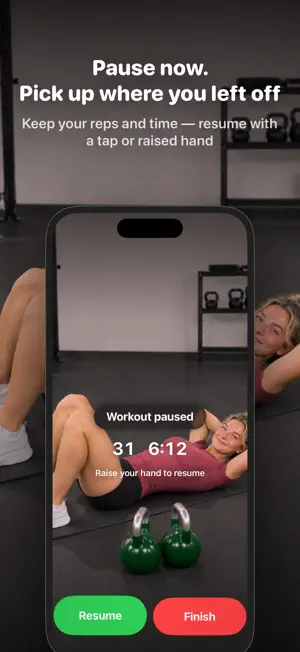
Kettlebell Rep Counter counts your kettlebell sport reps for you — no buttons, no wearables, no counting in your head. And it shows how you grow: kilograms per workout and records for every bell. Stand your iPhone 2–3 meters in front of you and tap Start. The screen edges glow green once the camera sees your whole body. Raise your hand, and after a short countdown the set begins. Every rep is counted the moment you fix the kettlebell overhead — shown in huge numbers and spoken aloud, so you can keep your eyes on the lift. SNATCH, JERK AND LONG CYCLE • Snatch: total reps plus the left and the right hand separately — switch hands as often as you like. • Jerk with one or two kettlebells. • Long cycle with one or two kettlebells — the clean and the jerk count as one rep. • A rep only counts with a full lockout overhead, so half reps don't add up. START, PAUSE AND RESUME • Start the set by raising your hand — no walking back to the phone. • Rest in the rack or overhead as long as you need — the set keeps going. • Pause during work or rest. Resume with a tap or a raised hand — your reps and remaining time are kept. • If the camera is interrupted or you leave the app, the workout pauses. • In an untimed set, putting the kettlebell down ends the set automatically. • Stop is a press-and-hold button, so a stray tap never ends your set. TIMERS, INTERVALS, PYRAMID AND REP SETS • Set timer for competition-style sets, with voice cues for the last minute, the last 30 seconds and the final countdown. • Intervals: work and rest rounds, like 2 minutes × 6. • Pyramid: 1–2–3–2–1 minutes, resting as long as you worked. • Sets by reps, like 10 × 5 with a minute of rest: each set ends when you've done the reps. • Target pace, like 14 per minute: the screen shows how many reps you're ahead or behind, and the voice tells you once a minute. • The whole workout is drawn on screen, so you always see which round you're in and how much is left. AFTER THE SET • Total reps, time, average pace and the left/right split. • Reps for every minute or every round — see exactly where your pace dropped. • Share a story-sized poster with your result and kettlebell weight. Choose from up to six workout photos, take a new photo, or use no photo. • The photo timer gives you 3, 5, 10 or 15 seconds to get ready. You can also turn it off. YOUR PROGRESS • Kilograms lifted in every workout — all sets of the day together, whatever the scheme. • This week against the same day last week. • Records for every bell weight: your longest work without a stop and your best pace. Work longer, then faster, then take a heavier bell. • Every set is saved on your iPhone: date, weight, reps, time and pace by minute. Forgot to set the weight? Fix it later in the set. • The summary compares you with the same set last time — and marks a new best result. • Your bell weight is remembered for each exercise and number of bells, and the app asks for it once. COUNT WAS OFF? • Tap "Counted too few" or "Counted too many" under the result, or enter the exact number: the app recounts that set and tunes counting to your technique, within safe limits. Reset it any time. VOICE THAT DOESN'T STOP YOUR MUSIC Reps are counted out loud in English or Russian, matching your phone's language. Your music is lowered while the app speaks, not stopped. PRIVATE BY DESIGN All tracking happens on your iPhone. Video is never recorded or sent anywhere, and the app doesn't collect any data. Your set history stays on your iPhone too. The photo on your result poster stays on your phone unless you share it yourself.
What’s new
Version 1.4.0 · Updated November 28, 2026
• Pause during work or rest, then resume with a tap or a raised hand. Your reps and remaining time are kept. • Choose a photo for your result poster from the workout, take a new one, or share without a photo. • Take your time: the photo timer offers 3, 5, 10 or 15 seconds, or no delay. • Clearer workout controls, more room between the numbers, and shorter hints.
App privacy
The developer, Viacheslav Iarkin, reported these privacy practices to Apple.
Data Not Collected
The developer does not collect any data from this app.
Alternatives to Kettlebell Rep Counter
Looking for apps like Kettlebell Rep Counter? Here are 6 similar apps on the App Store.
-
 KB LOG: Kettlebell Tracker
-
 Strongkind: Kettlebell Plans
-
 AIKettlebell
-
 SAMSON Personal Training
-
 KBStronger Kettlebell Method
-
 Primitive Performance
| App | Rating | Price | Last updated | Compare |
|---|---|---|---|---|
| Kettlebell Rep Counter | – | Free | November 28, 2026 | |
| KB LOG: Kettlebell Tracker | – | Free | Oct 10, 2026 | Compare |
| Strongkind: Kettlebell Plans | – | Free | Nov 22, 2026 | Compare |
| AIKettlebell | – | Free | Aug 14, 2025 | Compare |
| SAMSON Personal Training | – | Free | Nov 22, 2026 | Compare |
| KBStronger Kettlebell Method | – | Free | Jan 28, 2026 | Compare |
| Primitive Performance | – | Free | Oct 8, 2025 | Compare |