

Nocti: Dark Mode for Safari
燚 张 Utilities iPhoneiPadiPod touchMac
Nocti: Dark Mode for Safari is a free Utilities app for iPhone and iPad by 燚 张. Requires iOS 17.0. Updated November 16, 2026.
- Price
- Free
- on the App Store
- Size
- 12 MB
- Age 4+
- Updated
- Nov 16
- 2026 · v1.1
Screenshots
Save to Pinterest


About Nocti: Dark Mode for Safari
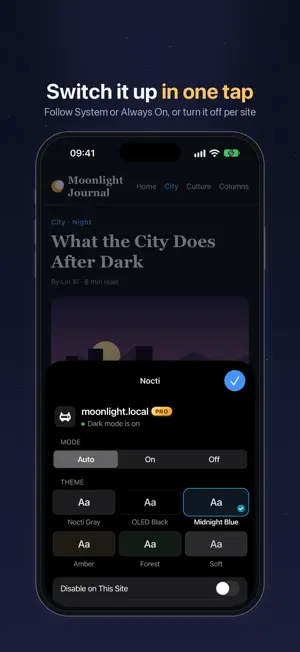
Nocti adds dark mode to websites in Safari. Pages are dark from the very first frame, so a bright white screen never catches you at night. ZERO WHITE FLASH The dark style applies the moment a page starts loading, before any script runs. New pages, back and forward, single-page app navigation and pop-up windows all stay dark. NO WHITE EDGES Safari's tab bar, address bar and status bar darken along with the page. Overscroll at the top, empty space below short pages, and the notch and Home Indicator areas never show white. FREE: DARK MODE THAT JUST WORKS Turn on Nocti and websites go dark in Nocti Gray, a soft dark gray tuned for long reading sessions. Everything that keeps pages readable is free, for good: • No white flash and no white edges • Follow System, Always On, and per-site on/off • Sites with their own dark mode are detected and skipped • Text and links that end up too dim are brightened automatically NOCTI PRO: MORE THEMES, MADE YOUR WAY • OLED Black: true black, the best choice for OLED screens and late nights • Midnight Blue, Amber, Forest and Soft • Build your own theme from any preset, with a color picker or hex input • Adjust brightness, contrast, warmth and image brightness Pro is a single one-time purchase that unlocks it on iPhone, iPad and Mac with the same Apple Account, and works with Family Sharing. Try Pro free for 14 days: tap Start 14-Day Free Trial in the app. Nothing is charged, and when the trial ends Nocti switches back to Nocti Gray. FOLLOWS YOUR SYSTEM By default, Nocti follows your device's appearance: dark when your system is dark, the original page when it is light. Every open tab updates instantly, with no reload. You can also keep it always on. CONTROL EVERY SITE • Turn Nocti off for a site in one tap, and the page restores right away • Wrong guess about a site's own dark mode? Correct it in one tap • PDFs and system pages are left untouched, never blank • Images and video keep their original colors, never inverted, with optional dimming PRIVACY Pages are restyled entirely on your device. Nocti never collects your browsing history or page content, and shows no ads. GETTING STARTED 1. Open the Nocti app and follow the steps to turn on the extension in Safari Settings. 2. Allow Nocti on All Websites so every page can go dark. 3. Head back to Safari and browse. Note: in-app browsers, such as the ones in Mail or social apps, do not support Safari extensions. Tap "Open in Safari" first.
What’s new
Version 1.1 · Updated November 16, 2026
• New icon and teal accent color • Animated setup guides • Send feedback with screenshots from the app • Sites that are already dark are recognized sooner
App privacy
The developer, 燚 张, reported these privacy practices to Apple.
Data Not Linked to You
The following data, which may be collected but is not linked to your identity, may be used for the following purposes:
- Purchases: Purchase History
- Usage Data: Product Interaction
- Diagnostics: Crash Data
Used for: Analytics
Alternatives to Nocti: Dark Mode for Safari
Looking for apps like Nocti: Dark Mode for Safari? Here are 6 similar apps on the App Store. The highest rated is Dark Mode for browser (3.9/5), and all 6 are free to download.


| App | Rating | Price | Last updated | Compare |
|---|---|---|---|---|
| Nocti: Dark Mode for Safari | – | Free | November 16, 2026 | |
| Darc: Dark Mode for Safari | – | Free | Nov 9, 2026 | Compare |
| Pinova | – | Free | Nov 27, 2026 | Compare |
| Dark Mode for browser | 3.9 / 5 (64) | Free | Sep 26, 2026 | Compare |
| ANB | – | Free | Oct 23, 2026 | Compare |
| 加画框神器 | – | Free | Oct 9, 2026 | Compare |
| Once - Relive Your Day | – | Free | Dec 3, 2025 | Compare |