

Pixel Pause: Color by Number
Sanjay Keyan Games iPhoneiPadiPod touch
Pixel Pause: Color by Number is a free Games app for iPhone and iPad by Sanjay Keyan. Requires iOS 16.4. Updated November 11, 2026.
- Price
- Free
- on the App Store
- Size
- 74 MB
- Age 4+
- Updated
- Nov 11
- 2026 · v1.1.0
Screenshots
Save to Pinterest


About Pixel Pause: Color by Number
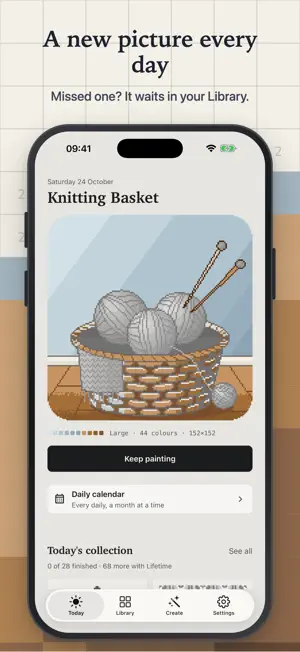
Pixel Pause is color by number, made calm. Pick a picture, choose a color, and watch it come together one square at a time. No timers, no pressure: just a quiet few minutes that end with something lovely. NEW PICTURES EVERY DAY Every day brings a fresh collection of pictures drawn for that day: patterns and mandalas, landscapes, space, cats and dogs, cakes, cars, fashion and painted styles, with three large Masterworks on top. Free players paint one picture of every kind each day. PICTURE OF THE DAY Open the app and today's original picture is waiting, with special pictures on the holidays. Missed a day? It stays in your Library, so nothing disappears. ILLUSTRATED BOOKS 19 illustrated books of 8 pictures each, among them Pets & Friends, Garden Flowers, Mountains & Lakes, Sweet Treats, Winter Holidays and Ocean Life. 16 easy starter pictures help you find your way in. Pictures range from small and quick to detailed masterworks with up to 99 colors. TURN YOUR PHOTOS INTO PAINTINGS Choose a photo and Pixel Pause turns it into a numbered painting right on your device. Pick the level of detail, crop or fit, and how many colors to use. Your photo is converted on the device and never uploaded. Only the finished painting is kept. PAINT YOUR WAY - Tap a cell to paint it - Drag across cells of your color to paint a stroke; drag anywhere else to move the picture - Pinch to zoom: grid lines and numbers sharpen as you come closer - Mistakes are marked, never punished, and the eraser takes them back - Share or save every painting you finish HELPERS, NEVER REQUIRED Find a missing cell, or fill a connected area with the Bucket. Free helpers refresh every day, and when they run out a short optional video earns one more. YOUR PROGRESS, EVERYWHERE Paintings sync privately through your own iCloud account. Pixel Pause works offline, and there is no account to create. WHAT'S FREE - A new picture of the day, every day - One picture of every kind from each day's collection, and the first of its Masterworks - 6 complete books and 16 starter pictures - A free picture in every Lifetime book - Your first photo painting - 2 of each helper every day PIXEL PAUSE LIFETIME: ONE PURCHASE, NO SUBSCRIPTION - All 13 Lifetime books, and every book added later - Every picture of every day's collection, and all three of each day's Masterworks - Unlimited photo paintings - Unlimited helpers - No ads Lifetime is a single in-app purchase linked to your Apple Account and shared with your family through Family Sharing. Restore it on any of your devices from Settings. PRIVATE BY DESIGN No sign-up and no tracking. The free version shows a few ads, never personalised and never in the middle of a painting; Lifetime removes them. Your photos never leave your device. Questions or ideas? Settings > Contact support.
What’s new
Version 1.1.0 · Updated November 11, 2026
- Painting feels smoother: the picture follows your finger exactly, and long strokes keep up. - Light mode by default, with Dark and Match iPhone in Settings. - Run out of Find or Bucket? Watch a short optional video for one more. - The free version now shows a few ads, never in the middle of a painting. Lifetime removes them.
App privacy
The developer, Sanjay Keyan, reported these privacy practices to Apple.
Data Linked to You
The following data, which may be collected and linked to your identity, may be used for the following purposes:
- Location: Coarse Location
- Identifiers: Device ID
- Usage Data: Product Interaction, Advertising Data
Used for: Third-Party Advertising, Developer’s Advertising or Marketing, Analytics, App Functionality
Data Not Linked to You
The following data, which may be collected but is not linked to your identity, may be used for the following purposes:
- Diagnostics: Performance Data, Other Diagnostic Data, Crash Data
Used for: Third-Party Advertising, Developer’s Advertising or Marketing, Analytics, App Functionality
Alternatives to Pixel Pause: Color by Number
Looking for apps like Pixel Pause: Color by Number? Here are 6 similar apps on the App Store. The highest rated is PixelZen: AI Color by Number (5.0/5), and all 6 are free to download.
-
 Sticky Pixel Color AI Coloring
-
 Scapes Yarn ? Color by Number
-
 PixelZen: AI Color by Number
5.0
-
 Bottle Frenzy
4.5
-
 Dazzle: Jigsaw Puzzles
5.0
-
 Blume Art - Color by Number
| App | Rating | Price | Last updated | Compare |
|---|---|---|---|---|
| Pixel Pause: Color by Number | – | Free | November 11, 2026 | |
| Sticky Pixel Color AI Coloring | – | Free | Nov 2, 2026 | Compare |
| Scapes Yarn ? Color by Number | – | Free | Nov 3, 2026 | Compare |
| PixelZen: AI Color by Number | 5.0 / 5 (8) | Free | Oct 3, 2026 | Compare |
| Bottle Frenzy | 4.5 / 5 (2) | Free | Feb 18, 2025 | Compare |
| Dazzle: Jigsaw Puzzles | 5.0 / 5 (2) | Free | Oct 20, 2026 | Compare |
| Blume Art - Color by Number | – | Free | Nov 12, 2026 | Compare |