

Gigabye: Photo & Video Cleaner
NEMESIDA SMART DATA, Ltd Utilities iPhoneiPadiPod touch
Gigabye: Photo & Video Cleaner is a free Utilities app for iPhone and iPad by NEMESIDA SMART DATA, Ltd. Requires iOS 17.6. Updated November 27, 2026.
- Price
- Free
- on the App Store
- Size
- 40 MB
- Age 4+
- Updated
- Nov 27
- 2026 · v1.3
Screenshots
Save to Pinterest


About Gigabye: Photo & Video Cleaner
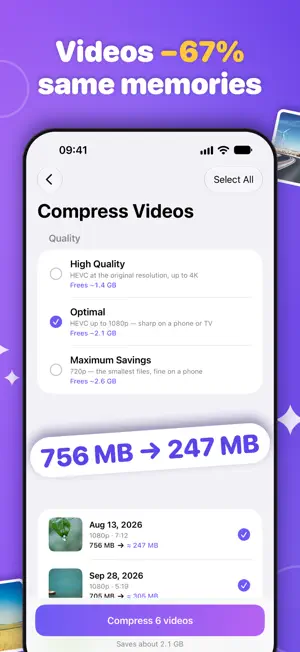
Storage full? Gigabye finds duplicates, similar shots, old screenshots and big videos you no longer need. Free up gigabytes in minutes: the first scan often finds several GB, and the best photo of every group always stays. Works without internet: analysis runs on your iPhone, and Offline Review lets you sort photos even on a plane. All analysis runs on your iPhone. Your photos are never uploaded, and you don't need an account. REVIEW WITHOUT INTERNET Going on a flight or into the subway? Prepare photos and videos in advance: Gigabye downloads light viewing copies from iCloud, never the originals, so your iPhone doesn't fill up. Then swipe through them offline. Anything you delete syncs with iCloud once you're back online, and the copies are removed automatically after 14 days. SMART CLEANUP IN ONE TAP Gigabye gathers what's safe to remove: exact duplicates, extra burst frames, near-identical shots and screen recordings. The best photo of every group always stays. Open any section to check it before you delete. KEEP THE BEST SHOT Ten photos of the same sunset? Gigabye groups shots taken seconds apart and picks the sharpest one, preferring your favorites. Photos with different text or numbers, like two bank screenshots or pages of a document, are never treated as duplicates. Touch and hold any photo to see it full screen before you decide. SHRINK BIG VIDEOS INSTEAD OF DELETING Pick the quality: High Quality (up to 4K), Optimal (up to 1080p) or Maximum Savings (720p). You see the estimated savings for each option before you start, and videos that wouldn't get noticeably smaller are skipped. The copy keeps its date, location and albums. Convert Live Photos to still photos to save even more. SWIPE TO DECLUTTER Daily Swipe shows 20 photos a day: swipe left to set a photo aside, right to keep it. Nothing is deleted until you review your picks and confirm. Done for today? Tap 20 More Photos and keep going, or go month by month through your whole library. SEE YOUR PROGRESS The home screen shows how much you can free up on this iPhone, your next goal and your achievements. Categories with nothing left to remove move to All Tidy, so you only see what needs attention. ALSO FINDS • Old screenshots and screen recordings • Blurry, out-of-focus shots • The largest videos on your iPhone SAFE BY DESIGN Every deletion goes through the standard iOS confirmation. Deleted items stay in Recently Deleted for 30 days, so you can restore anything. GIGABYE PRO Scanning is free. Deleting, compressing videos and converting Live Photos require Gigabye Pro, an auto-renewable subscription billed weekly or yearly. New subscribers may start with a free trial where available. Payment is charged to your Apple Account at confirmation of purchase or when the trial ends. The subscription renews automatically for the same period unless it is canceled at least 24 hours before the end of the current period. You can manage or cancel it anytime in Settings > Apple Account > Subscriptions. Privacy Policy: https://gigabye.app/privacy Terms of Use (EULA): https://gigabye.app/terms
What’s new
Version 1.3 · Updated November 27, 2026
• New: merge duplicate contacts. • New: Secret Folder protected with Face ID. • New: “How much space do you need?” — Gigabye plans the cleanup for your goal. • New: one-time screenshots (codes, tickets, receipts) found automatically. • Simpler home screen and the same numbers everywhere.
App privacy
The developer, NEMESIDA SMART DATA, Ltd, reported these privacy practices to Apple.
Data Used to Track You
The following data may be used to track you across apps and websites owned by other companies:
- Usage Data: Advertising Data
Data Not Linked to You
The following data, which may be collected but is not linked to your identity, may be used for the following purposes:
- Purchases: Purchase History
- Identifiers: User ID, Device ID
- Usage Data: Product Interaction, Advertising Data
- Diagnostics: Crash Data, Performance Data
Used for: Third-Party Advertising, Analytics, App Functionality
Alternatives to Gigabye: Photo & Video Cleaner
Looking for apps like Gigabye: Photo & Video Cleaner? Here are 6 similar apps on the App Store. The highest rated is Beekeeper: Scam Defense (5.0/5), and all 6 are free to download.
-
 Beekeeper: Scam Defense
5.0
-
 MobiShip: Shipping App
4.7
-
 MeetiX: AI Meeting Notes
-
 VisaWatch: USCIS Case Tracker
4.6
-
 Wardian Shield: Clean&Protect
5.0
-
 SELF
4.6
| App | Rating | Price | Last updated | Compare |
|---|---|---|---|---|
| Gigabye: Photo & Video Cleaner | – | Free | November 27, 2026 | |
| Beekeeper: Scam Defense | 5.0 / 5 (2) | Free | Oct 3, 2026 | Compare |
| MobiShip: Shipping App | 4.7 / 5 (13) | Free | Nov 17, 2026 | Compare |
| MeetiX: AI Meeting Notes | – | Free | Nov 18, 2026 | Compare |
| VisaWatch: USCIS Case Tracker | 4.6 / 5 (16) | Free | Nov 24, 2026 | Compare |
| Wardian Shield: Clean&Protect | 5.0 / 5 (2) | Free | Sep 21, 2026 | Compare |
| SELF | 4.6 / 5 (9) | Free | Sep 23, 2026 | Compare |