

Hoopcut -Basketball Highlights
Swink AI Inc. Sports iPhoneiPadiPod touch
Hoopcut -Basketball Highlights is a free Sports app for iPhone and iPad by Swink AI Inc. Rated 4.8/5 from 5 ratings. Requires iOS 17.0.
- Rating
- 4.8
- 5 ratings
- Price
- Free
- on the App Store
- Size
- 418 MB
- Age 4+
- Updated
- Nov 25
- 2026 · v1.0.11
Screenshots
Save to Pinterest


About Hoopcut -Basketball Highlights
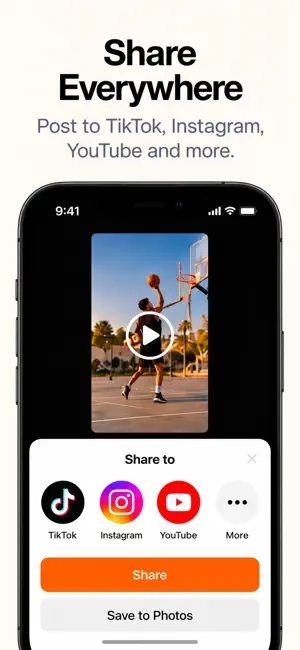
Your game. Just the highlights. Hoopcut helps you turn basketball footage into a highlight reel without scrubbing through every minute. FIND YOUR MAKES Import one or more videos, up to 60 minutes total, and find made shots automatically. Each video is analyzed separately before the clips are brought into Studio. RECORD LIVE Choose Single hoop for one hoop that stays in view, or Moving camera for full-court and handheld half-court footage. Hoopcut detects made shots while you record, then opens your footage in Studio. EDIT IN STUDIO Trim and reorder clips, add transitions, filters and effects, and keep your court audio. Review your highlights before exporting. ADD SHOT TRACERS Show the measured ball flight with smooth tracers. Choose styles, custom colors, multicolor gradients and tail fade. CHOOSE YOUR PLAYERS Request cloud-based player grouping from Studio to organize highlights by player. An internet connection is required for this optional feature. Review the suggested groups before sharing. EXPORT AND SHARE Save your finished reel to Photos and share it using the available sharing options. RECORDING REQUIREMENTS Keep the hoop and play visible whenever possible. Single hoop mode supports a mostly steady view of one hoop, including slight camera shake. Use Moving camera mode for panning, zooming, full-court play or hoops that move in and out of view. Automated detection, trajectories and player assignments can be imperfect; please review the results. Privacy Policy: https://hoopcut.ai/privacy Terms of Service: https://hoopcut.ai/terms Support: [email protected]
Ratings & reviews
4.8
5 ratings
What’s new
Version 1.0.11 · Updated November 25, 2026
• New Auto Clip and Add Tracer shortcuts: find your made shots or create highlights with ball trails. • Add Tracer now prepares your tracers before opening the editor. • Slow down key moments around the release or made shot, then fine-tune the speed curve. • Import music from an audio file or extract it from a video, choose your section, and sync made shots to the beat. • Add effects and filters at made-shot moments. • Refined editing tools and timeline controls, with clearer processing feedback. • Improved full-court video detection and avoided unnecessary reanalysis when adding tracers.
App privacy
The developer, Swink AI Inc., reported these privacy practices to Apple.
Data Used to Track You
The following data may be used to track you across apps and websites owned by other companies:
- Identifiers: Device ID
- Usage Data: Product Interaction, Advertising Data
Data Linked to You
The following data, which may be collected and linked to your identity, may be used for the following purposes:
- Identifiers: User ID, Device ID
- Usage Data: Product Interaction, Advertising Data
- Diagnostics: Crash Data, Performance Data, Other Diagnostic Data
- Contact Info: Email Address, Name
- User Content: Photos or Videos
Used for: Developer’s Advertising or Marketing, Analytics, App Functionality
Alternatives to Hoopcut -Basketball Highlights
Looking for apps like Hoopcut -Basketball Highlights? Here are 6 similar apps on the App Store. The highest rated is HighlightLab (5.0/5), and all 6 are free to download.
-
 HighlightLab
5.0
-
 Vigicue – Basketball Alerts
4.0
-
 HoopX: Basketball Highlights
-
 Tennis AI: Swing & Serve Coach
5.0
-
 ACTIVI
5.0
-
 AI Golf Caddie & Stats: Barkie
4.5
| App | Rating | Price | Last updated | Compare |
|---|---|---|---|---|
| Hoopcut -Basketball Highlights | 4.8 / 5 (5 ratings) | Free | November 25, 2026 | |
| HighlightLab | 5.0 / 5 (11) | Free | Nov 26, 2026 | Compare |
| Vigicue – Basketball Alerts | 4.0 / 5 (1) | Free | Nov 13, 2026 | Compare |
| HoopX: Basketball Highlights | – | Free | Oct 22, 2026 | Compare |
| Tennis AI: Swing & Serve Coach | 5.0 / 5 (10) | Free | Nov 24, 2026 | Compare |
| ACTIVI | 5.0 / 5 (2) | Free | Oct 15, 2026 | Compare |
| AI Golf Caddie & Stats: Barkie | 4.5 / 5 (37) | Free | Nov 27, 2026 | Compare |