

Large Print Solitaire
Fermatum Games iPhoneiPadiPod touch
Large Print Solitaire is a free Games app for iPhone and iPad by Fermatum. Requires iOS 16.4. Updated November 6, 2026.
- Price
- Free
- on the App Store
- Size
- 43 MB
- Age 4+
- Updated
- Nov 6
- 2026 · v1.2.1
Screenshots
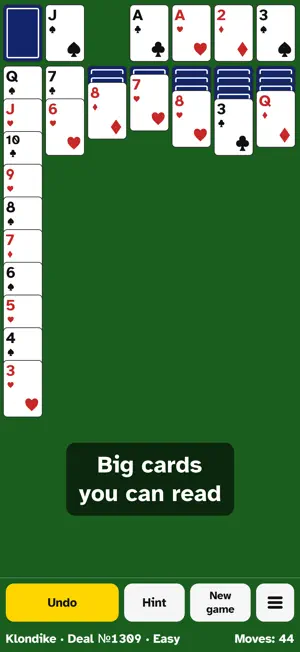


About Large Print Solitaire
Large Print Solitaire is classic Klondike, Spider and FreeCell, made easy to see and easy to play. The cards are big, the letters are clear, and you never have to drag a card across the screen. TAP, DON'T DRAG Tap a card and the places where it fits light up; tap the one you want. In Klondike, a card that fits in only one place goes there by itself. The game knows which card goes where, so you don't have to check. EVERY DEAL CAN BE WON Each of the 3,000 Klondike deals was checked by a computer solver, so no game is lost before it starts. Pick easy, medium or hard deals; easy is the default. Cards are dealt one at a time from the stock. SPIDER Ten columns, two decks and the same big cards. Tap anywhere on a column, not on one small card: the places where its cards fit light up, and you tap the one you want. Spider of the day has one suit and changes every day. Every Spider deal was checked by a solver too. On a phone, Spider asks once whether to turn the screen to landscape, where the ten columns get bigger cards. FREECELL Eight columns, four free cells and every card face up from the start: a game of thinking ahead. Tap a column to pick up its cards, then tap one of the places that light up. Cards that are no longer needed go to the foundations by themselves. FreeCell of the day is a new deal every day, and every FreeCell deal was checked by a solver too. HINTS THAT EXPLAIN Not sure what to do next? Hint shows a good move and tells you why, for example "This opens a face-down card". UNDO AS MUCH AS YOU LIKE A big Undo button takes back any number of moves. In Klondike, when all cards are face up, Finish plays the rest for you. EASY ON THE EYES AND HANDS • Three card sizes and a typeface designed for low vision (Atkinson Hyperlegible) • Suits differ by shape, with an optional four-color deck • Large touch targets everywhere • Follows your device's text size, up to the largest • Follows your device's setting to reduce motion • In landscape, the stock and Undo sit under your thumbs, and you choose which side the stock is on WHAT ALL GAMES ADDS All games is an in-app purchase. You buy it once, and then you can play as many Spider and FreeCell games as you like, Spider with one, two or four suits. It also adds more card backs to choose from and, in Spider and FreeCell, a hint that tells you whether you can still win. Everything else works without it: all of Klondike with its 3,000 deals and the deal of the day, Spider of the day, FreeCell of the day, the Hint and Undo buttons, and every setting for eyes and hands. CALM BY DESIGN No ads. No account. No timers and nothing that hurries you. Your game is saved when you leave and waits for you when you come back. YOUR RESULTS For each game: games started and won, your win rate and your fewest moves. Your results stay on your device. Available in English, German, French, Spanish, Japanese and Russian. Questions or ideas? Write to [email protected].
What’s new
Version 1.2.1 · Updated November 6, 2026
• Settings → Help has a new item, Rate the app. It opens the App Store page where you can rate the game and write a review. • FreeCell's hint no longer moves cards back and forth. With the All games purchase, when no sure win can be found from where you are, it tells you how many moves to undo to get back to a sure win. • VoiceOver now says which setting each choice belongs to, for example "Card size, Medium". • If the All games page could not get the price, it asks the App Store again the next time you open it. • With large text, the check mark next to "All games: yours" no longer covers the words.
Play today's Queens puzzle
One queen in every row, column and color. A free daily puzzle from Fiplay, same board for everyone. It plays right here, no download.
App privacy
The developer, Fermatum, reported these privacy practices to Apple.
Data Not Linked to You
The following data, which may be collected but is not linked to your identity, may be used for the following purposes:
- Usage Data: Product Interaction
- Purchases: Purchase History
- Identifiers: User ID
- Diagnostics: Crash Data
Used for: Analytics, App Functionality
Alternatives to Large Print Solitaire
Looking for apps like Large Print Solitaire? Here are 6 similar apps on the App Store. The highest rated is Classic Klondike Solitaire UN (4.0/5), and all 6 are free to download.
-
 NEARena: Games for Friends
-
 Solitaire: Klondike, No Ads
-
 Just Solitaire by Nonnie Games
-
 Classic Klondike Solitaire UN
4.0
-
 Klondike Solitaire - No Ads
-
 SpiderMate - Spider Solitaire
| App | Rating | Price | Last updated | Compare |
|---|---|---|---|---|
| Large Print Solitaire | – | Free | November 6, 2026 | |
| NEARena: Games for Friends | – | Free | Nov 5, 2026 | Compare |
| Solitaire: Klondike, No Ads | – | Free | Oct 30, 2026 | Compare |
| Just Solitaire by Nonnie Games | – | Free | Oct 22, 2026 | Compare |
| Classic Klondike Solitaire UN | 4.0 / 5 (2) | Free | Nov 22, 2025 | Compare |
| Klondike Solitaire - No Ads | – | Free | Sep 2, 2026 | Compare |
| SpiderMate - Spider Solitaire | – | Free | Oct 2, 2025 | Compare |