

InkLayer
Ho Lam Chung Productivity iPhoneiPadiPod touchMac
InkLayer is a free Productivity app for iPhone and iPad by Ho Lam Chung. Requires iOS 17.0. Updated November 13, 2026.
- Price
- Free
- on the App Store
- Size
- 61 MB
- Age 4+
- Updated
- Nov 13
- 2026 · v1.4.0
Screenshots



About InkLayer
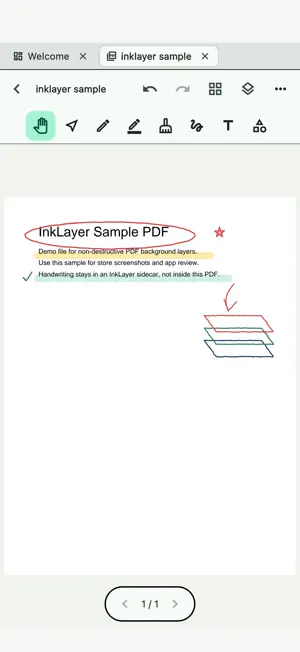
InkLayer is a notebook for reading, research and handwritten thinking. Handwriting, PDFs and Markdown notes share one canvas, and everything is saved as files you own. Write notes as real Markdown files. Open PDFs without modifying the original document. Draw with pens, highlighters, shapes and erasers on top of notes or PDF pages. Show, lock, reorder and fade layers so sources, handwritten derivations and your summaries stay separate. Core features: - A library of real Markdown files, kept on your device. - Handwriting and highlights on PDFs, with the original file untouched. - Select PDF text to copy, translate or add to a note, or draw a lasso around a passage to extract it into a note with its page number. - Shape recognition, a precision eraser, a full lasso (move, resize, rotate, recolor, copy and paste) and a laser pointer. - Layers with visibility, lock, opacity and order. - Markdown preview with math, wikilinks, tags, backlinks and a graph view. - Flowcharts: connect cards on a canvas with arrows. - Databases: organize documents in a table, filter and sort it, and export it as a PDF. - Handwrite while recording and replay the ink with the audio; make transcripts on the device and turn on live captions in class. - Search across your library, including text inside PDFs, recording transcripts and handwriting recognized on the device. - Sync through iCloud, Google Drive or your own WebDAV server; conflicts keep both versions. - Present a PDF or a canvas full screen with your handwriting on it: a laser pointer, a pen for writing on the slides, and pages turned from the keyboard or a presentation remote. - Open PDFs and Markdown files in InkLayer straight from Files, Mail, Safari and other apps. - E-ink mode: grayscale, high contrast, no animation. - Export and import your whole library without an account. Translation needs iPadOS 18 or iOS 18 and later; transcripts and live captions need iPadOS 26 or iOS 26 and later. Free to download, with every feature: handwrite in 3 documents for free. InkLayer Lifetime is one purchase that removes the limit, and every future on-device feature update is included. Nothing you write is ever locked. No account is required and there is no tracking or ads. Handwriting recognition, transcripts and translation happen on your device, and your library stays portable.
What’s new
Version 1.4.0 · Updated November 13, 2026
New in 1.4: - Write the moment Apple Pencil touches: documents open with your pen, fingers move and zoom, and a finger's long press still selects text in a PDF. - The pen bar draws every pen type as it writes, and the width slider shows the stroke while you drag. New My Pens switches type, colour and width in one tap. - Find any feature by typing: search the library, pull it down or press ⌘K, then type "scan", "mistakes" or "mind map". - Sync status in plain words, like "Only on this iPad" or "Synced to Google Drive, 3 minutes ago", with failures in orange. - A Recent list in the library and board thumbnails that show your handwriting; the toolbar puts the writing tools first and New beside the title. - Settings › About › Report a problem fills in the app version, device model and system for you. - Recordings keep going with the screen locked or another app in front, and carry on after a call. - The free version shows how many handwritten documents are used, and the stroke that reaches the limit is kept. Thanks to everyone who sent suggestions.
App privacy
The developer, Ho Lam Chung, reported these privacy practices to Apple.
Data Not Collected
The developer does not collect any data from this app.
Alternatives to InkLayer
Looking for apps like InkLayer? Here are 6 similar apps on the App Store. The highest rated is Jeejee: Markdown, LaTeX & Ink (5.0/5), and all 6 are free to download.
-
 ASUS OmniStor
2.0
-
 Presence 時現
-
 Jeejee: Markdown, LaTeX & Ink
5.0
-
 不揪?- 儲存、分享課表
-
 Clean Smarts Kiosk
-
 Acadenda
| App | Rating | Price | Last updated | Compare |
|---|---|---|---|---|
| InkLayer | – | Free | November 13, 2026 | |
| ASUS OmniStor | 2.0 / 5 (3) | Free | Nov 11, 2026 | Compare |
| Presence 時現 | – | Free | Jun 27, 2026 | Compare |
| Jeejee: Markdown, LaTeX & Ink | 5.0 / 5 (1) | Free | Nov 6, 2026 | Compare |
| 不揪?- 儲存、分享課表 | – | Free | Aug 29, 2025 | Compare |
| Clean Smarts Kiosk | – | Free | Aug 14, 2026 | Compare |
| Acadenda | – | Free | Nov 8, 2026 | Compare |
Compare InkLayer with the top alternatives: ratings, updates, ASO score and keyword gaps →