

TradeTrainer: Chart Replay
HIROKI MORI Finance iPhoneiPadiPod touch
TradeTrainer: Chart Replay is a free Finance app for iPhone and iPad by HIROKI MORI. Requires iOS 17.0. Updated November 12, 2026.
- Price
- Free
- on the App Store
- Size
- 1 MB
- Age 4+
- Updated
- Nov 12
- 2026 · v1.0.2
Screenshots
Save to Pinterest

About TradeTrainer: Chart Replay
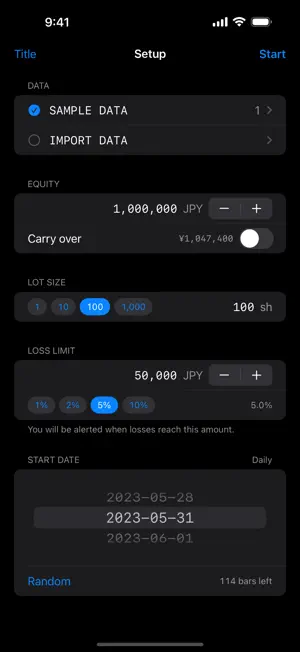
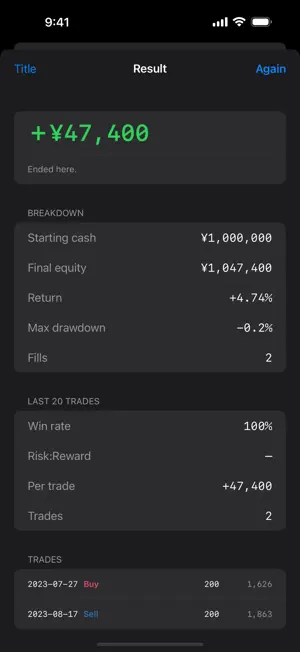
Step through historical charts one bar at a time and practice deciding how many shares to trade at each point. No real trading takes place, and there is no way to place real orders. ■ What you can do ・Replay a chart one bar at a time using built-in sample data or your own CSV ・Buy, sell and close at each point, and watch your position and P&L change ・When you finish, see your P&L, max drawdown and a record of every fill ・Every closed trade is recorded, building up your win rate and risk:reward ■ No peeking ahead You choose the starting point by date only. Choosing on the chart would show you the price action ahead, so you would start already knowing the answer. Once you start, the chart shows only bars up to the current one. Even the price scale is fitted to what you can see, so you cannot guess the future range from the axis. ■ Orders fill at the next open Filling at the close you just looked at would be a trade you could never make in reality. Orders are queued and fill at the next bar's open. Gaps move your fill price, just like in real markets. ■ Decide size and risk first ・Equity – your starting cash, the basis for return and exposure ・Loss limit – enter an amount and see what share of starting equity it is. Playback stops and alerts you when reached ・Lot size – 1 share for US stocks, 100 for standard Japanese lots Your position as a share of equity is always on screen. You cannot develop a feel for size without seeing it. ■ What the chart shows ・Candlesticks (Japanese colors: red for up, blue for down) ・Volume and its ratio to the median of the last 20 bars ・The highest price seen so far, and how far below it you are ・Your average price and where you were filled ■ About the data Eight sample data sets are built in and free to use. They are synthetic and do not represent any real security. You can also import your own CSV. Imported data stays on this device and is never sent anywhere. Any CSV with date, open, high, low, close and volume columns works (English or Japanese column names). Daily, weekly and intraday data are detected automatically from the dates. Prices in USD or JPY are detected automatically and can be changed for each data set. ■ Please note ・This app does not provide investment advice ・No real trading or order placement takes place ・Practice results do not guarantee future performance ・Margin trading is not modeled; positions are settled in full with cash ■ TradeTrainer Pro (auto-renewable subscription) ・Unlimited imports of your own CSV files ・Billed monthly (auto-renews every month) ・Practicing with sample data is free without a subscription ・The subscription renews automatically unless canceled at least 24 hours before the end of the current period ・Cancel anytime in Settings ▸ Apple ID ▸ Subscriptions Terms of Use (Apple Standard EULA) https://www.apple.com/legal/internet-services/itunes/dev/stdeula/ Privacy Policy https://tsuguha.app/tradetrainer/privacy
What’s new
Version 1.0.2 · Updated November 12, 2026
・Added English ・Eight built-in sample data sets, free to use ・Your first CSV import is free ・USD support: prices and amounts follow each data set's currency ・Give imported data your own display names ・Simplified, cleaner screens
App privacy
The developer, HIROKI MORI, reported these privacy practices to Apple.
Data Not Collected
The developer does not collect any data from this app.
Alternatives to TradeTrainer: Chart Replay
Looking for apps like TradeTrainer: Chart Replay? Here are 6 similar apps on the App Store. The highest rated is TradaZen: Day Trading Practice (5.0/5), and all 6 are free to download.
-
 株タイムトラベル
-
 かぶ戦記 - 株トレード記録と投資日記
-
 TradaZen: Day Trading Practice
5.0
-
 Order Book Trainer: Level 2
5.0
-
 ランチャ-スコアでわかるトレード弱点発見
-
 Trading Journal Proloca
5.0
| App | Rating | Price | Last updated | Compare |
|---|---|---|---|---|
| TradeTrainer: Chart Replay | – | Free | November 12, 2026 | |
| 株タイムトラベル | – | Free | Oct 8, 2026 | Compare |
| かぶ戦記 - 株トレード記録と投資日記 | – | Free | Nov 26, 2026 | Compare |
| TradaZen: Day Trading Practice | 5.0 / 5 (3) | Free | Nov 13, 2026 | Compare |
| Order Book Trainer: Level 2 | 5.0 / 5 (1) | Free | Nov 11, 2026 | Compare |
| ランチャ-スコアでわかるトレード弱点発見 | – | Free | Nov 26, 2025 | Compare |
| Trading Journal Proloca | 5.0 / 5 (4) | Free | Oct 17, 2026 | Compare |