

WristBrief: AI Voice Recorder
li yuan Productivity iPhoneiPadiPod touchApple Watch
WristBrief: AI Voice Recorder is a free Productivity app for iPhone and iPad by li yuan. Rated 5.0/5 from 1 ratings. Requires iOS 26.0.
- Rating
- 5.0
- 1 ratings
- Price
- Free
- on the App Store
- Size
- 30 MB
- Age 4+
- Updated
- Nov 15
- 2026 · v26.4.0
Screenshots


About WristBrief: AI Voice Recorder
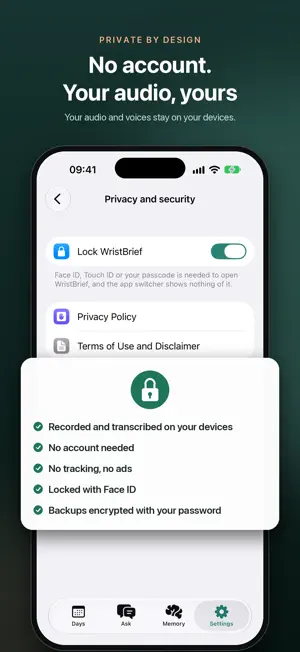
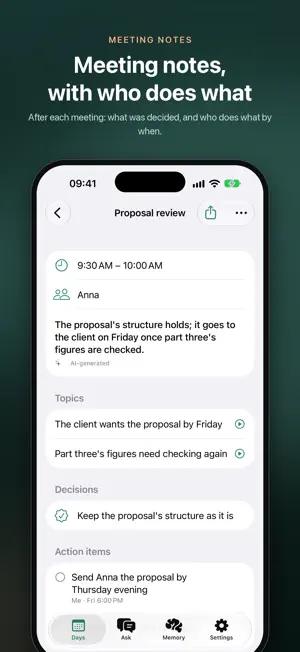
WristBrief remembers what was said, so you don't have to take notes while you talk. Start on your watch and lower your arm. Your iPhone turns what's heard into the day's transcript: every sentence, who said it and when. RECORDED ON YOUR WRIST • Start from the app, a complication, the Action button, Control Center or Siri • Keeps recording wrist down, even with the iPhone out of reach • Tap to mark a moment; hold to stop • Pause for 15 minutes when a conversation isn't yours to keep • Up Next on your watch: tick off what's due, or put it off a day • Ask on your wrist: hold, ask, and the answer comes back with what was said TRANSCRIBED ON YOUR IPHONE • Speech recognition and voices told apart on this iPhone: you, Anna, Speaker 3 • Name a voice once and it's named everywhere; add terms so they're spelled right • Tap any sentence to hear it; other languages translated beneath • Clearer voices in the player; transcribe a day again in another language MEETING NOTES, WRITTEN FOR YOU • No watch needed in a meeting: lay your iPhone on the table and tap record • Meetings found in your calendar, or marked from any moment • After each: the conclusion, topics, decisions, and who does what by when • Your action items become to-dos; others', things you're waiting on • Export a day or a meeting's notes as a PDF • Templates: sales call, doctor's visit, one-on-one, or your own A REVIEW OF EVERY DAY • A short summary of the day and an hour-by-hour account • The promises you made, as to-dos you can tick off • A reminder before a promise is due, with the moment you made it A MEMORY THAT THINKS WITH YOU • Sorted as a mind sorts: schedule, people, you, likes, wishes; repeats merged, the outdated put away • Hears when it's done ("I sent it") and ticks it off • Each week, your goals and patterns, each with what it rests on, yours to confirm • Ask what to do: a judgement, a few steps, and the sentences behind them • Monday morning, what matters most this week; before a meeting, what to aim for ASK ABOUT ANYTHING YOU HEARD • "What did I agree to do this week?" "What did the doctor say about the dose?" • Every answer cites the sentences it rests on, to play • Search every word you've recorded PEOPLE, PICTURES AND LOOKING BACK • A page for everyone you talk to: when you last spoke, what's open, and who's due a catch-up • Widgets and complications for what's next and who to catch up with; a daily recording goal and a nudge before meetings • If you like, each day drawn as a comic page, by an image service with your own key • A look back at every week and month, and a card to share a day or a moment • Ask Siri, and find what was said in Spotlight search WHERE IT WAS SAID (OPTIONAL) • Every recording belongs to its place, named down to the building: grouped by place each day, and named your way, like Home • All your recordings on a map: tap a place to play what was said there; reviews say where things happened PRIVATE BY DESIGN • Audio, transcripts and voices stay on your devices. No account, no ads, no tracking; only anonymous usage counts, never what you recorded • Summaries are written on this iPhone by Apple Intelligence, or by DeepSeek, Qwen or another compatible service with your own key: only the text needed, straight from your iPhone. Free trial, if offered: text goes via our relay and is kept 6 months • Quiet places: add a clinic or a client's office and your watch stops recording when you arrive • Lock the app with Face ID • Back up to a file you keep, encrypted with a password if you choose GOOD TO KNOW • A whole day takes an Apple Watch paired with your iPhone; a meeting, the iPhone alone • Records what the microphone hears, not phone calls or other apps • Recording people can require their consent, and laws differ. Let people know, and pause when a conversation isn't yours to record Privacy policy: https://joyeko.com/wristbrief/en/privacy/ Terms of use: https://joyeko.com/wristbrief/en/terms/ Support: [email protected]
What’s new
Version 26.4.0 · Updated November 15, 2026
• Try AI free, or use your own key • One tap on Days to record a meeting, class, interview or doctor's visit, with notes written for that kind • A simpler first launch; long recordings are transcribed in parts, so nothing is lost
App privacy
The developer, li yuan, reported these privacy practices to Apple.
Data Not Linked to You
The following data, which may be collected but is not linked to your identity, may be used for the following purposes:
- Identifiers: Device ID
- Usage Data: Product Interaction
- Diagnostics: Crash Data, Other Diagnostic Data
- Location: Coarse Location
- User Content: Other User Content
Used for: Analytics, App Functionality
Alternatives to WristBrief: AI Voice Recorder
Looking for apps like WristBrief: AI Voice Recorder? Here are 6 similar apps on the App Store. The highest rated is Contact Cleaner: Merge Dupes (2.0/5), and 4 of the 6 are free to download.
-
 OneTapReminder Voice Reminders
-
 PDF Compressor Mini
-
 Screenshot to Text
-
 Contact Cleaner: Merge Dupes
2.0
-
 個人 CRM
-
 Swype: Clean Your Photos
| App | Rating | Price | Last updated | Compare |
|---|---|---|---|---|
| WristBrief: AI Voice Recorder | 5.0 / 5 (1 rating) | Free | November 15, 2026 | |
| OneTapReminder Voice Reminders | – | 4.99 USD | Nov 5, 2026 | Compare |
| PDF Compressor Mini | – | Free | Nov 3, 2026 | Compare |
| Screenshot to Text | – | Free | Nov 13, 2026 | Compare |
| Contact Cleaner: Merge Dupes | 2.0 / 5 (1) | Free | Nov 5, 2026 | Compare |
| 個人 CRM | – | Free | Oct 14, 2026 | Compare |
| Swype: Clean Your Photos | – | 0.99 USD | Oct 29, 2026 | Compare |