

LeapSteps: AI To-Do & Goals
ZestRoot Inc. Productivity iPhoneiPadiPod touchMac
LeapSteps: AI To-Do & Goals is a free Productivity app for iPhone and iPad by ZestRoot Inc. Requires iOS 15.0. Updated November 12, 2026.
- Price
- Free
- on the App Store
- Size
- 42 MB
- Age 12+
- Updated
- Nov 12
- 2026 · v1.0.6
Screenshots
Save to Pinterest

About LeapSteps: AI To-Do & Goals
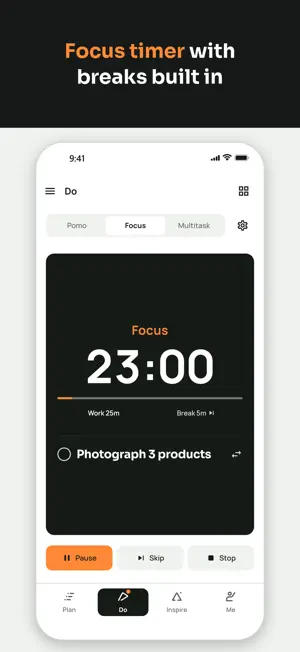
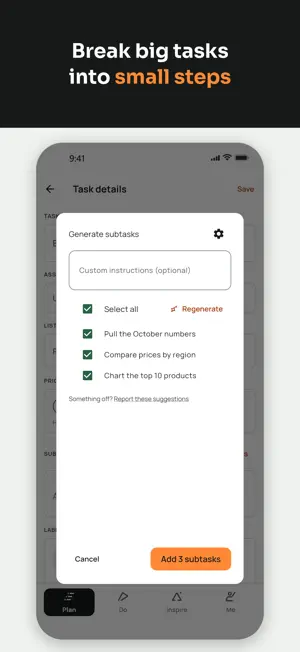
LeapSteps is a goal-driven AI to-do list for iPhone and iPad. Plan your day, link the tasks that matter to your bigger goals, and let AI suggest your next step. A built-in goal planner and a flexible Pomodoro focus timer help you get it done. Most to-do list apps show what's due and stop there. LeapSteps starts with the tasks already on your plate and adds goal setting when you want it. Write a goal in your own words, and AI suggests a milestone for the next few months and a step for this week. Tasks without a goal stay simple to-dos, so LeapSteps works as a plain daily planner too. PLAN: A DAILY PLANNER AND TO-DO LIST • Add tasks in seconds. End one with a date like "tomorrow 7am" and the due date is set • Due dates, reminders and repeating tasks, with reminders as notifications • Break a big task into small subtasks with AI • Stuck on what to do next? Ask AI for task ideas • Say your tasks out loud with voice capture • Lists, labels and a calendar view keep work, study and home apart • A daily summary shows what's due, at a time you choose INSPIRE: GOAL SETTING AND GOAL PLANNING • Link any task to a goal, or keep it as a plain to-do • Write the goal yourself, and AI suggests a milestone and this week's step • Edit anything before you save it. Your goal, your plan • Track progress as each step gets done, with a goal tracker built into your list • Repeating tasks help you build the habits behind your goals DO: A FLEXIBLE POMODORO FOCUS TIMER • Start a focus timer on any task • Set your own lengths: 15 to 120 minutes of focus and 1 to 60 minutes of break • Breaks are built in, Pomodoro style • Work through several tasks in one focus session • Multitask mode keeps several tasks on one timer, including the ones you've handed off to AI ME: PROGRESS YOU CAN SEE • Earn XP and level up as you get things done • Unlock achievements and earn avatar rewards • Share your progress with friends FOR SMALL TEAMS (PRO) • Share a project with up to five teammates, who join free • Assign tasks, add comments and see progress in one place GOALS YOU CAN PLAN WITH IT • Make my online shop my full-time income • Get promoted to senior analyst this year • Earn $2,000 a month freelancing • Become a registered nurse • Finish the online course I started in March MADE FOR IPHONE AND IPAD Sign in with Apple, Google, Microsoft or your email. Reminders arrive as notifications, and light and dark themes are included. On a wide iPad screen, your workspaces, lists and projects sit in a sidebar beside your plan, and a task's details open next to your list. Pro keeps your goals and tasks in sync across your devices. FREE AND PRO Free covers one active goal on one device, with AI planning, tasks, subtasks, reminders, lists, the calendar view, the focus timer and achievements. Pro adds unlimited active goals and lists, sync across your devices, team projects, multitasking with up to nine tasks, much more AI planning and voice capture every day, and faster rewards. Pro is a monthly or yearly subscription, and new subscribers start with a 7-day free trial. It's charged to your Apple Account and renews automatically unless you cancel at least 24 hours before the current period ends. Manage or cancel it anytime in your Apple Account settings. QUESTIONS Do I have to set goals? No. LeapSteps works as a plain to-do list, and goal setting is there when you want it. Do I have to use the AI? No. You can write every goal, step and task yourself. AI only drafts ideas when you ask, and you keep, edit or skip what it suggests. Does LeapSteps work offline? Yes. After you sign in, your tasks, plans and focus timer work without a connection. AI features, voice capture and sync need one. LeapSteps needs a free account. AI-generated content is for general planning and inspiration only, not professional advice. Terms of Use: https://leapsteps.ai/terms/ Privacy Policy: https://leapsteps.ai/privacy/
What’s new
Version 1.0.6 · Updated November 12, 2026
• Enabled sign-in options refresh when you reopen the app. • Schedule tasks, Pomodoro, Focus and Multitask sessions with time blocks. • See today's schedule beside your Do timers. • Edit tasks in a sheet that slides down to close. • Open Lounge from your profile, with softer item highlights. • Improved timer controls and layouts across screen sizes.
App privacy
The developer, ZestRoot Inc., reported these privacy practices to Apple.
Data Linked to You
The following data, which may be collected and linked to your identity, may be used for the following purposes:
- User Content: Other User Content, Audio Data, Customer Support
- Identifiers: User ID, Device ID
- Usage Data: Product Interaction, Other Usage Data
- Purchases: Purchase History
- Contact Info: Email Address, Name
- Diagnostics: Other Diagnostic Data
Used for: Analytics, App Functionality
Alternatives to LeapSteps: AI To-Do & Goals
Looking for apps like LeapSteps: AI To-Do & Goals? Here are 6 similar apps on the App Store. The highest rated is Snippety - Snippets Manager (4.8/5), and all 6 are free to download.
-
 Beyond Time: Time Tracker
-
 Snippety - Snippets Manager
4.8
-
 Push to Kindle by Mochi
2.9
-
 Userbrain Recorder
1.3
-
 Podwise: Podcasts, Notes, AI
4.8
-
 LanguagePro: AI Assistant
4.4
| App | Rating | Price | Last updated | Compare |
|---|---|---|---|---|
| LeapSteps: AI To-Do & Goals | – | Free | November 12, 2026 | |
| Beyond Time: Time Tracker | – | Free | Nov 7, 2026 | Compare |
| Snippety - Snippets Manager | 4.8 / 5 (73) | Free | Oct 21, 2026 | Compare |
| Push to Kindle by Mochi | 2.9 / 5 (15) | Free | Sep 9, 2025 | Compare |
| Userbrain Recorder | 1.3 / 5 (3) | Free | Sep 2, 2026 | Compare |
| Podwise: Podcasts, Notes, AI | 4.8 / 5 (84) | Free | Nov 25, 2026 | Compare |
| LanguagePro: AI Assistant | 4.4 / 5 (77) | Free | Jan 2, 2024 | Compare |