

MeClips: AI Video Tracking
Beijing Enjoy Technology Co., Ltd Photo & Video iPhoneiPadiPod touch
MeClips: AI Video Tracking is a free Photo & Video app for iPhone and iPad by Beijing Enjoy Technology Co., Ltd. Requires iOS 16.0. Updated November 2, 2026.
- Price
- Free
- on the App Store
- Size
- 2 MB
- Age 4+
- Updated
- Nov 2
- 2026 · v1.0.3
Screenshots



About MeClips: AI Video Tracking
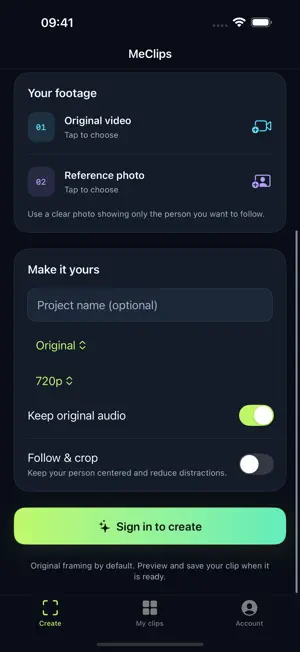
MeClips uses AI video tracking to turn recorded footage into person-focused highlights. Upload a video and a reference photo, find the moments featuring your chosen person, and generate a collection of clips. Add optional auto reframing to create a dance fancam or a focused performance video. Choose a person. Find their moments. Bring together appearances from dance practice, stage performances, concerts and event recordings. A clear reference photo tells MeClips who to look for. Cloud processing finds and combines their appearances, so you do not have to mark each time range. Check progress and preview the finished video. Auto reframe when you want to Keep the original aspect ratio and framing by default. Enable Follow & crop to adjust the frame as the person moves, keep them near the center and reduce other people in view. Turn group dance footage into a personal fancam, or reframe landscape footage for a portrait clip. Generate, save and share • Create person-focused highlights without selecting every time range • Keep the original aspect ratio or choose 9:16 portrait, 16:9 landscape or 1:1 square • Export at 720p or 1080p, with original audio or muted output • Preview, save to Photos and share • Sign in with an email code and sync projects with the MeClips website • Use English or Simplified Chinese, with project deletion and account deletion Cloud processing and your media Your video and reference photo are uploaded for cloud processing, which requires an internet connection. Before upload or retry, the app explains media and analysis-frame processing by AI services and requests your consent. Tracking targets the person in your reference photo. Results depend on image quality, occlusion and motion; preview the output before sharing. Only upload media you have the right to process. Source uploads remain after generation until you delete the project.
What’s new
Version 1.0.3 · Updated November 2, 2026
Updated the App Store name and descriptions to make person tracking, dance clips and optional auto reframing easier to discover and understand.
App privacy
The developer, Beijing Enjoy Technology Co., Ltd, reported these privacy practices to Apple.
Data Linked to You
The following data, which may be collected and linked to your identity, may be used for the following purposes:
- Contact Info: Email Address
- User Content: Photos or Videos, Audio Data, Other User Content
- Identifiers: User ID
- Diagnostics: Other Diagnostic Data
Used for: App Functionality
Alternatives to MeClips: AI Video Tracking
Looking for apps like MeClips: AI Video Tracking? Here are 6 similar apps on the App Store. The highest rated is DancePai - AI Dance Editor (5.0/5), and all 6 are free to download.
-
 FILMGAWI
-
 FanCam AI: Fan Cam Video Maker
-
 TapSolo
-
 DancePai - AI Dance Editor
5.0
-
 Centered – Auto Reframe
-
 Fancam Maker
1.0
| App | Rating | Price | Last updated | Compare |
|---|---|---|---|---|
| MeClips: AI Video Tracking | – | Free | November 2, 2026 | |
| FILMGAWI | – | Free | Oct 5, 2026 | Compare |
| FanCam AI: Fan Cam Video Maker | – | Free | Oct 29, 2026 | Compare |
| TapSolo | – | Free | Jul 20, 2026 | Compare |
| DancePai - AI Dance Editor | 5.0 / 5 (1) | Free | Oct 14, 2026 | Compare |
| Centered – Auto Reframe | – | Free | Oct 30, 2026 | Compare |
| Fancam Maker | 1.0 / 5 (1) | Free | Nov 10, 2026 | Compare |