

DDNote - AI Drum Transcription
Issei Nishi Music iPhoneiPadiPod touch
DDNote - AI Drum Transcription is a free Music app for iPhone and iPad by Issei Nishi. Requires iOS 17.0. Updated November 12, 2026.
- Price
- Free
- on the App Store
- Size
- 42 MB
- Age 4+
- Updated
- Nov 12
- 2026 · v1.2.7
Screenshots


About DDNote - AI Drum Transcription
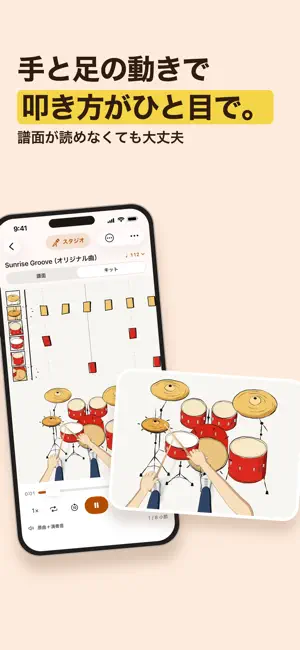
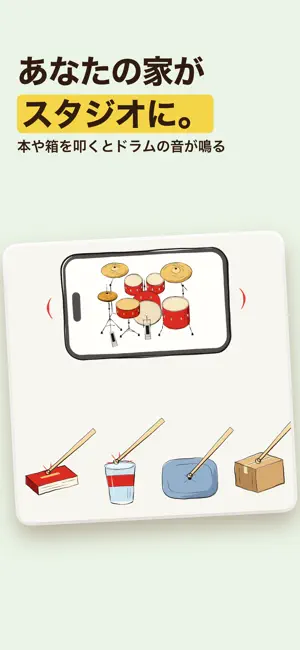
DDNote turns the songs you love into drum practice. The AI listens to a song and writes out the drum score for you, ready to play. ■ From audio files, videos and recordings Make drum scores from audio files, videos in Photos, or a recording made on the spot. You can also add songs from the share menu of Files, AirDrop and other apps. Up to 20 minutes per song. Transcription runs entirely on your device, so your audio is never uploaded, and it works without a connection. ■ See how to play at a glance Kit view shows a drummer's hands and feet moving over a drum kit, so you can see what to hit and with which limb, even if you can't read music. Choose a hand-drawn or photo style, and switch to a left-handed kit. In Style you can pick your own photo as the background, adjust its darkness, blur and light, and choose the colour of what flows toward you, as blocks or as a flowing staff. ■ Turn your home into a studio Hit books, boxes or cushions with your sticks and the microphone hears them and plays drum sounds. Teach the app each thing with a few taps, then play along with a score, or turn what you play into a score. The sound is analysed on your device. ■ Drum notation that's easy to read Notes played by hand have their stems up and notes played by foot have them down, grouped beat by beat. Bass drum, snare, hi-hat (closed, open and pedal), three toms, crash and ride, plus rim, ride bell and splash. A guide to reading the score is included. ■ Hear the original and the drums Play the drum part exactly as written, over the original song, or on its own. ■ Practice tools for beginners Slow down from 1.5x to 0.25x without changing the pitch, loop the bars you want to practise, and speed up a little on each pass. A click follows the song's tempo, with a count-in before playback (none, one bar or two). Choose a beep or a spoken "one, two, three, four", and where the accents fall. The score follows the playback position. ■ Fix the score on the spot Tap a bar to open it large, then add or remove notes down to 32nd notes. You can always go back to the score as it was before you edited. ■ Write your own phrases Start from an empty score under Compose on the home screen. Tap the grid to write notes, or tap pads in time with the click to record them. ■ Keep track of practice See your practice streak and the week's practice on the home screen, and continue from where you left off, at the same position, speed and loop. ■ Export Print or share the score as a PDF (A4), or export MusicXML and MIDI. The MIDI follows the original's tempo, so it lines up with the song in a DAW. The drum performance can be exported as WAV, and any stretch of Kit view as a vertical (9:16) or wide (16:9) video with sound. ■ Ask the developer directly Send a song that didn't transcribe well, or a request, straight to the developer from the app's chat. You'll get a notification when there's a reply. ■ DDNote Pro Creating drum scores needs a plan. Conversions are unlimited. An annual plan (with a free trial for eligible new subscribers) and a weekly plan (no free trial) are available. Prices vary by country and are shown on the purchase screen. The free trial is for eligible subscribers only, once per subscription group. After the trial, the plan renews automatically at its regular price. Please check the price, period and offer terms on the purchase screen. Payment is charged to your Apple Account. To stop renewal, cancel in your Apple subscription settings at least 24 hours before the period ends. Transcription is automatic and may contain mistakes; it is not guaranteed to match the original song exactly. Please use audio that you own or have permission to use. Privacy Policy: https://ddnote-support.mayth-issei.workers.dev/privacy/ Terms of Use: https://ddnote-support.mayth-issei.workers.dev/terms/ Standard EULA: https://www.apple.com/legal/internet-services/itunes/dev/stdeula/
What’s new
Version 1.2.7 · Updated November 12, 2026
- In Style, you can now choose the colour of the drums and the colour of the notes separately, and set either back to Default at any time. - The reminder before a free trial ends now arrives on a day that fits the length of the trial. - Other small improvements.
App privacy
The developer, Issei Nishi, reported these privacy practices to Apple.
Data Linked to You
The following data, which may be collected and linked to your identity, may be used for the following purposes:
- Purchases: Purchase History
- Identifiers: User ID
- Usage Data: Product Interaction
- User Content: Customer Support
Used for: Analytics, App Functionality
Data Not Linked to You
The following data, which may be collected but is not linked to your identity, may be used for the following purposes:
- Location: Coarse Location
- Identifiers: Device ID
- Other Data: Other Data Types
Used for: Analytics
Alternatives to DDNote - AI Drum Transcription
Looking for apps like DDNote - AI Drum Transcription? Here are 6 similar apps on the App Store. The highest rated is Drum Snap: Music to Drum Score (5.0/5), and all 6 are free to download.
-
 DrumNotes
-
 Sight Pocket
-
 Drum Snap: Music to Drum Score
5.0
-
 Drums Extractor - for musician
3.9
-
 GORILLA DRUM - Drum Practice
-
 Metronome++: BPM Finder
| App | Rating | Price | Last updated | Compare |
|---|---|---|---|---|
| DDNote - AI Drum Transcription | – | Free | November 12, 2026 | |
| DrumNotes | – | Free | Oct 9, 2026 | Compare |
| Sight Pocket | – | Free | Sep 9, 2026 | Compare |
| Drum Snap: Music to Drum Score | 5.0 / 5 (2) | Free | Nov 9, 2026 | Compare |
| Drums Extractor - for musician | 3.9 / 5 (27) | Free | Jan 7, 2026 | Compare |
| GORILLA DRUM - Drum Practice | – | Free | Sep 20, 2026 | Compare |
| Metronome++: BPM Finder | – | Free | Oct 15, 2026 | Compare |