

RiseCheck: Mission Alarm Clock
PO HSIU CHANG Utilities iPhoneiPadiPod touch
RiseCheck: Mission Alarm Clock is a free Utilities app for iPhone and iPad by PO HSIU CHANG. Requires iOS 26.1. Updated November 13, 2026.
- Price
- Free
- on the App Store
- Size
- 34 MB
- Age 4+
- Updated
- Nov 13
- 2026 · v1.5.1
Screenshots
Save to Pinterest


About RiseCheck: Mission Alarm Clock
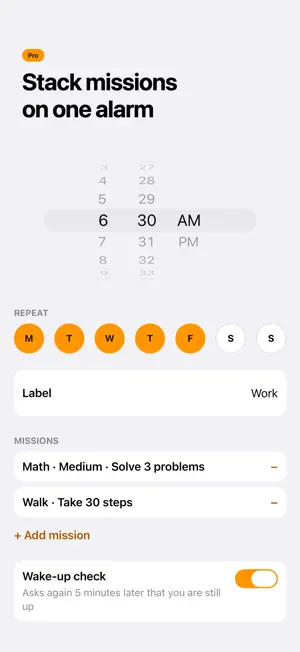
6:30. The alarm rings. You press Stop without opening your eyes. Two minutes later it rings again. RiseCheck is for people who turn alarms off in their sleep. To stop the repeat rings you finish a short mission: solve a few sums, shake the phone, walk some steps, photograph a spot in another room, or scan a barcode. Some missions need Pro. Why it holds It is built on Apple's own alarm system, so it rings through Silent mode and Focus, even with the app closed. If you pressed Stop in your sleep, backup rings follow every two minutes, up to five times, until you open RiseCheck and finish the mission. An optional wake-up check rings once more a few minutes later, so you do not fall back asleep. Fair at 6:30 The screen is clean and bright with big buttons and a large number pad. Fail three times and you get an easier backup mission instead of being stuck. Emergency off is always there: type one sentence and the alarm stops, though that morning does not count toward your streak. Watch it get better See your streak of good mornings, skipping the days your repeating schedule has no alarm; your average wake-up time over the last 7 days against the 7 before; and how many extra rings you needed. What every alarm gets Any number of alarms, repeating on any days. One mission per alarm: math in three levels or shake. A test ring during setup, and a 60-second test before bed, so you hear it work before you trust it. RiseCheck Pro Walking missions count your steps on your phone. Camera missions: photograph a spot, like your bathroom sink, or scan a barcode, like your toothpaste. Photos are compared on your phone and never leave it. Squat and push-up missions: the front camera counts reps on your phone, and nothing is saved or uploaded. Stack several missions on one alarm, and choose a wake-up check of 3, 5 or 10 minutes. You can try a camera mission for one night before you decide. Pro is monthly or yearly and renews by itself; to stop it, switch off auto-renewal in your App Store account settings at least 24 hours before the period ends. The price and terms are shown in the App Store before you subscribe. Your alarms and history stay on your phone, and no account is needed. Requires iOS 26.1 or later. RiseCheck uses the phone's own alarm volume (Settings › Sounds & Haptics). Terms of Use: https://apps.methodhelm.com/risecheck/terms Privacy Policy: https://apps.methodhelm.com/risecheck/privacy
What’s new
Version 1.5.1 · Updated November 13, 2026
A calmer look for your mornings. • Settings: the Pro card now shows the Pro missions at the top, with Manage subscription inside it. • Home, buttons and the Pro screen follow a more native iOS look. • The number keys on smaller screens are easier to tap. • The Pro screen keeps its purchase button in place at larger text sizes. Already using RiseCheck? Your alarms and settings stay as they are.
App privacy
The developer, PO HSIU CHANG, reported these privacy practices to Apple.
Data Not Linked to You
The following data, which may be collected but is not linked to your identity, may be used for the following purposes:
- Usage Data: Product Interaction
Used for: Analytics
Alternatives to RiseCheck: Mission Alarm Clock
Looking for apps like RiseCheck: Mission Alarm Clock? Here are 6 similar apps on the App Store. The highest rated is GT Alarm - Weekday Alarm Clock (5.0/5), and all 6 are free to download.
-
 Owake Wake Challenge
-
 Alarmio - Mission Alarm Clock
-
 DanXing: Wake Mission Alarm
-
 刷題吧
-
 WakeGate: Get Up Alarm
-
 GT Alarm - Weekday Alarm Clock
5.0
| App | Rating | Price | Last updated | Compare |
|---|---|---|---|---|
| RiseCheck: Mission Alarm Clock | – | Free | November 13, 2026 | |
| Owake Wake Challenge | – | Free | Mar 24, 2026 | Compare |
| Alarmio - Mission Alarm Clock | – | Free | Nov 15, 2026 | Compare |
| DanXing: Wake Mission Alarm | – | Free | Oct 23, 2026 | Compare |
| 刷題吧 | – | Free | May 20, 2026 | Compare |
| WakeGate: Get Up Alarm | – | Free | Oct 6, 2026 | Compare |
| GT Alarm - Weekday Alarm Clock | 5.0 / 5 (1) | Free | Jan 8, 2026 | Compare |