

Upglass: What's Up There
Noah Tatko Education iPhoneiPadiPod touchApple Watch
Upglass: What's Up There is a free Education app for iPhone and iPad by Noah Tatko. Requires iOS 17.0. Updated November 16, 2026.
- Price
- Free
- on the App Store
- Size
- 12 MB
- Age 4+
- Updated
- Nov 16
- 2026 · v1.1
Screenshots
Save to Pinterest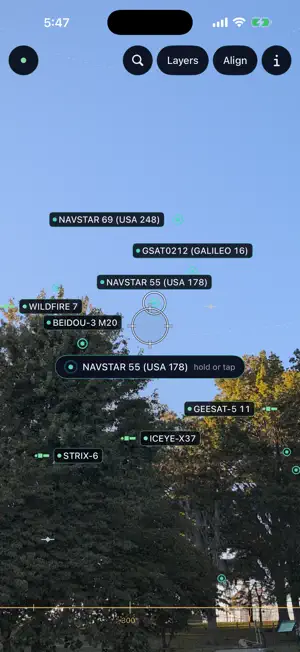

About Upglass: What's Up There
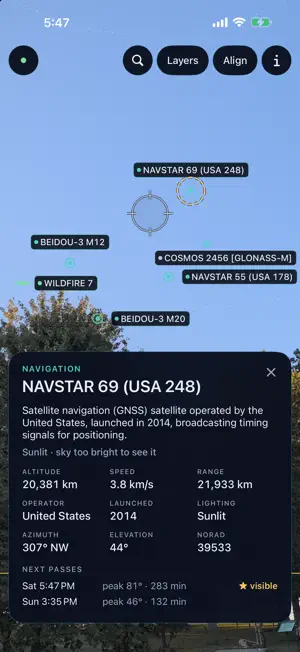
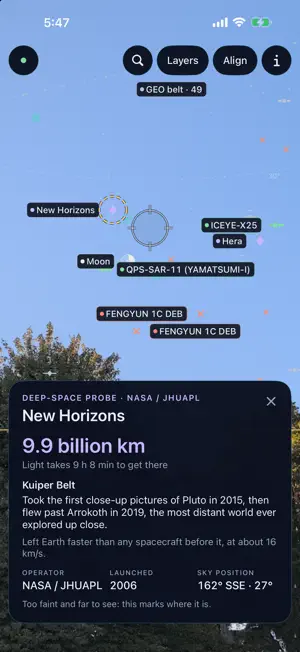
Hold your iPhone up to the sky and Upglass labels what's there: satellites, space debris, planets, deep-space probes and the aircraft flying over you right now, each drawn where it really is. EVERYTHING ABOVE YOU, IN ONE VIEW • About 19,600 tracked objects in orbit, refreshed from public orbital data every few hours • The ISS, China's Tiangong station, Hubble, weather and navigation satellites, color-coded by type, plus Starlink, OneWeb, Kuiper and the geostationary belt with Pro • Debris clouds from past breakups, such as the 2007 Fengyun-1C anti-satellite test (Pro) • Live aircraft within about 50 nautical miles, with callsign, aircraft type, altitude, speed and distance • The Sun, Moon and planets, plus deep-space probes like Voyager 1, about 25.9 billion km away (Pro) HOLD IT IN THE RETICLE Keep an object in the center ring for a few seconds and its card opens on its own, or just tap it. The card tells you what it is and what it's for, who operates it, when it launched, how high and how fast it's going, how far it is from you, and whether it's in sunlight or in Earth's shadow. KNOW WHEN TO LOOK Satellites shine only when sunlight catches them against a dark sky. Upglass lists upcoming passes and marks the ones you can see with your eyes. Tap the bell beside a pass for a notification before it. A fresh Starlink launch shows up as one "train". Select anything to see its path for the next ten minutes, and slide the clock up to a day ahead. Visible passes show the cloud forecast. Tap “I saw it” on a card to keep a logbook of what you've spotted, with badges for firsts like your first ISS. It stays on your device, free. Widget, Live Activity and Apple Watch: the next pass, with a wrist arrow. FIND ANYTHING Search by name or catalog number, or jump straight to the ISS, Tiangong or Hubble. An arrow points the way when your target is off screen or below the horizon. The ISS and Tiangong cards list who's aboard. SHARE WHAT YOU SAW Tap the shutter to save or share the sky as you see it, labels and all, with a small Upglass mark in the corner. Free. AFTER DARK A red night mode keeps your night vision, "Naked-eye only" shows just what you can see, and Find guides you with haptic ticks. LINES UP WITH THE REAL SKY Phone compasses drift. Tap Align, then tap the real Moon, Jupiter or another bright body, and the overlay snaps into line with it and stays locked there. You can also drag to nudge it. ALSO ON APPLE VISION PRO One purchase covers both: look up with Vision Pro and the labels sit on the sky around you. FREE, WITH ONE OPTIONAL UPGRADE Upglass is free to download and use: stations, the brightest and best-known satellites, the Sun, Moon and planets, live aircraft, Starlink trains, cards, passes, Find and Align. Upglass Pro is a single one-time purchase, with no subscription and no ads. It adds every piece of tracked debris, the full Starlink, OneWeb, Kuiper and geostationary constellations, and deep-space probes. PRIVATE BY DESIGN • No account, no ads, no analytics, no tracking • The camera image is shown on your screen and never leaves your device unless you share a shot • Your precise location stays on your device. Only a location rounded to about 1 km is sent to the live aircraft service, and one rounded to about 10 km to our weather service for pass forecasts. DATA SOURCES Orbital elements and satellite catalog: CelesTrak (celestrak.org). Aircraft positions: adsb.lol, under the Open Database License (ODbL). Weather and amateur balloons: SondeHub (sondehub.org), under Creative Commons BY-SA 2.0. Planet and probe positions: JPL Horizons. Cloud forecasts: MET Norway, CC BY 4.0. Station crews: Launch Library 2 by The Space Devs. Photos: Wikimedia Commons. Positions are computed on your device from published orbital elements. They're accurate enough to point you at the right part of the sky, but not for navigation or safety use.
What’s new
Version 1.1 · Updated November 16, 2026
Now in Spanish, German, French, Japanese and Brazilian Portuguese. Pass alerts, Starlink trains, sky paths and a clock to see the sky up to a day ahead, cloud forecasts, who's aboard the stations, photos on cards, and a logbook with badges. On iPhone, also: a widget, a Live Activity, an Apple Watch app, night mode, and sharing a shot of the sky.
App privacy
The developer, Noah Tatko, reported these privacy practices to Apple.
Data Not Linked to You
The following data, which may be collected but is not linked to your identity, may be used for the following purposes:
- Location: Coarse Location
Used for: App Functionality
Alternatives to Upglass: What's Up There
Looking for apps like Upglass: What's Up There? Here are 6 similar apps on the App Store. The highest rated is The Atlas - Universe Simulator (5.0/5), and all 6 are free to download.
-
 Satellite Tracker: Live ISS
4.0
-
 The Atlas - Universe Simulator
5.0
-
 Kids Science Explorer: Games
-
 Deep Galaxy: UFO Space Flight
-
 Apphemeride Precise Astronomy
-
 Orbit Viewer: Live Satellites
| App | Rating | Price | Last updated | Compare |
|---|---|---|---|---|
| Upglass: What's Up There | – | Free | November 16, 2026 | |
| Satellite Tracker: Live ISS | 4.0 / 5 (1) | Free | Nov 6, 2026 | Compare |
| The Atlas - Universe Simulator | 5.0 / 5 (1) | Free | Nov 6, 2026 | Compare |
| Kids Science Explorer: Games | – | Free | Nov 23, 2026 | Compare |
| Deep Galaxy: UFO Space Flight | – | Free | Nov 28, 2026 | Compare |
| Apphemeride Precise Astronomy | – | Free | Sep 21, 2026 | Compare |
| Orbit Viewer: Live Satellites | – | Free | Aug 11, 2026 | Compare |