

FamilyCal: Family Calendar
Chung-Hsien Huang Productivity iPhoneiPadiPod touch
FamilyCal: Family Calendar is a free Productivity app for iPhone and iPad by Chung-Hsien Huang. Requires iOS 26.0. Updated November 14, 2026.
- Price
- Free
- on the App Store
- Size
- 10 MB
- Age 4+
- Updated
- Nov 14
- 2026 · v1.2
Screenshots
Save to Pinterest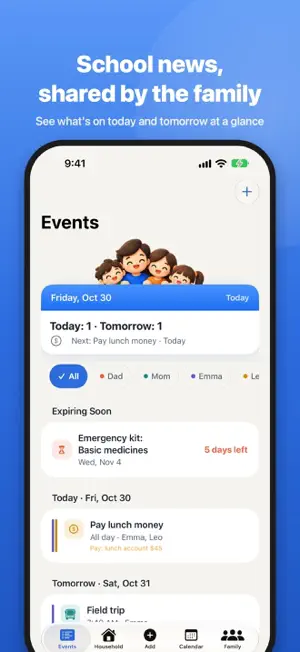

About FamilyCal: Family Calendar
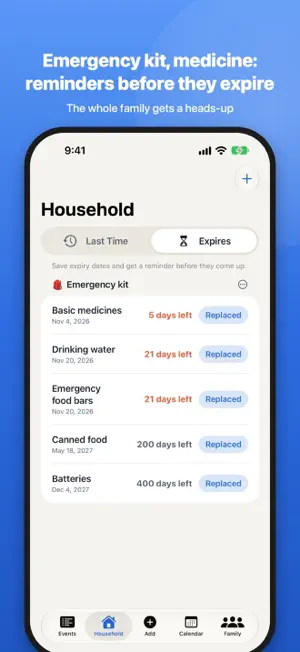
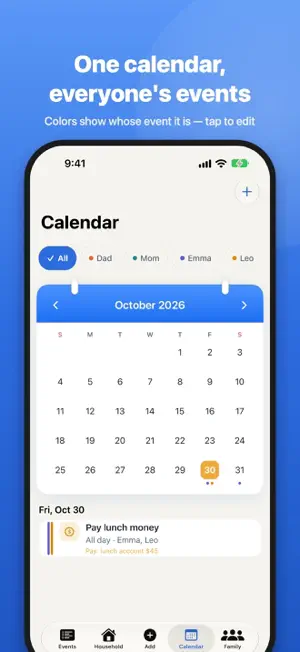
Field trips, tests, money due, things to bring — school news is scattered across newsletters, flyers, class notes and app messages. FamilyCal turns a photo into a calendar the whole family shares. SNAP IT, AND AI FILLS IN YOUR CALENDAR • Photograph a newsletter, school calendar or class notes, or pick a screenshot of a teacher's message • The page edges are found automatically — drag the corners to adjust • AI reads the dates, times, things to bring and money due, and drafts the events • Words like "tomorrow" or "next Wednesday" become real dates; possible duplicates and doubtful dates are flagged • Nothing is added until you confirm, and every event can be edited OR JUST SAY IT • "Emma needs her recorder next Wednesday" — say it, and the event is created THE WHOLE FAMILY, IN SYNC • The organizer creates the family and invites everyone with a QR code • Each person has a color, so you can see at a glance whose event it is • Add kids without phones too, so events can be marked as theirs • Any change shows up on everyone's phone right away NEVER MISS A THING • Every evening at 8, a reminder of tomorrow's events and what to bring • A notification when family adds something for you • See today, tomorrow, this week and everything after on the Events tab, or the whole month on the Calendar LAST TIME AND EXPIRES • Last Time: haircuts, mopping, water filters… tap “Did It” and see how many days it’s been • Expires: emergency kit, medicine cabinet, IDs… save expiry dates and the whole family gets a reminder before they come up • Ready-made templates for an emergency kit, a medicine cabinet and chores, plus your own groups and reminder days • Tag items with a family member, like Emma’s haircut or Grandma’s medicine WIDGETS AND SIRI • Home Screen widgets: today's and tomorrow's events and anything expiring soon, the moment you pick up your phone • Lock Screen widgets: how many events you have today and how many items are expiring soon • Say “Log haircut in FamilyCal” and Siri updates the date for you • Ask “What's on FamilyCal today”, or say “Add an event to FamilyCal” to start dictating • The same actions appear in the Shortcuts app, ready for your own automations DESIGNED WITH CARE • When a family member deletes an event, it's crossed out until the organizer confirms — no accidental deletions • Photos are only used for reading and never uploaded • The organizer signs in with Apple, so the family survives a new phone GOOD TO KNOW • AI reading needs a device that supports Apple Intelligence; you can always add events by hand • The app shows ads. When anyone in the family subscribes to "Support the Developer", ads disappear for the whole family • AI can make mistakes — check against the original before adding SUBSCRIPTION • "Support the Developer (monthly)" is an auto-renewing subscription billed once a month at the price shown in the app • Payment is charged to your Apple Account at confirmation of purchase. It renews automatically unless cancelled at least 24 hours before the end of the current period • Manage or cancel anytime in Settings > Apple Account > Subscriptions • Terms of Use (EULA): https://www.apple.com/legal/internet-services/itunes/dev/stdeula/ • Privacy Policy: https://schedule.djhousetw.com/en/privacy
What’s new
Version 1.2 · Updated November 14, 2026
Widgets and Siri shortcuts: • Home Screen widgets: today's and tomorrow's events and anything expiring soon, without opening the app • Lock Screen widgets: how many events you have today and how many items are expiring soon • Siri: say “Log haircut in FamilyCal” and it’s done. You can also ask what’s on today or start a new event by voice • Widgets update when someone in the family changes an event
App privacy
The developer, Chung-Hsien Huang, reported these privacy practices to Apple.
Data Not Linked to You
The following data, which may be collected but is not linked to your identity, may be used for the following purposes:
- Location: Coarse Location
- Identifiers: Device ID, User ID
- Usage Data: Product Interaction, Advertising Data
- Diagnostics: Crash Data, Performance Data
- Purchases: Purchase History
- User Content: Other User Content
Used for: Third-Party Advertising, Analytics, App Functionality
Alternatives to FamilyCal: Family Calendar
Looking for apps like FamilyCal: Family Calendar? Here are 6 similar apps on the App Store. The highest rated is Savely - Your Personal Space (5.0/5), and all 6 are free to download.
-
 Haberdashery: Bookmark Library
-
 Savely - Your Personal Space
5.0
-
 VoiceCalendar AI
-
 Lavapup - Calendar & Notes
-
 Ankorlist - Quick Task Capture
5.0
-
 GoCalendar- 整合日曆、待辦事項與財務管家
| App | Rating | Price | Last updated | Compare |
|---|---|---|---|---|
| FamilyCal: Family Calendar | – | Free | November 14, 2026 | |
| Haberdashery: Bookmark Library | – | Free | Nov 15, 2026 | Compare |
| Savely - Your Personal Space | 5.0 / 5 (1) | Free | Nov 16, 2026 | Compare |
| VoiceCalendar AI | – | Free | Sep 11, 2026 | Compare |
| Lavapup - Calendar & Notes | – | Free | Aug 10, 2026 | Compare |
| Ankorlist - Quick Task Capture | 5.0 / 5 (2) | Free | Sep 17, 2026 | Compare |
| GoCalendar- 整合日曆、待辦事項與財務管家 | – | Free | Nov 12, 2026 | Compare |