

VideoVia: Video Editor
Mersas Grup Insaat Sanayi ve Ticaret Limited Sirketi Photo & Video iPhoneiPadiPod touch
VideoVia: Video Editor is a free Photo & Video app for iPhone and iPad by Mersas Grup Insaat Sanayi ve Ticaret Limited Sirketi. Requires iOS 15.6.
- Price
- Free
- on the App Store
- Size
- 76 MB
- Age 4+
- Updated
- Oct 21
- 2026 · v1.5.0
Screenshots
Save to Pinterest
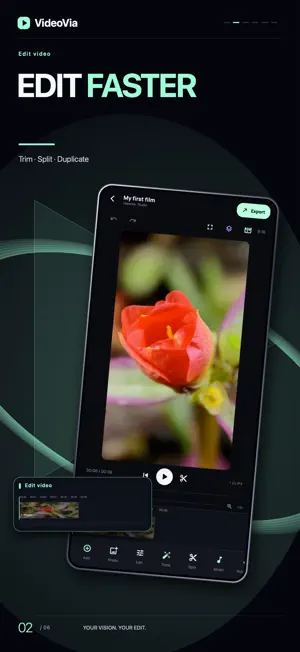

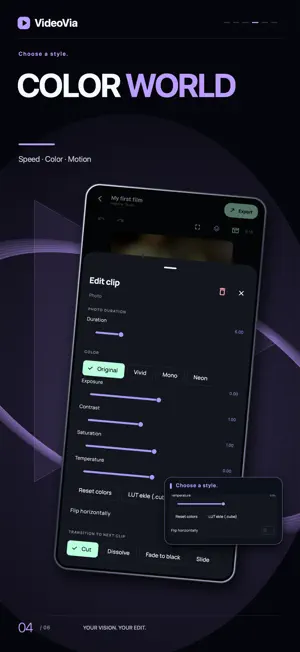
About VideoVia: Video Editor
Turn your clips and photos into a story with VideoVia. Trim videos, arrange your timeline and add music, text and captions in one video editor. BUILD YOUR EDIT • Trim, split, merge and reorder clips. • Create photo slideshows and combine photos with video. • Add text, stickers, music and voiceovers. Detach and adjust audio. • Edit subtitle timing and import or share SRT files. SHAPE YOUR STYLE • Adjust color, speed ramps and keyframes. • Work with masks, green screen, motion tracking and auto reframe. • Choose portrait, landscape or square formats. • Export in 720p, 1080p or 4K, with 24, 30 or 60 FPS options depending on your source and device. Automatic speech recognition supports Turkish and English. A speech model downloads on first use; recognition then runs on your device. FREE EDITING AND PREMIUM Basic editing is free. Complete one rewarded ad to use an advanced tool once. Free export requires two completed ads and includes a VideoVia watermark at the bottom right. Premium removes ads, the watermark and tool limits. Subscription prices appear in your store. Payment is charged to your store account, and subscriptions renew automatically unless cancelled. Manage or cancel your subscription through your store account. Your videos are processed on your device for editing and export, rather than uploaded for those tasks. Ads, purchase verification and the initial speech-model download use online services. EULA: https://www.apple.com/legal/internet-services/itunes/dev/stdeula/ https://videovia.mersasgrup.com/en/privacy.html
App privacy
The developer, Mersas Grup Insaat Sanayi ve Ticaret Limited Sirketi, reported these privacy practices to Apple.
Data Used to Track You
The following data may be used to track you across apps and websites owned by other companies:
- Purchases: Purchase History
- Location: Coarse Location
- Identifiers: Device ID
- Usage Data: Product Interaction, Advertising Data
- Diagnostics: Performance Data
Data Linked to You
The following data, which may be collected and linked to your identity, may be used for the following purposes:
- Location: Coarse Location
- Identifiers: Device ID
- Usage Data: Product Interaction, Advertising Data
- Diagnostics: Performance Data
- Purchases: Purchase History
Used for: Third-Party Advertising, Developer’s Advertising or Marketing, Analytics, App Functionality
Data Not Linked to You
The following data, which may be collected but is not linked to your identity, may be used for the following purposes:
- Diagnostics: Crash Data
Used for: Third-Party Advertising, Analytics, App Functionality
Alternatives to VideoVia: Video Editor
Looking for apps like VideoVia: Video Editor? Here are 6 similar apps on the App Store. The highest rated is Video Compressor: Resize Vid (5.0/5), and all 6 are free to download.
-
 Video Compressor: Resize Vid
5.0
-
 VidCompress: Video Compressor
-
 Video Compressor for Social
-
 Arya Video Editor
5.0
-
 FlickBin
-
 BeatReel
| App | Rating | Price | Last updated | Compare |
|---|---|---|---|---|
| VideoVia: Video Editor | – | Free | October 21, 2026 | |
| Video Compressor: Resize Vid | 5.0 / 5 (1) | Free | Oct 12, 2026 | Compare |
| VidCompress: Video Compressor | – | Free | Oct 27, 2026 | Compare |
| Video Compressor for Social | – | Free | Oct 23, 2026 | Compare |
| Arya Video Editor | 5.0 / 5 (1) | Free | Nov 25, 2026 | Compare |
| FlickBin | – | Free | Nov 2, 2026 | Compare |
| BeatReel | – | Free | Oct 6, 2026 | Compare |