

Sard AI
Ibrahim Ali Productivity iPhoneiPadiPod touch
Sard AI is a free Productivity app for iPhone and iPad by Ibrahim Ali. Requires iOS 26.0. Updated October 24, 2026.
- Price
- Free
- on the App Store
- Size
- 68 MB
- Age 4+
- Updated
- Oct 24
- 2026 · v1.1
Screenshots



About Sard AI
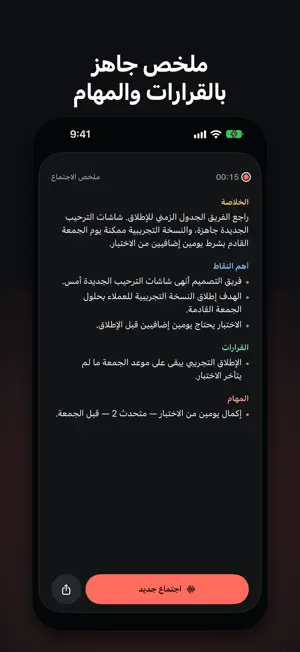
Sard listens to your meeting through your iPhone's microphone, writes it down and translates it as people speak, then hands you clean minutes. One tap and it starts. What Sard does • Live translation in 15 languages, line by line, with each speaker named. Pick two languages per meeting and every sentence is written in the language it was said in. • Tap any sentence in the minutes to hear it exactly as it was said. The audio stays on your iPhone. • After the meeting, Sard can separate the voices and recover what was lost when people talked over each other, all on your iPhone. • Hear the translation in your earphones while the meeting goes on. • A summary with the key points, decisions, tasks and owners. Add a task to Reminders or a decision to Calendar in one tap. • Ask the meeting: "What did they say about the budget?" and get an answer from what was actually said, with the time it was said. • Share the minutes as a tidy PDF. • A small floating window keeps the captions on screen while you use other apps. Start a meeting from Siri or the Action button. Why you can trust it • Audio is processed on your iPhone and never leaves it. When AI is on, only the written text is sent, and it isn't kept on our servers. • No account, no sign-in. • One balance across iPhone and Mac: subscribe on one, use it on both. Pricing Your first 30 AI minutes are free. Then pick a plan that fits your meetings: Weekly, Basic, Pro or Max. If your hours run out before renewal, add 5 hours once; they never expire. On-device translation is free and unlimited. Note: iOS doesn't let any app hear the other side of a call on the same iPhone. Sard for iPhone is for in-person meetings and lectures; for Zoom and Teams calls, use Sard for Mac. Subscriptions renew automatically and are charged to your Apple Account. Cancel anytime in your account settings before the period ends. Privacy Policy: https://ibsleman.com/sard-privacy/ Terms of Use: https://www.apple.com/legal/internet-services/itunes/dev/stdeula/
What’s new
Version 1.1 · Updated October 24, 2026
• Two languages per meeting: each sentence is written in the language it was said in and translated into your reading language. • Hear any sentence: meeting audio is kept on your iPhone only. Tap a line in the minutes to hear it as it was said. • Better minutes: after the meeting, Sard separates the speakers' voices and catches what was lost when people talked at once. • Translation in your earphones while the meeting goes on. • Tasks to Reminders and decisions to Calendar in one tap. • Share the minutes as a PDF. • Sard now speaks English too. Switch the app's language in Settings. • Fixes and improvements.
App privacy
The developer, Ibrahim Ali, reported these privacy practices to Apple.
Data Linked to You
The following data, which may be collected and linked to your identity, may be used for the following purposes:
- Purchases: Purchase History
- Identifiers: User ID
- Usage Data: Product Interaction
Used for: App Functionality
Alternatives to Sard AI
Looking for apps like Sard AI? Here are 6 similar apps on the App Store. The highest rated is ChatAxis: AI Tutor & Writer (5.0/5), and all 6 are free to download.
-
 CooTeam
-
 Revisits: Service Report JW
4.7
-
 ChatAxis: AI Tutor & Writer
5.0
-
 Towers Valley ERP
5.0
-
 Scan Partner
-
 صياناتي
4.5
| App | Rating | Price | Last updated | Compare |
|---|---|---|---|---|
| Sard AI | – | Free | October 24, 2026 | |
| CooTeam | – | Free | Oct 27, 2026 | Compare |
| Revisits: Service Report JW | 4.7 / 5 (32) | Free | Feb 23, 2026 | Compare |
| ChatAxis: AI Tutor & Writer | 5.0 / 5 (8) | Free | Sep 30, 2025 | Compare |
| Towers Valley ERP | 5.0 / 5 (1) | Free | Jan 7, 2025 | Compare |
| Scan Partner | – | Free | Jun 22, 2026 | Compare |
| صياناتي | 4.5 / 5 (2) | Free | Nov 3, 2026 | Compare |
Compare Sard AI with the top alternatives: ratings, updates, ASO score and keyword gaps →