

Home.io: Smart Home Floor Plan
Steven Koch Lifestyle iPhoneiPadiPod touchMacApple Watch
Home.io: Smart Home Floor Plan is a free Lifestyle app for iPhone and iPad by Steven Koch. Rated 5.0/5 from 3 ratings. Requires iOS 17.0.
- Rating
- 5.0
- 3 ratings
- Price
- Free
- on the App Store
- Size
- 38 MB
- Age 4+
- Updated
- Nov 23
- 2026 · v1.1.4
Screenshots
Save to Pinterest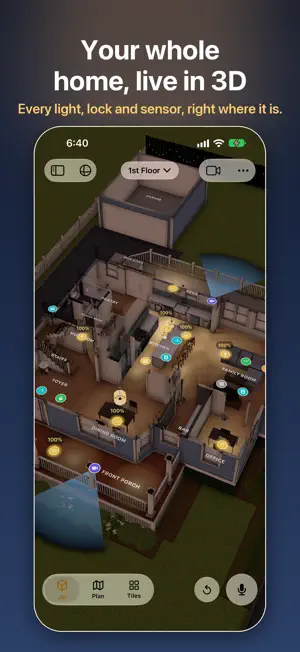


About Home.io: Smart Home Floor Plan
Home.io puts your smart home on a 3D model of your own house. See at a glance which lights are on, which doors are open and how warm every room is, then tap anything to control it. YOUR HOUSE, IN 3D • Draw your floor plan room by room, scan it with LiDAR, use a photo of your plans, or import a 3D model (USDZ, OBJ). • Walls cut away so you can see into every room; choose how high the walls and furniture stand. • Switch floors, turn the house, pan and zoom, and save your favorite views. • A real-time sky with the actual sun position and live weather, from day to night. EVERY ACCESSORY WHERE IT REALLY IS • Works with Apple Home (HomeKit) and Home Assistant, side by side, without duplicates. • Lights glow in their rooms with their brightness; locks, doors, sensors, thermostats, speakers and cameras show their state on the model. • Rooms named differently in Apple Home or Home Assistant are easy to match to your plan. • A clean 2D plan view, the Accessories list, scenes, music and Siri-style voice control. AWAY FROM HOME • Leave an iPad at home as your hub and control Home Assistant from your iPhone anywhere, through your own iCloud, with no network setup. WORKFLOWS AND TILES • Workflows run step by step on your home hub, even with your phone asleep: wait, do one thing or another, send a notification. • Tiles that show up only when you need them, charts, and dashboards you arrange yourself. • Describe It: type what you want in a sentence and check the draft, on devices that can run it. ON ALL YOUR DEVICES • iPhone, iPad and Mac, plus Apple Watch, Apple TV and widgets with Home.io Pro. Your plans and settings sync through iCloud. HOME.IO PRO (ONE-TIME PURCHASE) Unlock the model editor (paint any surface, add trees, shrubs and furniture, make doors move), your own house models and more floor plans, widgets, Control Center buttons and Live Activities, the Apple Watch and Apple TV apps, the idle screen's Favorites, Home, Weather and Now Playing faces, replay of the last day on the model, history charts, more dashboards, automations, workflows and Describe It, and live camera windows on the model. One purchase, no subscription, shared with your family. Home.io collects no personal data.
What’s new
Version 1.1.4 · Updated November 23, 2026
• Your house in 3D in any web browser. Floor Plan on the Web (Settings, on your home hub) now has a 3D House link: the same house Home.io shows, to turn and zoom on a computer, a tablet or a kitchen display at home, with your accessories live on it. With Allow Taps on, lights, outlets, fans, shades and thermostats work from the page. A new switch, Locks and Garage Doors, lets the page lock and close, and unlock or open after your PIN. It is off until you turn it on. • iPhone held sideways: a new button beside the microphone hides the top bar and the bottom row, so the plan or the house has the whole screen. One button brings them back. • Draw a Floor Plan: an Open Air area can have a Roof Over It, for a covered terrace or porch: a paved floor under a roof on four posts. • Idle screen: a new setting, Dark Screen After 5 Minutes Alone, turns the screen black with its light all the way down once no one has been in front of it for five minutes. A face or a touch brings it back. • A camera's view on the house stops at walls, the way a light's glow does, and turns in finer steps (15° a tap). • A Reolink camera opened full screen gets a new picture every second. • Draw a Floor Plan: the hint for Open Air now says how outdoor accessories land in it: give the area the name of the room they are in in Apple Home.
App privacy
The developer, Steven Koch, reported these privacy practices to Apple.
Data Linked to You
The following data, which may be collected and linked to your identity, may be used for the following purposes:
- Contact Info: Physical Address, Email Address
- User Content: Photos or Videos, Other User Content
Used for: App Functionality
Alternatives to Home.io: Smart Home Floor Plan
Looking for apps like Home.io: Smart Home Floor Plan? Here are 6 similar apps on the App Store. The highest rated is Smart Home Display for HomeKit (5.0/5), and all 6 are free to download.
-
 Habitat — 3D Smart Home
-
 Smart Home Display for HomeKit
5.0
-
 SimpleHaven: Smart Home in 3D
5.0
-
 Hearth for HomeKit
3.3
-
 Itsyhome for HomeKit
5.0
-
 Vulpo for Home Assistant
4.7
| App | Rating | Price | Last updated | Compare |
|---|---|---|---|---|
| Home.io: Smart Home Floor Plan | 5.0 / 5 (3 ratings) | Free | November 23, 2026 | |
| Habitat — 3D Smart Home | – | Free | Nov 18, 2026 | Compare |
| Smart Home Display for HomeKit | 5.0 / 5 (2) | Free | Nov 23, 2026 | Compare |
| SimpleHaven: Smart Home in 3D | 5.0 / 5 (10) | Free | Oct 1, 2026 | Compare |
| Hearth for HomeKit | 3.3 / 5 (3) | Free | Nov 14, 2026 | Compare |
| Itsyhome for HomeKit | 5.0 / 5 (13) | Free | Nov 18, 2026 | Compare |
| Vulpo for Home Assistant | 4.7 / 5 (13) | Free | Oct 15, 2026 | Compare |