

Duorama: Waist Level Camera
Serkan DAL Photo & Video iPhoneiPadiPod touch
Duorama: Waist Level Camera is a free Photo & Video app for iPhone and iPad by Serkan DAL. Requires iOS 18.0. Updated November 23, 2026.
- Price
- Free
- on the App Store
- Size
- 25 MB
- Age 4+
- Updated
- Nov 23
- 2026 · v1.2
Screenshots
Save to Pinterest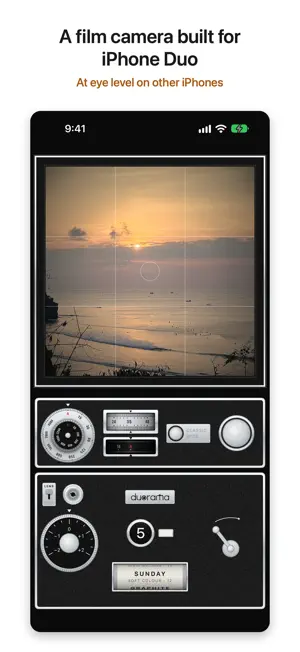


About Duorama: Waist Level Camera
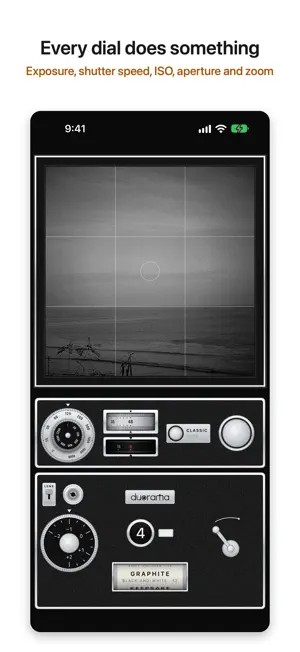
Duorama is a vintage film camera built for iPhone Duo. Half-fold it, hold it at your waist and look down into the glass, like the box cameras of the late 1950s. The waist-level finder needs iPhone Duo. The half with the cameras stands up and faces your subject, and the flat half becomes a ground glass. Every picture is a square frame on a roll of 12. The waist-level finder - The folding hood springs open over the glass when the camera starts. Swipe down on the glass to close the hood, and up to open it; the camera is off while it is closed. Settings, Hood at start, chooses how the camera begins: Open, Closed or As left. - A live square picture on ground glass, with an etched grid, a bright centre and darker corners. It's reversed left to right, like the real thing. A switch in Settings turns that off. - Tap the glass to raise a magnifier and focus there. - A small counter on the film back shows how far the phone is folded. - Open the phone out flat and the same camera works at eye level; closed, the outer screen's camera takes selfies. A camera, not a filter - Press the shutter release and hear the shutter. The signal turns red and the glass goes dark until you wind on with the crank. - Turn the exposure ring in click stops, set a shutter speed from 1/15 to 1/4000 or leave it on A, with the ISO on the dial's centre, and roll the zoom wheel or tap between the classic and wide views. - Turn the aperture wheel from ƒ/1.6 to ƒ/16, or leave it on A. Where your phone records depth, a low number softens the photo's background. Four films Roll the film card to change film. Each film has its own look and its own roll: - SUNDAY, soft colour - GRAPHITE, black-and-white - KEEPSAKE, faded and warm - POSTCARD, vivid colour Each look has grain (off, light or heavy, in Settings), a slight glow in the highlights and a gentle vignette, on the glass and in the photo. An optional film border adds a black edge with the film's name and the frame number. Rolls and contact sheets Finish a roll of 12 and it becomes a contact sheet: four strips of three frames on black, with the film's name and the date. Developed photos go to Photos at full size, and you can share each contact sheet. Three finishes Instrument, Heirloom and Atelier: the same camera in cool bright chrome, warm and lived-in, or graphic with a coloured enamel for each film. Free to shoot, pay to develop Every part of the camera is free: all four films, the finishes, the border and every control. Shoot a whole roll of 12 and the photos wait inside the camera. When the roll is finished, its contact sheet gives you two choices: Develop this roll, or Don't develop. Developing uses one roll and sends the roll's 12 photos and its contact sheet to Photos at full size. Don't develop deletes the roll, after a warning. Rolls are bought in the app, one at a time or in packs of three or five, and your first roll costs less. Rolls never expire and work on any film. The camera shows how many are left, and the list of rolls you've used is kept in your iCloud, so it follows you to a new iPhone. Or buy Every roll, for good (the purchase called Develop Film in the App Store), once: every roll on every film then develops by itself when you finish it, now and later, and you can turn on Save each photo right away in Settings. Photos waiting in the camera are kept when you close the app. Restore Purchases is on the Buy rolls sheet and in Settings. No subscription. Private No account and no ads in the app. Duorama asks once whether it may track, to measure its own ads, and the camera works the same either way. The app only adds photos to your Photos library. It can't see the photos already there. Which iPhone Duorama is built for iPhone Duo, and the waist-level finder needs iPhone Duo. On any other iPhone with iOS 18 or later, Duorama works as an eye-level camera: the same film looks, rolls and controls, with a slide on the film back for the front camera, without the waist-level finder.
What’s new
Version 1.2 · Updated November 23, 2026
New parts on the camera, and more in every photo. - The shutter-speed dial now goes to 1/4000, with a small ISO dial at its centre. - An aperture wheel, ƒ/1.6 to ƒ/16 or A. Where your phone records depth, a low number softens the background of the photo. - The zoom wheel shows millimetres on phones whose lenses are known. - A flash: tap the reflector on the camera's back to put a bulb in, and it fires with the photo. - A water level on the camera, clear or honey (Settings, Level). - A date stamp, in the picture or on the border, and the film's name printed in the border (Settings, Photos). - Photo details now show Duorama, the film, the frame, the exposure ring's setting and the aperture, and files are named after their film, such as DUORAMA_SUNDAY_0001. - When you load a new roll, the glass shows the film going in as you turn the crank. - A daily reminder, if you want one (Settings, Reminder). - Folded shut, the camera takes selfies with the outer screen's camera, upright and not mirrored. - Fully open and held sideways, a new layout: the film back on the left, the glass on the right. - On phones that don't fold, the LENS / SELF switch is now small, in the top-left corner. - The tour has new tags for the film card, the dials and the flash (Settings, About, Show the tour again). - Duorama now asks once whether it may track, to measure our ads. Nothing in the camera depends on your answer. - A new app icon, a lens, in light and dark versions. Some other bug fixes and improvements.
App privacy
The developer, Serkan DAL, reported these privacy practices to Apple.
Data Used to Track You
The following data may be used to track you across apps and websites owned by other companies:
- Purchases: Purchase History
- Identifiers: Device ID
- Usage Data: Product Interaction
- Other Data: Other Data Types
Data Linked to You
The following data, which may be collected and linked to your identity, may be used for the following purposes:
- Purchases: Purchase History
- Identifiers: Device ID
- Usage Data: Product Interaction
- Other Data: Other Data Types
Used for: Third-Party Advertising, Analytics, App Functionality
Data Not Linked to You
The following data, which may be collected but is not linked to your identity, may be used for the following purposes:
- Diagnostics: Crash Data
Used for: App Functionality
Alternatives to Duorama: Waist Level Camera
Looking for apps like Duorama: Waist Level Camera? Here are 6 similar apps on the App Store. The highest rated is Flipcorder: Retro Camcorder (4.8/5), and 5 of the 6 are free to download.
-
 Flipcorder: Retro Camcorder
4.8
-
 pico cam: Dynamic Island pics
4.7
-
 (Not Boring) Camera
4.6
-
 No Fusion-Powerful Pro Cam
4.5
-
 mood.camera
4.8
-
 Dehancer Film Emulation
4.3
| App | Rating | Price | Last updated | Compare |
|---|---|---|---|---|
| Duorama: Waist Level Camera | – | Free | November 23, 2026 | |
| Flipcorder: Retro Camcorder | 4.8 / 5 (37) | 4.99 USD | Nov 25, 2026 | Compare |
| pico cam: Dynamic Island pics | 4.7 / 5 (139) | Free | Nov 25, 2026 | Compare |
| (Not Boring) Camera | 4.6 / 5 (5,922) | Free | Nov 17, 2026 | Compare |
| No Fusion-Powerful Pro Cam | 4.5 / 5 (314) | Free | Nov 16, 2026 | Compare |
| mood.camera | 4.8 / 5 (572) | Free | Nov 22, 2026 | Compare |
| Dehancer Film Emulation | 4.3 / 5 (443) | Free | Nov 25, 2026 | Compare |